When Agents Start Making Decisions, Architecture Must Keep Up
Agentforce has gone from Winter '25 Beta to Spring '26 GA, and most discussions focus on what agents can do. But if you're the architect or senior admin responsible for production, the more pressing questions are: Can you see what the agent is doing? Can you trust the data it's using? Can you control the resources it's accessing?
In a traditional CRM architecture, data sits quietly in Salesforce objects, users access it through page layouts and permission sets, and when something goes wrong, you check Debug Logs. Agents operate completely differently — they pull data from external systems for RAG, invoke LLM reasoning, trigger complex automation chains via Flows, and all of this can happen in seconds with no one watching the screen.
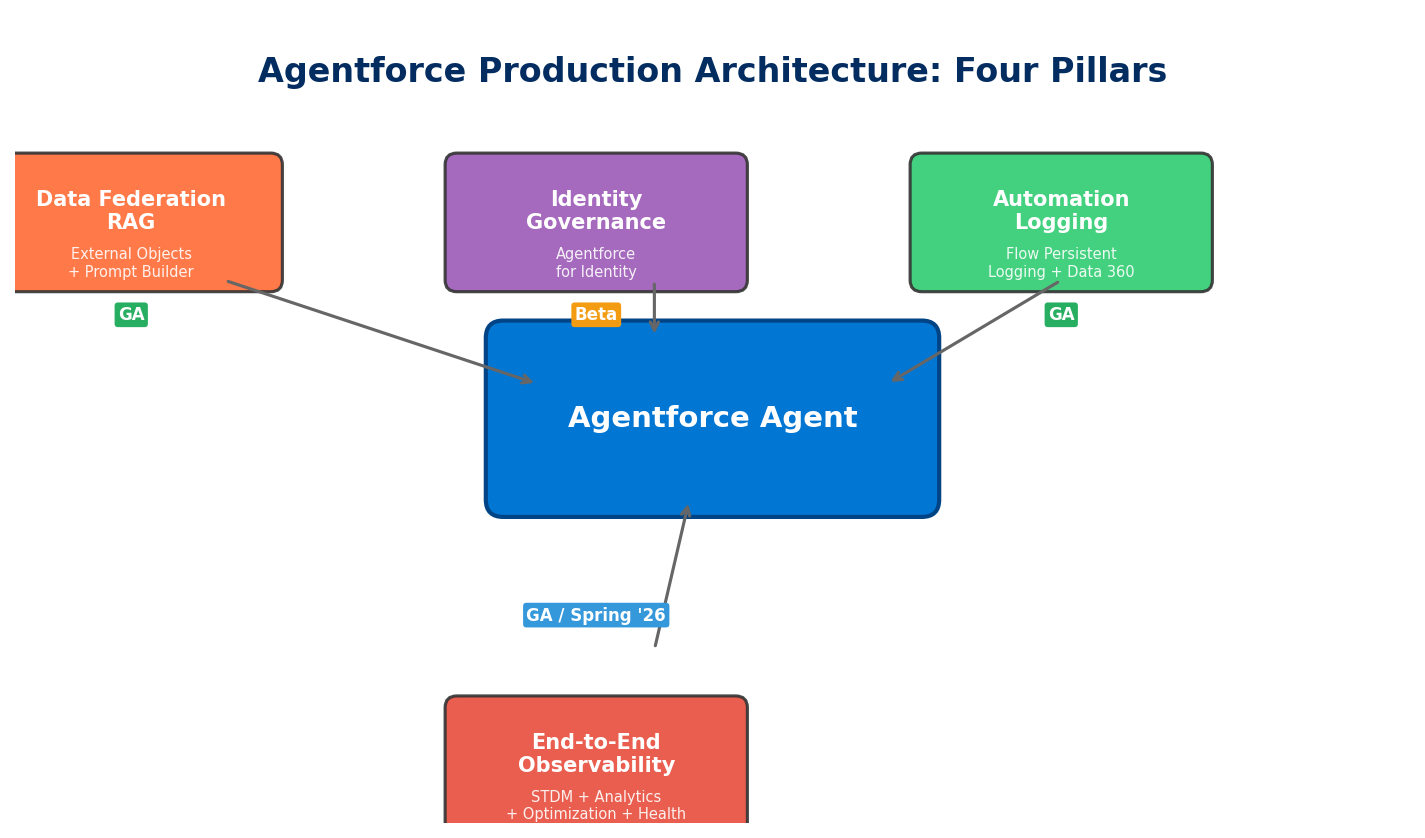
This is why Salesforce has shipped a wave of architecture-level capabilities around Spring '26: replacing data replication with data federation, introducing AI-assisted identity governance, offloading automation logs to Data 360, and enabling end-to-end observability through Session Tracing. These four directions form the pillars of Agentforce production architecture.
Pillar 1: External Objects + Prompt Builder for Federated RAG
Agentforce answer quality ultimately depends on what data it can access. The traditional approach is ETL-ing external data into Salesforce or Data Cloud, but this creates two problems: data latency and storage costs. If your ERP holds 50 million inventory records, you can't (and don't need to) sync them all into Salesforce.
Starting with Spring '26, External Objects can serve as data sources in Prompt Builder for RAG Grounding. Here's how it works:
- When building a template in Prompt Builder, the Resource Picker now includes External Objects as grounding data sources
- At runtime, Salesforce queries the external system in real time via Salesforce Connect, injecting field values into the prompt context
- The LLM generates responses based on live data rather than potentially stale copies
The architectural significance is data stays put, the agent goes to read it. The external system remains the single source of truth, and Salesforce only queries when needed. The agent doesn't care where data lives — ERP, data warehouse, or third-party SaaS — it just needs Prompt Builder to assemble the right context.
A few real-world scenarios:
Service agent checking order status: A customer asks "has my order shipped?" The agent connects to SAP or Oracle's order table via an External Object, pulls real-time logistics status, and generates an answer. No need to maintain a mirror copy of order data in Salesforce.
Sales agent checking inventory: During quoting, the agent automatically checks live inventory levels from an external warehouse management system, preventing quotes for products that can't be delivered.
Field service agent checking equipment history: When a technician arrives on site, the agent pulls maintenance records and parts availability from an external asset management system to assist with diagnosis.
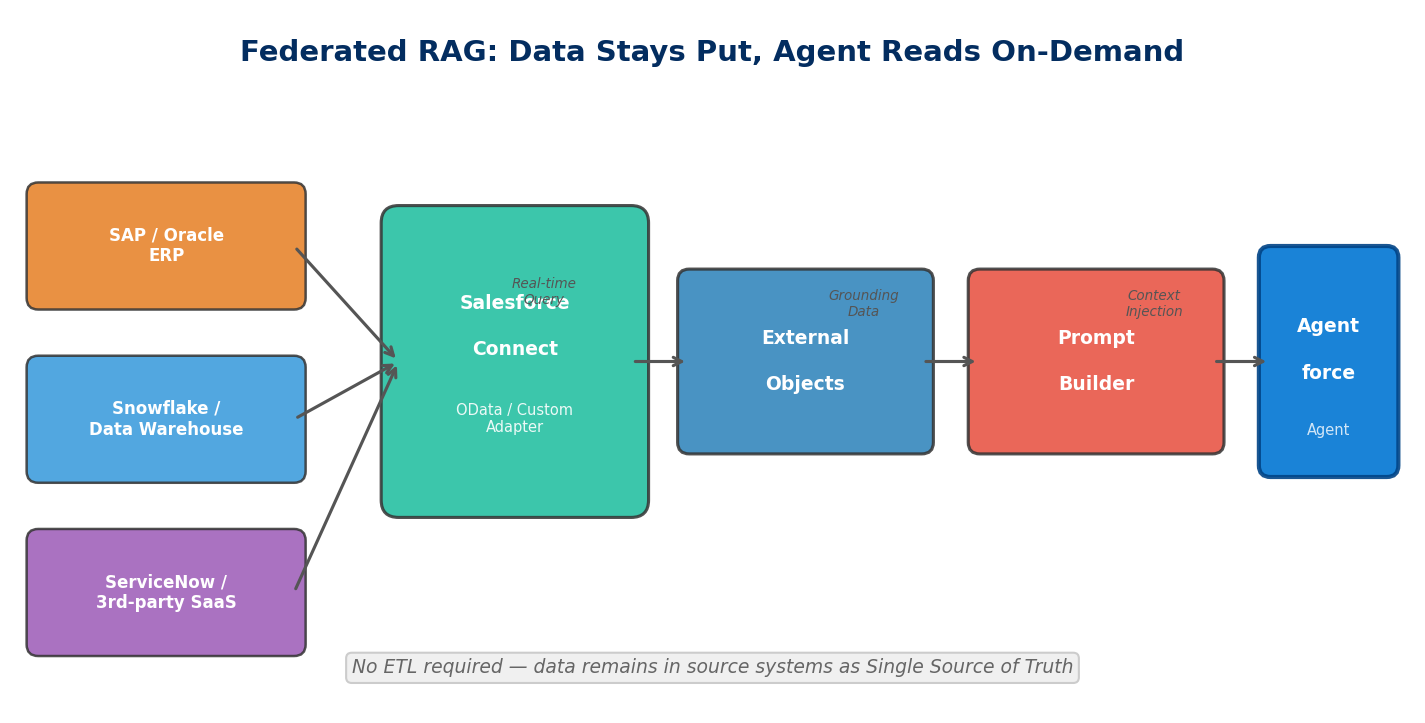
There are limitations, though. External Objects query via Salesforce Connect using OData or Custom Adapters, so query performance is bound by the external system's API response time. If the external API's P99 latency exceeds 2 seconds, the agent's overall response time stretches with it. Architects need to balance data freshness against response speed — for high-frequency, low-latency scenarios, you may still want to sync critical data into Data 360 using Zero Copy.
Pillar 2: Agentforce for Identity — Managing OAuth in Natural Language
OAuth configuration has always been one of the more painful Salesforce admin tasks. Connected Apps require Callback URLs, Scopes, Consumer Key/Secret, IP whitelisting — get any field wrong and the integration breaks. To make things worse, Connected Apps are being superseded by External Client Apps (we've covered the migration playbook), so the configuration UI and concepts are shifting under your feet.
Agentforce for Identity extends Setup with Agentforce (we introduced the Beta version previously) with identity management capabilities, turning the three most common identity operations into conversational interactions:
1. External Client App Management: Create and configure External Client Apps using natural language. You can say "Create an External Client App that supports the Authorization Code flow, with a Callback URL of https://myapp.com/callback, and needs the api and refresh_token scopes" — and the agent handles the entire configuration.
2. Connected App Migration: If you have a legacy Connected App that needs migrating to an External Client App, the agent can read the existing configuration and execute the conversion. Far faster than manually cross-referencing documentation item by item, and less prone to missed settings.
3. Connected App Summary: Quickly review the OAuth configuration summary of any Connected App. When troubleshooting integration issues, no more digging through Setup pages.
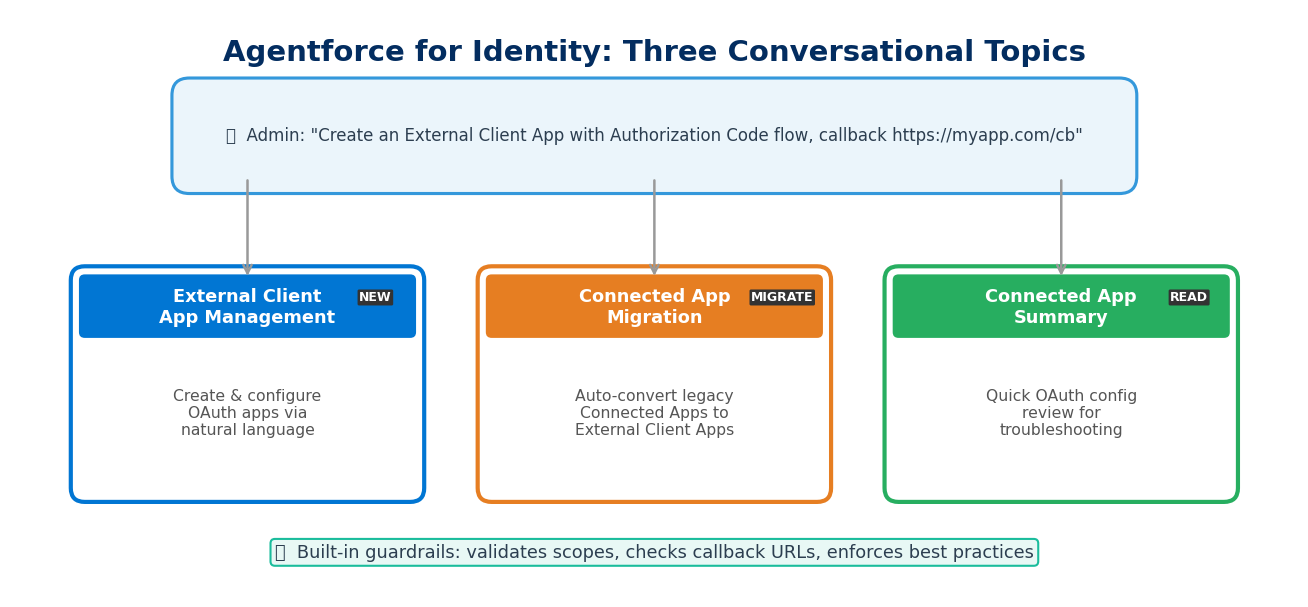
From an architecture perspective, the value isn't just time savings. OAuth misconfiguration is a common source of security incidents — overly broad scopes, unrestricted callback URLs, token expiry set too long. The agent can embed security checks and best practice recommendations into the configuration process, effectively adding a guardrail layer at the point of setup.
That said, Agentforce for Identity is still in Beta, and real-world reliability remains to be validated. Delegating identity configuration to AI is itself a trust decision — if the agent misconfigures a scope, the impact could be more severe than a misconfigured Flow. Thoroughly test in a Sandbox before bringing this anywhere near production.
Pillar 3: Flow Persistent Logging — Sinking Automation Logs into Data 360
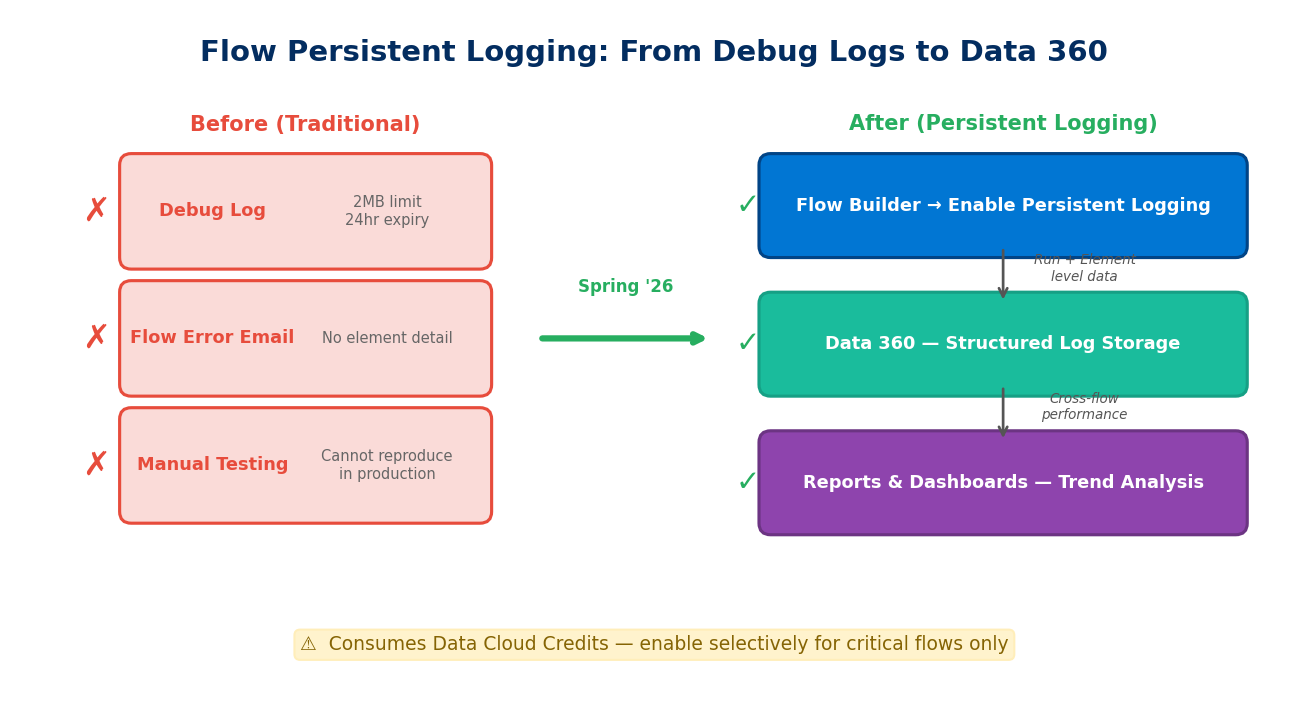
Flow is the Salesforce admin's primary automation tool, but it's had a long-standing pain point: troubleshooting is largely guesswork. Debug Logs cap at 2MB, expire after 24 hours, and enabling them in production itself impacts performance. For Record-Triggered Flows that may fire dozens of times per second, traditional logging simply can't keep up.
Spring '26 brings Flow Persistent Logging to GA. The core idea: Flow execution data is no longer confined to ephemeral Debug Logs but is instead streamed as structured data into Data 360 (formerly Data Cloud) for long-term storage, trend analysis, and anomaly detection.
Key capabilities:
- Run-level logging: Status (success/failure/error), execution duration, and trigger context for each flow run
- Element-level logging: Execution details for each element within the flow (Decision, Assignment, Record Update, etc.), including entry time, exit time, and records processed
- Centralized management: A new Flow Logs tab in the Automation App provides a unified view of which flows have Persistent Logging enabled and how many Data Cloud Credits are being consumed
- Reports and dashboards: Because data lands in Data 360, you can use standard reporting tools for cross-flow performance comparisons, failure rate trends, and execution volume heatmaps
For Agentforce architecture, this matters because flows triggered by agents finally have traceability. Previously, when an agent called a flow via an Action and that flow failed at some intermediate node, all you'd see was an error returned to the agent — no visibility into which Decision took the wrong branch or which DML operation hit a governor limit. With Persistent Logging, you can trace back to the execution state of every single element.
One easily overlooked cost consideration: this feature consumes Data Cloud Credits. Every log record counts toward Data Cloud data ingestion. If you have 200 active Record-Triggered Flows, each firing tens of thousands of times daily, the log volume adds up fast. Enable Persistent Logging selectively for critical flows — don't blanket-enable it across the board.
Enablement is straightforward:
- Ensure Data 360 (Data Cloud) is enabled in your org
- Open the target flow in Flow Builder
- Enable Persistent Logging in the flow's properties
- Select logging granularity (Run-level or Element-level)
- Monitor logs and credit consumption in Automation App → Flow Logs
Pillar 4: Agentforce Observability — Seeing Every Step of Agent Reasoning
The first three pillars address data access, identity management, and automation tracing. The fourth — observability — tackles the most fundamental trust question: what is the agent actually thinking?
Agentforce Observability consists of three components, released in phases:
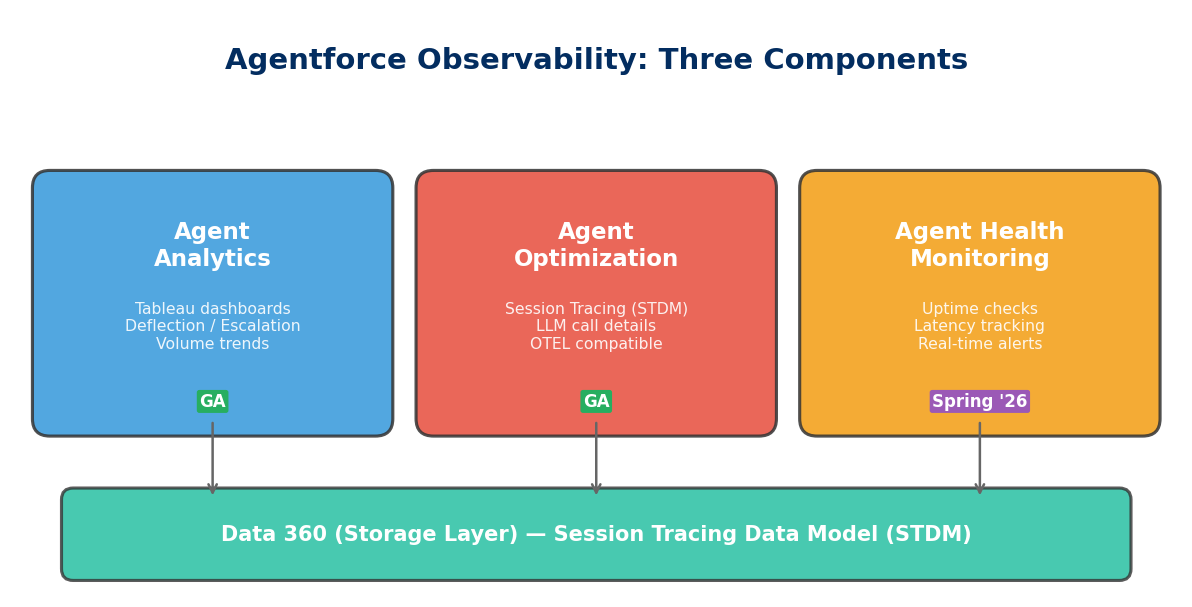
Agent Analytics (GA)
A Tableau-powered agent performance dashboard. Core metrics include:
- Deflection Rate: Percentage of conversations the agent resolved autonomously without human escalation
- Abandonment Rate: Percentage of users who gave up mid-conversation — typically a sign the agent failed to provide useful answers
- Escalation Rate: Human escalation frequency and reason distribution
- Volume Trends: Agent handling volume over time
- Quality Scores: Quality ratings based on user feedback and subsequent actions
These metrics help leadership answer "is the agent actually helping?" — if deflection sits at only 20%, that likely signals insufficient knowledge base coverage or inadequate grounding data.
Agent Optimization (GA)
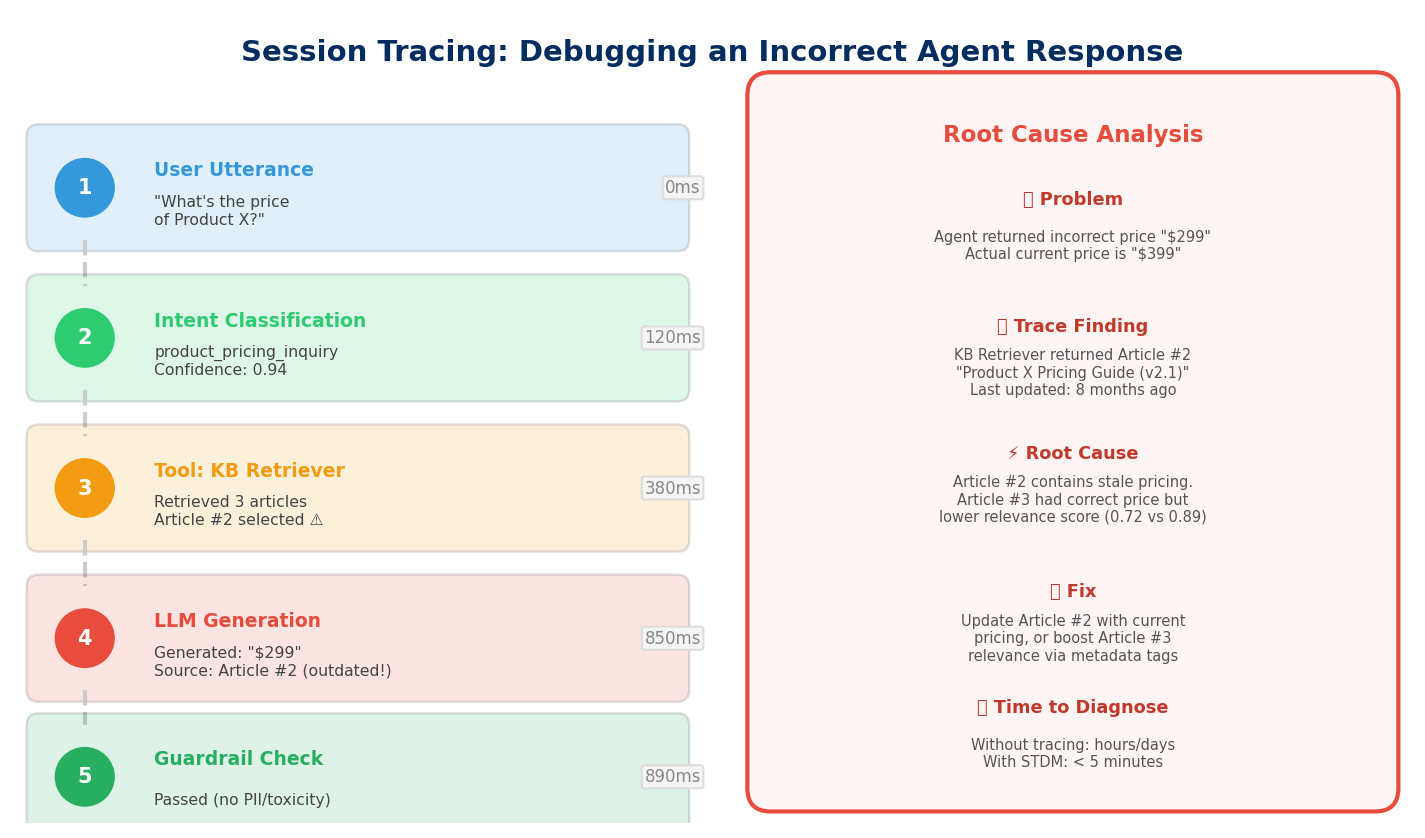
If Analytics provides the macro view, Optimization is the microscope. Built on the Unified Session Tracing Data Model (STDM), it records the complete reasoning chain for every agent conversation:
- User input (utterance)
- Intent classification results
- LLM call details (including prompt, token consumption, latency)
- Tool invocations — which Action the agent called, what parameters it passed, what results came back
- Guardrail check outcomes — whether any safety rails were triggered
- Final response and timestamps
STDM data is stored in Data 360 and is OpenTelemetry (OTEL) compliant. This means you can export session traces to Datadog, Splunk, New Relic, or other external observability platforms, integrating with your existing APM infrastructure.
A real debugging scenario: an agent returns an incorrect product price. Through Session Trace, you can see the agent called the Knowledge Article Retriever → retrieved 3 documents → the LLM generated pricing information based on document #2 → but document #2 was outdated. Problem identification goes from "no idea what went wrong" to "need to update Knowledge Article #2."
Agent Health Monitoring (GA in Spring '26)
Health Monitoring is the operations-level guardian, providing near-real-time alerting:
- Uptime Checks: Whether the agent is running normally
- Latency Tracking: Whether agent response times fall within SLA bounds
- Error Rates: Whether error rates are spiking abnormally
- Escalation Spikes: Whether human escalation frequency has suddenly increased
Think of this as PagerDuty or CloudWatch Alarms for your AI agents — when agent behavior deviates from normal ranges, the responsible team gets notified immediately. For enterprises already running Agentforce in production service scenarios, operating without Health Monitoring means you might discover the agent is giving wrong answers hours later, through customer complaints.
How the Four Pillars Fit Together
These four capabilities aren't isolated features — they form a closed loop:
| Pillar | Problem It Solves | Core Technology | Status |
|---|---|---|---|
| Federated RAG | What data the agent uses for decisions | External Objects + Prompt Builder + Salesforce Connect | GA |
| AI Identity Governance | Who manages the agent's external system credentials | Agentforce for Identity + External Client App | Beta |
| Automation Logging | How to debug flows triggered by agents | Flow Persistent Logging + Data 360 | GA |
| End-to-End Observability | How to monitor agent reasoning and health | STDM + Agent Analytics / Optimization / Health | Analytics & Optimization GA, Health Spring '26 |
Data federation gives agents access to the right data. Identity governance ensures that access is secure. Automation logging tracks the operation chains agents trigger. Observability monitors the quality and health of the entire process. Remove any single pillar and Agentforce in production risks going off the rails — wrong data, leaked credentials, untraceable errors, or problems discovered too late.
For teams planning Agentforce production deployments, consider this priority sequence: start with observability (at minimum, enable Session Tracing), then establish Flow Persistent Logging baselines, then gradually connect external data through External Objects in Prompt Builder, and finally evaluate whether Agentforce for Identity fits your identity management needs.
The bottom line: the more autonomous the agent, the more critical architectural control becomes. These four pillars aren't nice-to-haves — they're the foundation.