From Headcount to Human-AI Teams
Sales reps have never lacked things to do — sourcing leads, writing emails, updating CRM records, prepping for meetings, generating quotes. The time actually spent talking to customers? Often less than a third of the workday. Salesforce's latest State of Sales report adds a more pointed data point: nine out of ten sellers believe AI agents will become standard by 2027 — meaning teams that don't adopt AI are about to get left behind.
On March 16, 2026, Salesforce officially launched Agentforce Sales — six pre-built AI agents embedded directly into the selling workflow, covering the entire sales lifecycle from lead discovery to contract close. The headline numbers: sellers save up to 25 hours per week, and 30% of sales leaders have already seen revenue increases after deploying a digital workforce.
Salesforce itself was the first customer. Over the past four months, Agentforce touched 130,000 previously untouched leads and generated 3,200 new opportunities internally. Salesforce President of Sales Adam Alfano put it bluntly: "Agents sweep up untouched leads like gold sifting." The company projects 10x growth in those numbers next year.
Six Agents, Each With a Clear Job
Agentforce Sales isn't a monolithic chatbot. It's six specialized agents, each owning a distinct phase of the sales cycle. They work independently or chain together into an end-to-end automation pipeline — one agent's output feeds directly into the next.
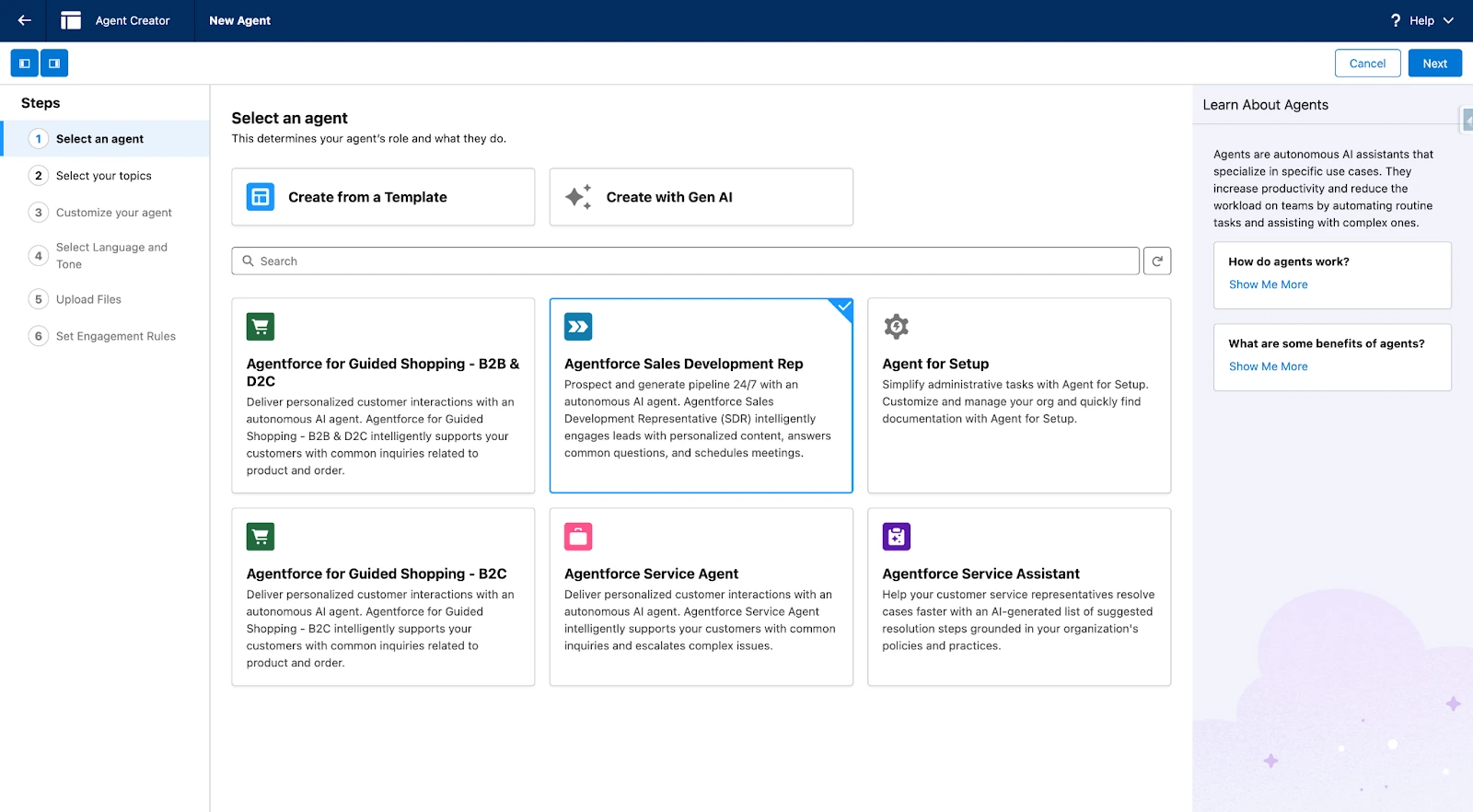
In the Agentforce Agent Creator, these agents are presented as templates. When creating a new agent, you'll see pre-built options like Sales Development Rep, Guided Shopping, and Service Agent — select one and you're guided through the configuration flow. You can also choose "Create with Gen AI" to have AI build a custom agent from scratch.
1. Prospecting Agent — 24/7 Lead Discovery Engine
Given your Ideal Customer Profile (ICP), this agent continuously scans Salesforce CRM data, Data Cloud enrichment data, and external web signals to find matching prospects. Its output isn't just a list — each lead comes with a priority ranking and an explanation of why now is the right time to reach out, helping sellers decide where to focus first.
Unlike traditional Lead Scoring, the Prospecting Agent doesn't require you to predefine complex scoring rules. It uses the Atlas Reasoning Engine (Salesforce's agent reasoning framework) to analyze intent signals in real time — recent funding rounds, leadership changes, technology stack shifts — and dynamically adjusts lead priority.
This is the last of the six agents to go live — GA is scheduled for March 31, 2026.
2. Engagement Agent — Multi-Channel Lead Nurture
Leads have been sourced, but who follows up? The traditional approach is to assign them to SDRs, but response times are often hours or even a full day. Equipter VP of Sales David Beiler shared the reality: "Reps were taking four to eight hours — or even a day — to follow up with leads."
The Engagement Agent eliminates that gap. Once assigned leads, it initiates multi-channel outreach automatically: responding to website visitor inquiries in real time, sending personalized email sequences, answering product questions, and booking meetings. All responses are grounded in your actual sales data and product documentation (indexed through Data Cloud's Content Library), not generic template copy.
Several implementation details are worth knowing:
- Independent email identity: The agent runs as an independent user with its own email address (e.g.,
ai-sdr@yourcompany.com), authenticated at the user level through Einstein Activity Capture. Every outbound email and inbound reply is logged in the CRM Activity History. - Configurable response personality: In Agentforce Builder, you define a company description (2-3 sentences), value proposition, tone (professional / friendly / consultative), and industry-specific language preferences. The agent calibrates its communication style accordingly.
- Automatic handoff: When a lead hits a configured maturity threshold — such as asking about pricing or requesting a demo — the agent hands off the complete context to a human rep, preventing information loss.
Equinox CTO Eswar Veluri described the impact: "Agentforce can now engage with our prospects 24/7 and respond immediately — with all of the context needed to answer questions clearly, thereby improving our customer experience."
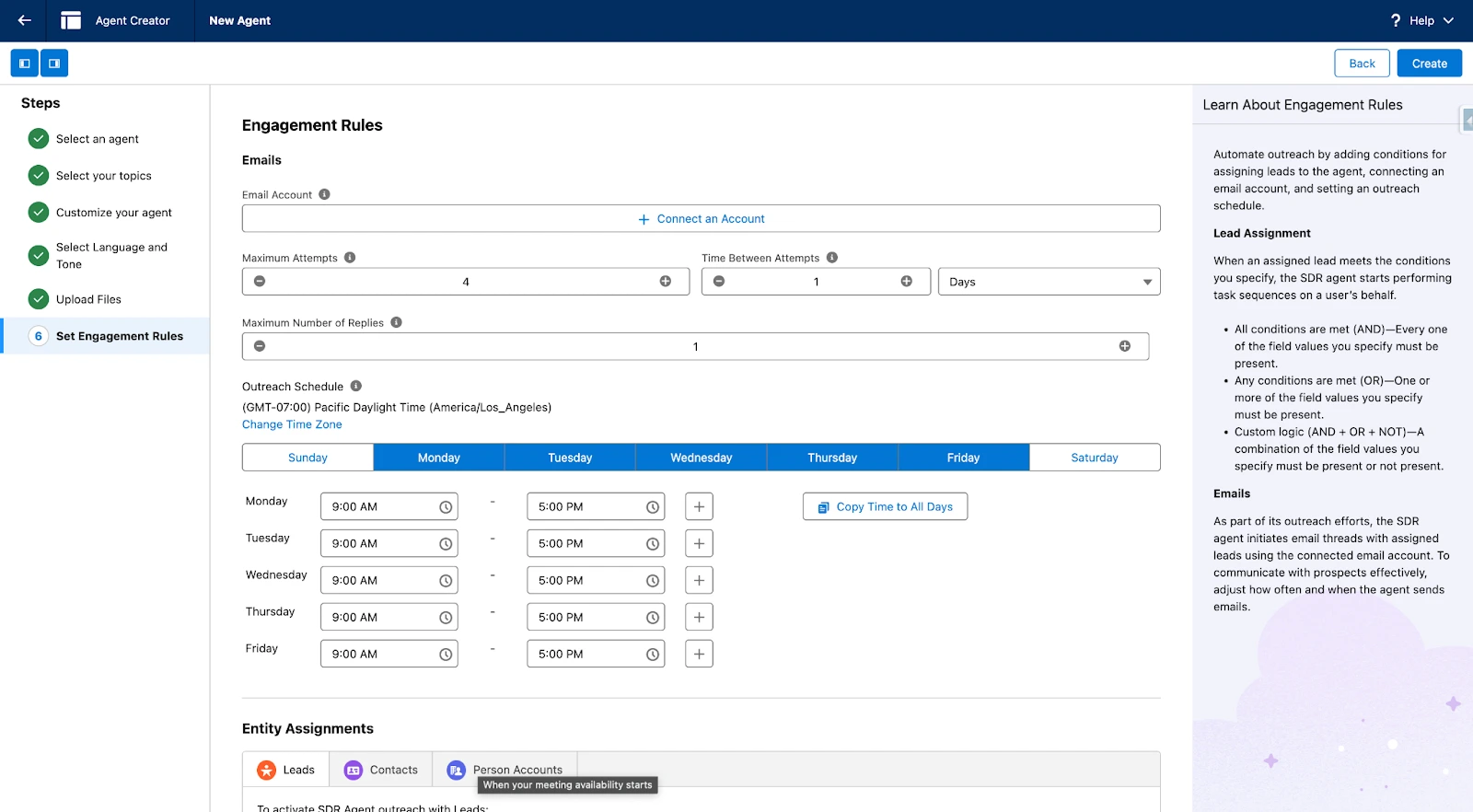
The Engagement Agent's behavior is controlled through Engagement Rules in Agentforce Builder. Admins configure email send windows (e.g., weekdays only, 9:00-17:00), contact frequency limits, and which entities (Leads or Contacts) the agent should engage. The screenshot below shows the Engagement Rules configuration — email channel settings, contact schedule, and entity assignment rules are all managed on a single page.
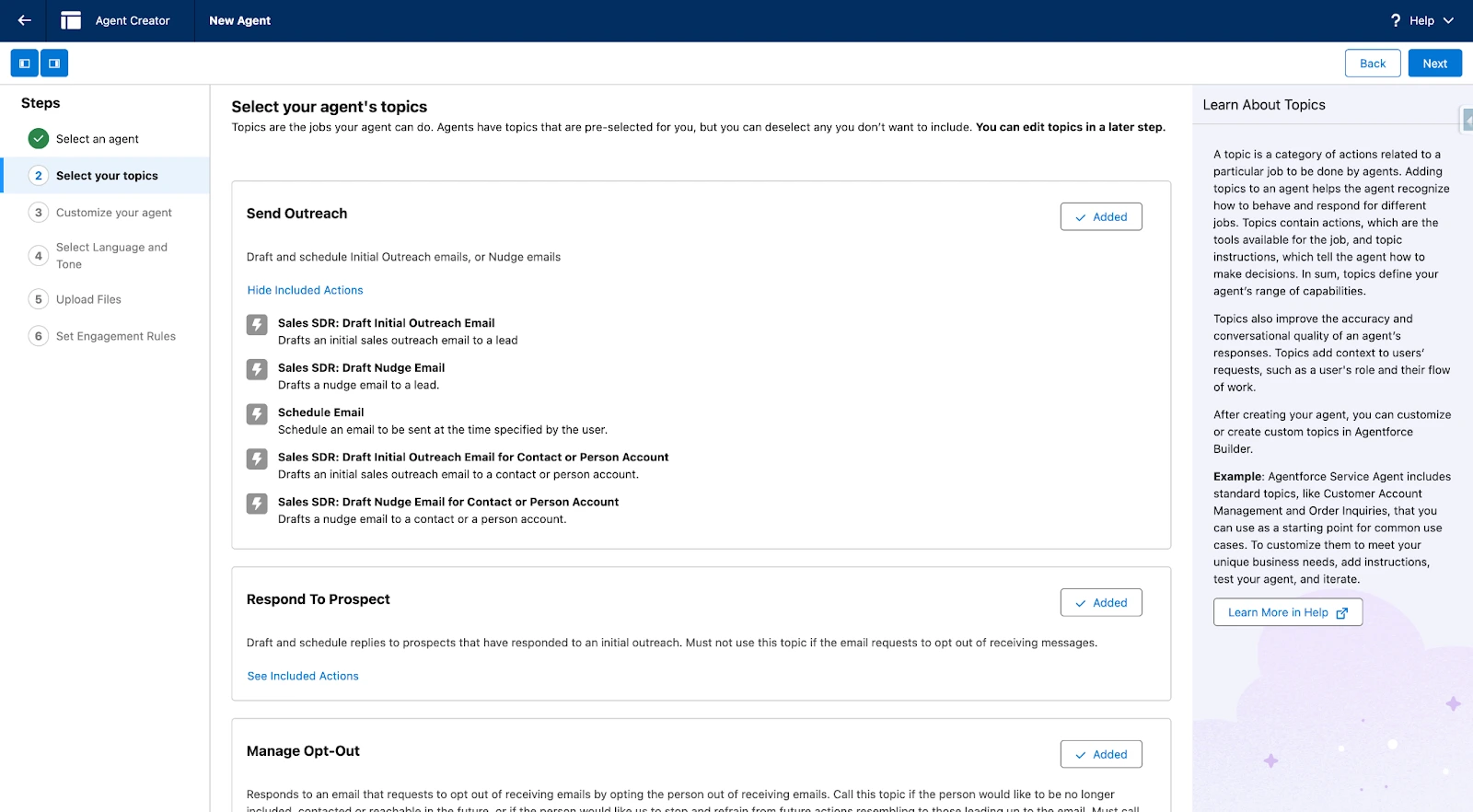
Another key configuration step is Topic selection. The SDR Agent comes with two pre-built Topics — Send Outreach (proactive outreach) and Respond To Prospect (handling replies). Each Topic contains granular Actions: "Sales SDR: Draft Initial Outreach Email" handles the first cold email, while "Sales SDR: Send Nudge Email" sends follow-ups when there's no reply. You can enable or disable specific Actions based on your needs.
3. Account Research & Meeting Prep Agent — No More Last-Minute Scrambling
Still digging through CRM records and Google before customer meetings? This agent automatically aggregates a customer's full Salesforce history — Opportunity stages, interaction history, Service Case records, Marketing engagement data — and combines it with third-party intelligence and recent news from Data Cloud to produce a structured Account Brief.
The brief isn't just a data dump. The agent identifies key relationships (decision-makers vs. influencers), flags recent anomalies (such as a newly filed high-priority Support Case), and suggests specific topics to address in the meeting. Salesforce's internal testing shows a 33% reduction in meeting prep time.
This agent is also available in Slack. Within a Deal Room channel, simply @mention the agent to pull up a customer briefing — team members don't need to switch to the Salesforce interface.
4. Pipeline Management Agent — Your Automated CRM Updater
One of the most tedious parts of selling is manually updating Opportunity fields — stage, next steps, expected amount, close date. Skip the updates and sales managers see inaccurate pipeline data; enforce them and sellers lose hours to data entry. It's a classic lose-lose.
The Pipeline Management Agent resolves this by parsing Conversation Data — call transcripts, email threads, meeting notes — to extract key details and write them back to the CRM. It operates in two modes:
- Suggestive mode: The agent drafts update proposals and pushes them to sellers as review cards. Sellers confirm with one click to write the changes. Best for newly deployed teams or data-sensitive environments.
- Autonomous mode: The agent writes directly to CRM fields without human confirmation. Appropriate for teams that have validated agent accuracy and established trust.
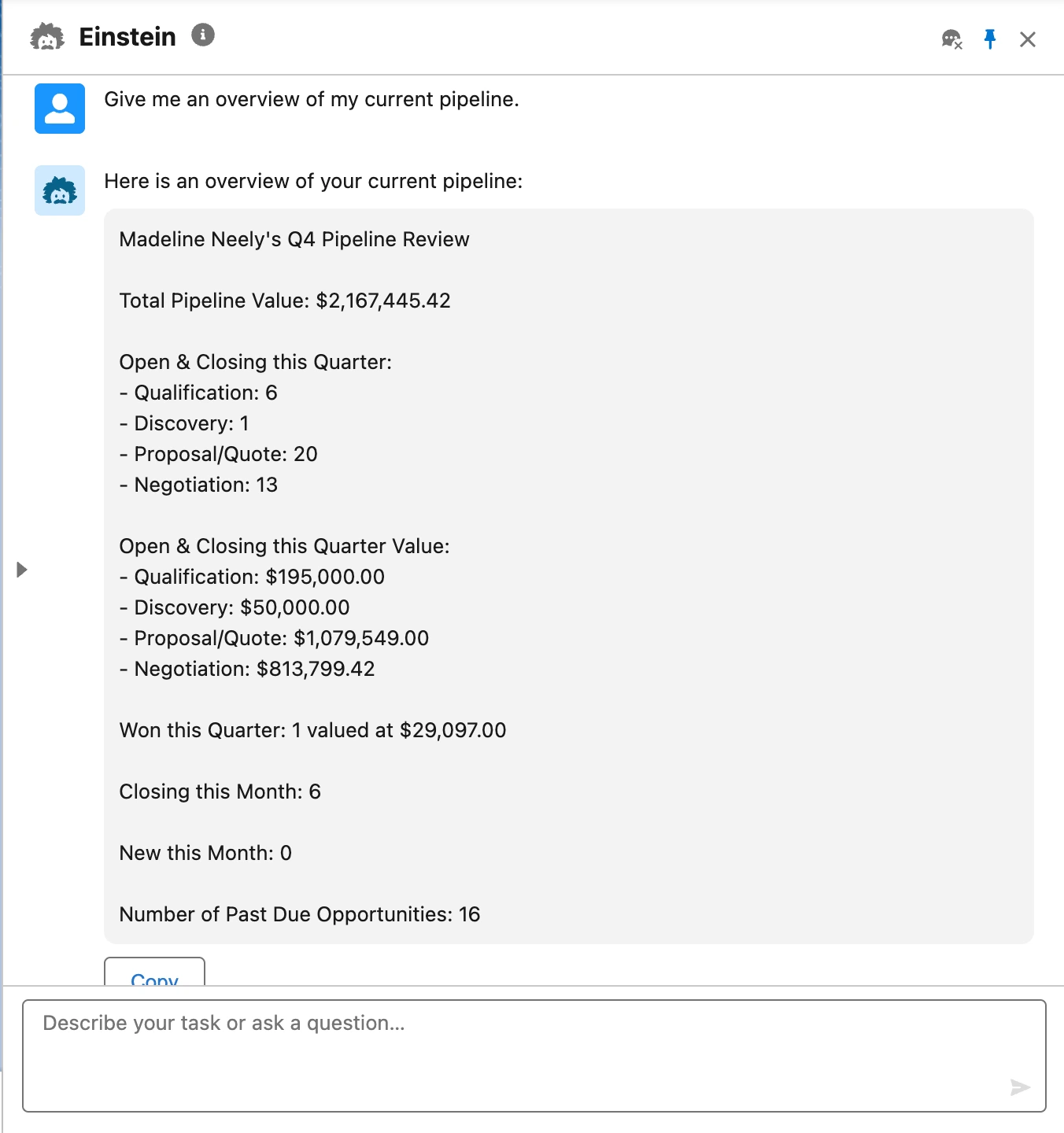
In the Einstein conversational interface, you can query pipeline status in natural language — "Give me an overview of my current pipeline." The agent returns a structured Pipeline Review showing total pipeline value, opportunity counts and values by stage (Qualification / Discovery / Proposal / Negotiation), deals expected to close this quarter, and overdue opportunities requiring attention.
The Pipeline Management Agent is also live in Slack. Within Deal Rooms, you can have the agent update deal status and summarize recent activity without switching to the Salesforce UI.
5. Sales Coach Agent — AI Sparring Partner for Real Deals
Traditional sales training has two problems: it depends on one-on-one coaching from managers who never have enough time, and the training content is usually generic scripts disconnected from actual deal contexts. The Sales Coach Agent solves both — it provides role-play practice and structured feedback scoring tied to specific Opportunities.
Three prebuilt Topics:
- Negotiation/Review Role-Play: Simulates negotiation scenarios where the agent plays a customer pushing back on pricing and terms.
- Proposal Quote Role-Play: Simulates proposal presentations where the agent raises objections and asks tough questions as the customer.
- Opportunity Coaching: After role-play sessions, the agent delivers stage-specific feedback across five Opportunity stages (Qualification / Needs Analysis / Discovery / Proposal-Pricing / Negotiation-Review).
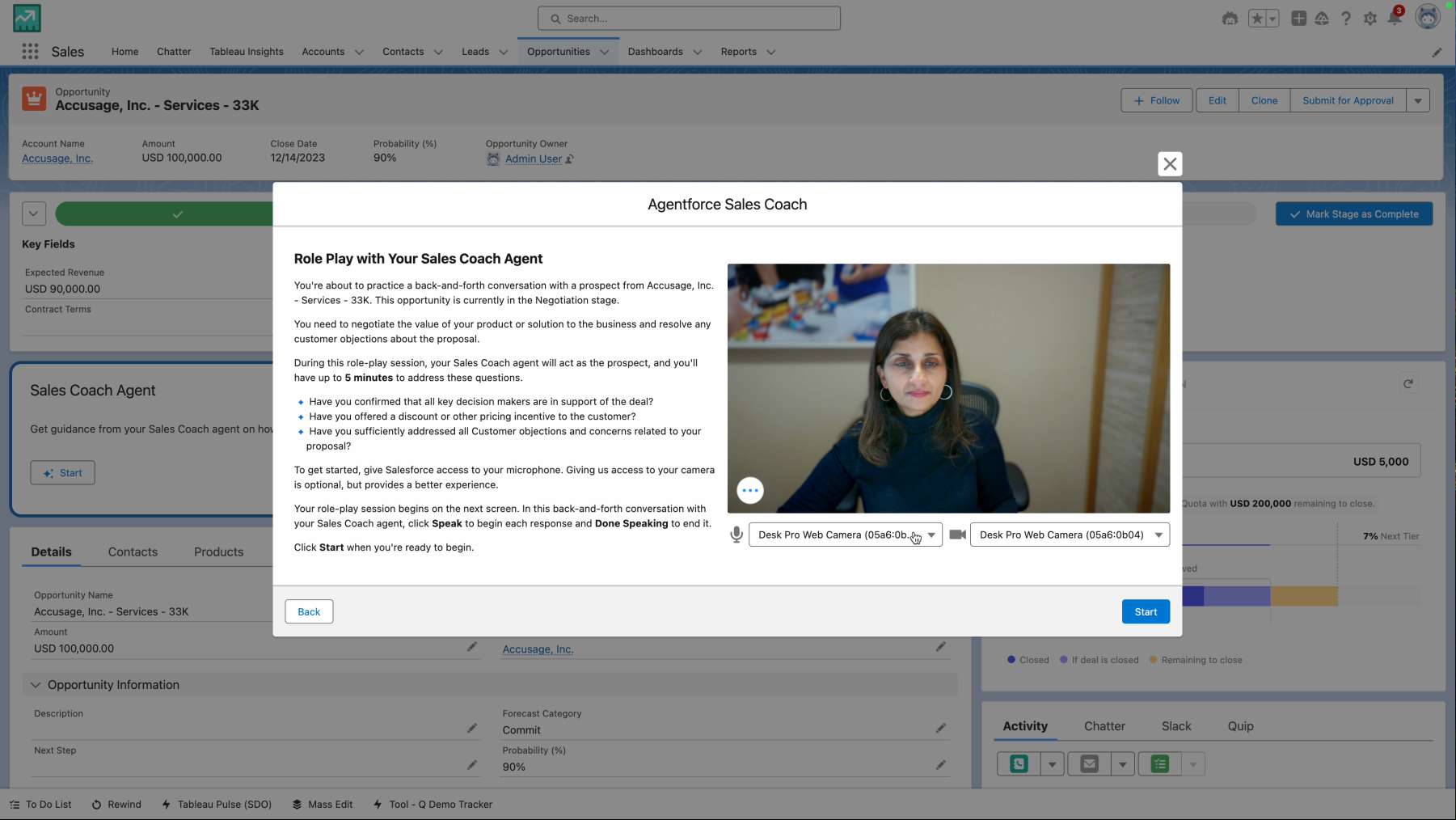
On an Opportunity record page, the Sales Coach Agent section shows the current deal context. Clicking "Start" launches the role-play. The agent reads the Opportunity's stage, amount, customer industry, interaction history, and related Contacts to generate contextually relevant dialogue. It supports voice input (with microphone and camera permissions) and text responses.
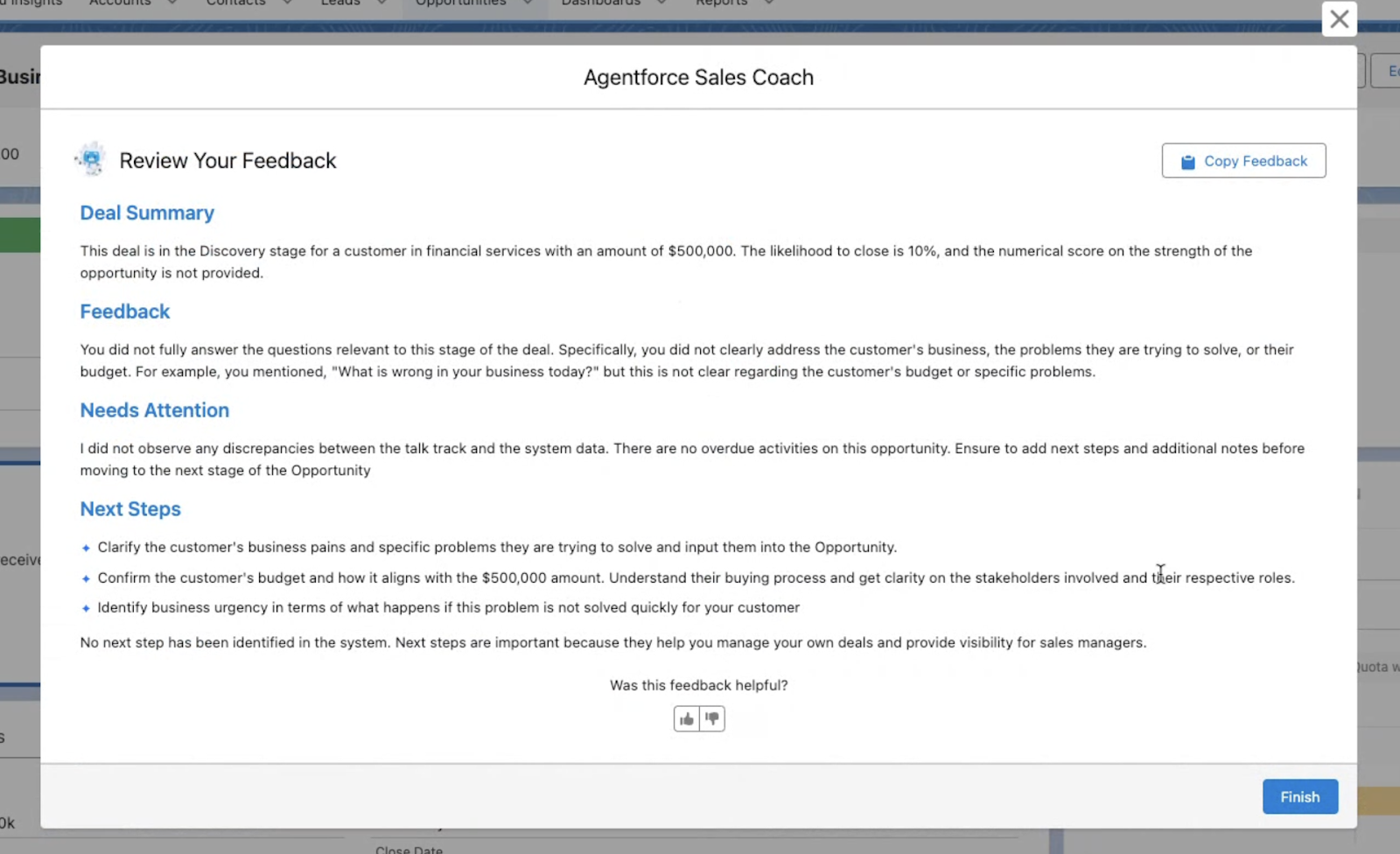
How the feedback engine works: Each Opportunity stage maps to a dedicated Prompt Template containing evaluation criteria and expected behaviors for that stage. The agent cross-references the seller's responses against CRM data and produces a four-part feedback report:
- Deal Summary: Background context including amount, stage, and likelihood to close.
- Feedback: Specific issues identified. For example, "You did not ask about the customer's budget" or "The questions you raised don't align with core Discovery-stage concerns."
- Needs Attention: Discrepancies between the seller's talk track and CRM system data. For instance, the seller claiming the customer is "very interested" while Activity History shows no email replies in two weeks.
- Next Steps: Precise recommended actions such as "Confirm whether the customer's budget aligns with the $500,000 quote" or "Map the customer's buying process and identify stakeholder roles."
Each coaching session is automatically logged as a Task on the Opportunity's Activity Timeline. Sales managers can review training records and scoring trends across their team without sitting in on every session.
6. Quoting Agent — Natural Language Quote Generation
Generating quotes in Sales Cloud typically requires navigating the CPQ (Configure, Price, Quote) interface — manually selecting products, configuring parameters, and applying discount rules. It's tedious and error-prone. The Quoting Agent supports natural language instructions like "Generate an annual quote for Acme Corp including Enterprise License and Premier Support with a 10% discount."
The agent generates quotes within established pricing rules and permission boundaries — it won't bypass discount approval workflows. Modifications work the same way: "Upgrade Support to Premier Plus and recalculate the total." Generated quotes can be emailed directly to the customer.
7. Partner Success Agent — Channel Partner Enablement
A 24/7 support agent for channel partners, providing personalized product training, co-selling guidance, and FAQ resolution. For companies that rely on indirect sales models — ISVs and manufacturers, for example — Partner Enablement is an ongoing human capital investment. This agent lets partners access product information, best practices, and sales materials at any time without waiting for a Channel Manager's response.
How the Agents Work Together
The six agents aren't siloed. Salesforce has designed a Seamless Handoff mechanism between agents, enabling them to chain into a complete sales automation pipeline:
- Prospecting Agent continuously scans external signals and builds ICP-matched lead lists.
- Engagement Agent picks up those leads and initiates multi-channel nurture — answering questions and booking meetings.
- Account Research Agent automatically generates customer briefs before scheduled meetings.
- After meetings, Pipeline Management Agent parses meeting transcripts and auto-updates Opportunity stages and next steps.
- Before the next customer touchpoint, Sales Coach Agent provides deal-specific role-play practice.
- When the deal reaches the quoting phase, Quoting Agent generates a compliant quote and sends it to the customer.
Every handoff carries full context — customer data, interaction history, prior agent analysis and decisions — eliminating the need for humans to manually reassemble information.
Technical Architecture: A Four-Layer Design
Agentforce Sales isn't a thin LLM wrapper over a CRM. It's built on a four-layer architecture with clear separation of concerns:
Data Retrieval Layer
All agents share a data foundation built on Customer 360 + Data Cloud. Sources include CRM standard objects (Lead / Contact / Account / Opportunity), email and calendar data captured by Einstein Activity Capture, call transcripts (Conversation Data), third-party enrichment data in Data Cloud, and product documentation indexed through the Data Library.
Data Cloud's role extends beyond storage. It provides DLO (Data Lake Object), DMO (Data Model Object), Vector Store, and RAG Retriever components that enable agents to perform semantic retrieval against unstructured data (PDF documents, knowledge base articles) rather than simple keyword matching.
Reasoning & Decision Layer
At the core is the Atlas Reasoning Engine — Salesforce's proprietary agent reasoning framework. It handles intent parsing, lead maturity assessment, and next-action determination. Unlike a raw LLM call, Atlas cross-references CRM data during the reasoning process to validate its conclusions, reducing the hallucination problem inherent in pure language models.
Action Execution Layer
Agent operations — sending emails, updating fields, creating Tasks, generating quotes — execute through Salesforce's native automation framework, governed by Permission Sets and Sharing Rules. Agents cannot perform actions beyond their assigned permissions.
Trust & Audit Layer
The Einstein Trust Layer provides end-to-end traceability. Every agent decision includes source citations — which email, call transcript, or CRM record informed the judgment — and users can audit the decision path at any time. The trust layer also handles data masking and toxicity scoring; all logs are written to Data Cloud for downstream analysis.
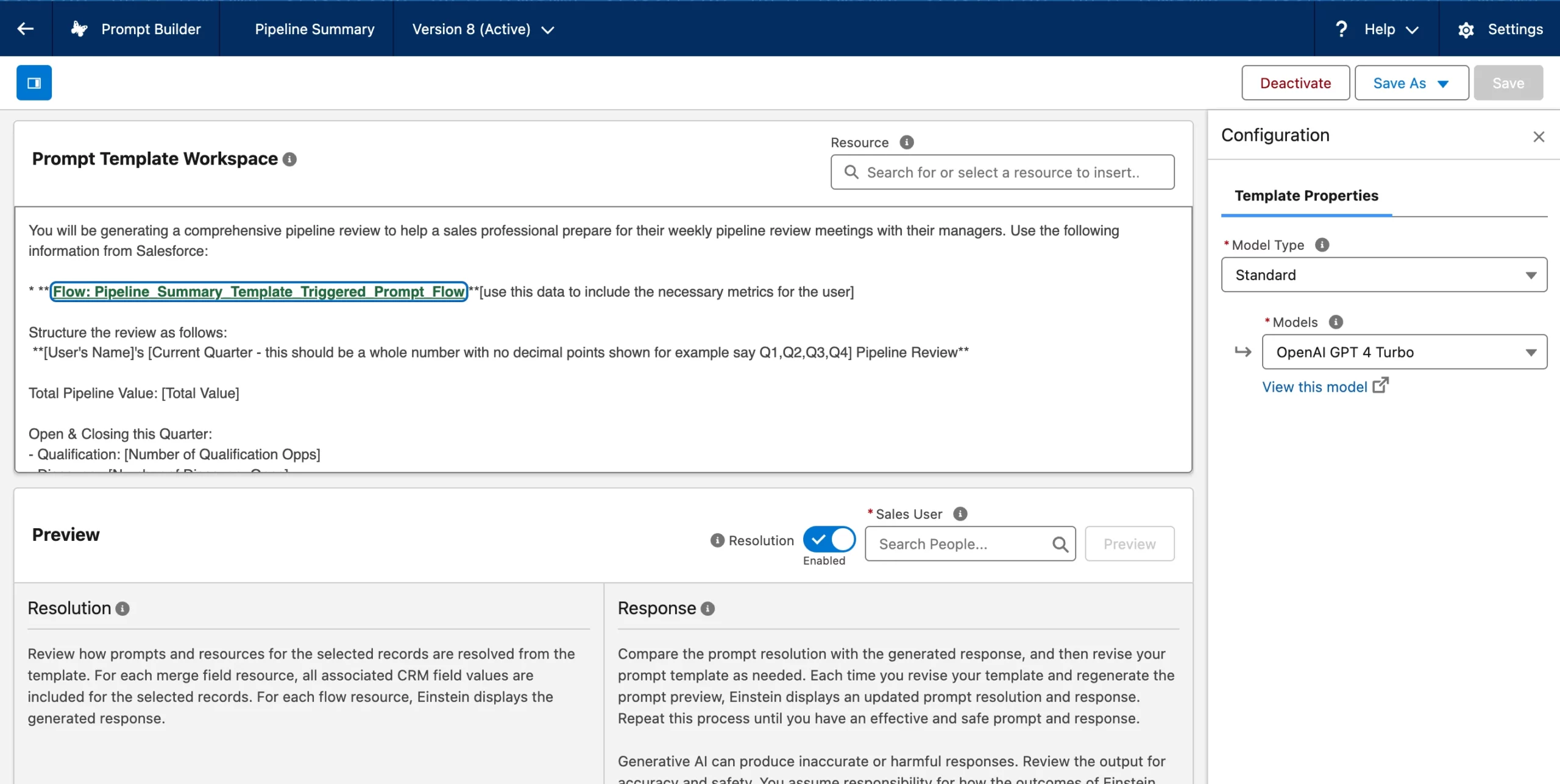
Through the Prompt Template Workspace, administrators can view and customize the Prompt Templates each agent uses. Each template consists of three parts: Grounding Data (data anchors), Evaluation Criteria, and Feedback Format. Templates use merge field placeholders that reference CRM fields, which are dynamically resolved at runtime to generate personalized prompts.
Cross-Platform Capabilities: Slack, ChatGPT, and Teams
A core design principle of Agentforce Sales is "run where sellers already work, rather than forcing them to adopt a new tool." Three external platforms are currently supported:
Slack integration: Within Deal Room channels, agents can update deal status, summarize recent progress, and generate customer briefs. Salesforce is also building the ability for the Prospecting Agent to push high-priority leads to the Engagement Agent directly within Slack.
ChatGPT integration (Beta): Launched in beta on December 17, 2025, this allows sellers to query and update Salesforce data directly from ChatGPT without switching applications. Requires an Agentforce for Sales add-on or Agentforce 1 Sales Edition license.
Sales Workspace: A purpose-built unified workspace designed for Agentforce, displaying core sales metrics, action items, and agent-powered recommendations across meeting preparation, Opportunity management, and lead processing. Enabled through the AI-Powered Selling setup in Salesforce Foundations.
Customer Case Studies
Asymbl, a workforce orchestration platform, needed to quadruple its team during hypergrowth but didn't have enough recruiters. They built a hybrid human-AI SDR team using Agentforce: the agent handles daily lead nurturing and qualification across inbound, outbound, and nurture channels, while human SDRs focus on strategic outreach. The results: coverage equivalent to a team five times larger, $575,000 in annual savings, a 427% increase in prospect engagement, and a 1,529% ROI.
Equinox, the premium fitness chain, uses Agentforce for 24/7 member engagement — booking classes, managing guest passes, discovering events, and answering facility questions. CTO Eswar Veluri said: "Agentforce can now engage with our prospects 24/7 and respond immediately — with all of the context needed to answer questions clearly, thereby improving our customer experience."
HackerOne's SVP of GTM Operations Tiffany Jones captured the value proposition succinctly: "Because Agentforce is powered by all our unified data, it will meaningfully take work off our sellers' plates — the kind of work no one would put on a résumé — and give our teams more time to focus on the high-value moments that win deals."
Pricing and Availability
Agentforce Sales is available through two paths:
- Sales Cloud add-on: Purchase the Agentforce for Sales add-on on top of an existing Sales Cloud license.
- Agentforce One Edition (formerly Agentforce 1 Sales Edition): A bundled package that includes Sales Cloud and the full Agentforce capability set.
Specific pricing varies by conversation volume and data integration depth. Sales Coach Skills (role-play and feedback) start at $2 per conversation. Salesforce provides an ROI calculator for estimation.
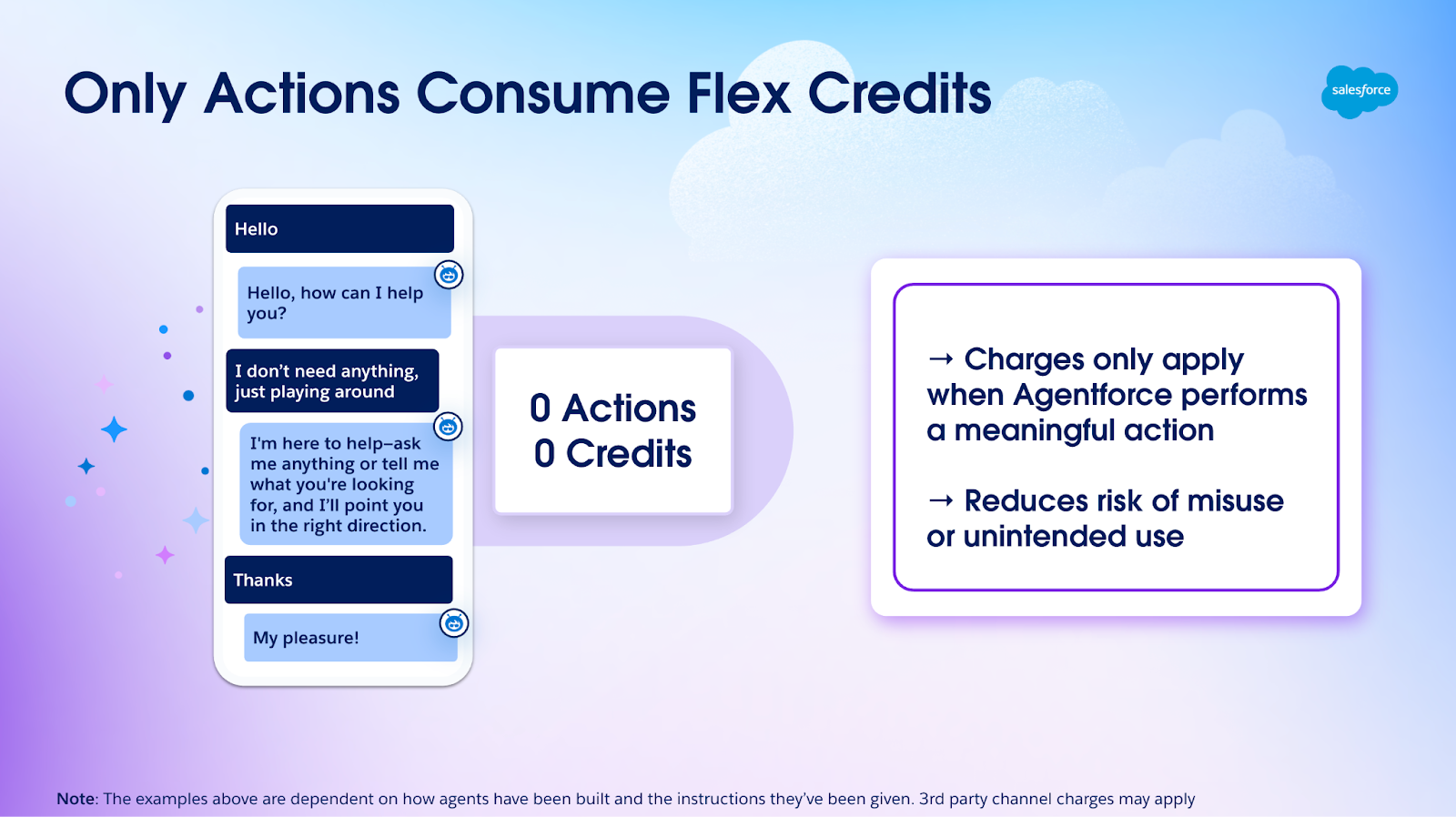
Agentforce uses a Flex Credits billing model where credits are only consumed when the agent performs a meaningful action (sending an email, updating a field, generating a quote). If a conversation is just casual chat or the user ends without requesting an action, no credits are consumed. This design reduces the risk of accidental charges or misuse.
| Agent | Responsibility | Availability | Operating Mode |
|---|---|---|---|
| Prospecting | Discover and rank leads by ICP match with timing rationale | GA March 31, 2026 | Autonomous |
| Engagement | Multi-channel lead nurture, product Q&A, meeting booking | GA | Autonomous / Suggestive |
| Account Research & Meeting Prep | Aggregate CRM + external data into customer briefs | GA | On-demand |
| Pipeline Management | Parse conversation data to auto-update Opportunity fields | GA | Autonomous / Suggestive |
| Sales Coach | Opportunity-based role-play + four-part feedback scoring | GA ($2/conversation) | On-demand |
| Quoting | Natural language quote generation within governed workflows | GA | Autonomous / Suggestive |
| Partner Success | 24/7 partner product training and co-selling support | GA | Autonomous |
Getting Started: Four Steps to Deploy Agentforce SDR
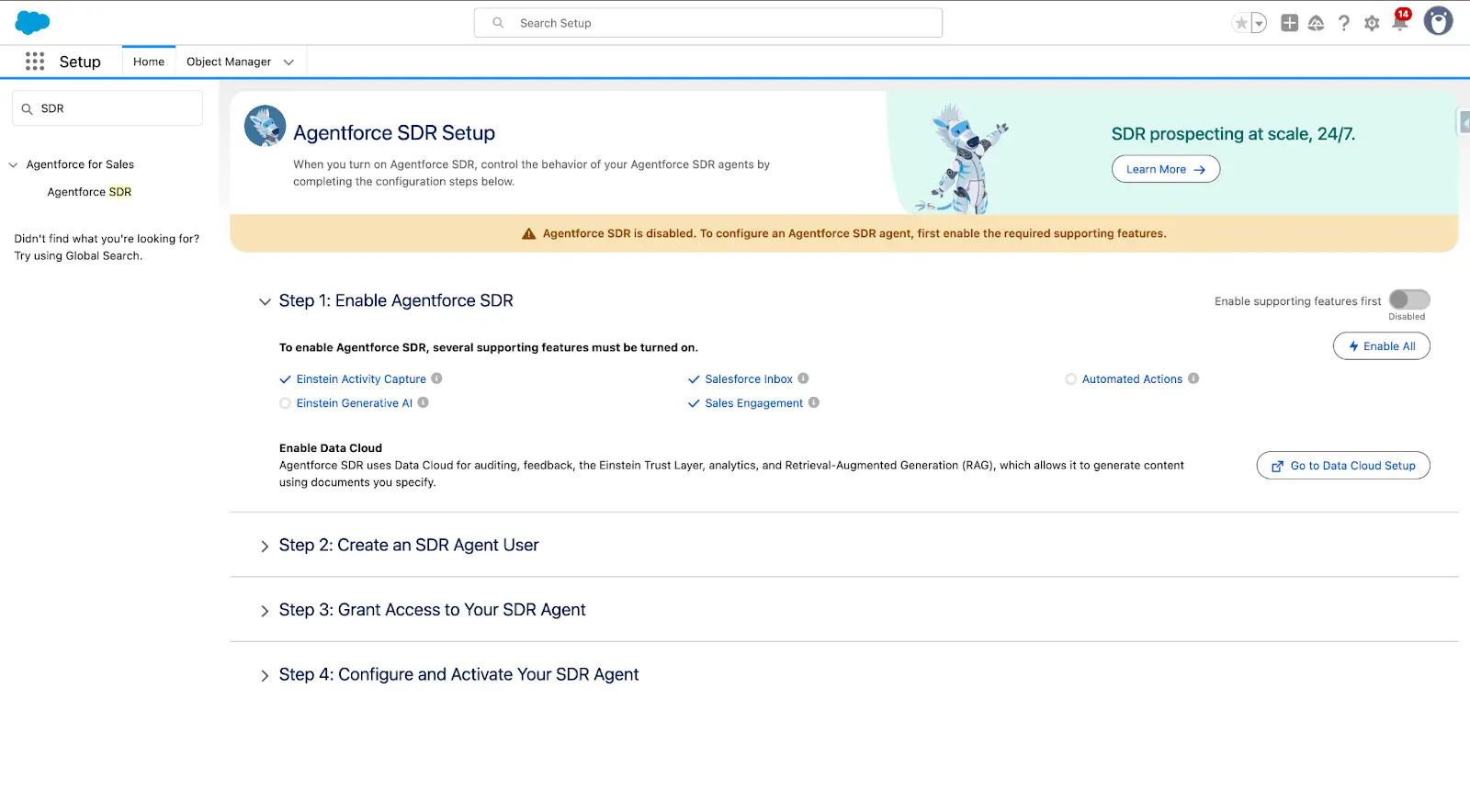
Using the Engagement Agent (SDR Agent) as an example, deployment follows a four-step guided process. Search "SDR" in Setup to access the Agentforce SDR Setup page.
Step 1: Enable Agentforce SDR. Five prerequisite features must be activated: Einstein Activity Capture, Einstein Generative AI, Salesforce Inbox, Sales Engagement, and Automated Actions. Click "Enable All" to turn them on in one shot. Data Cloud must also be enabled — the agent's audit logs, feedback loops, and RAG retrieval all depend on it.
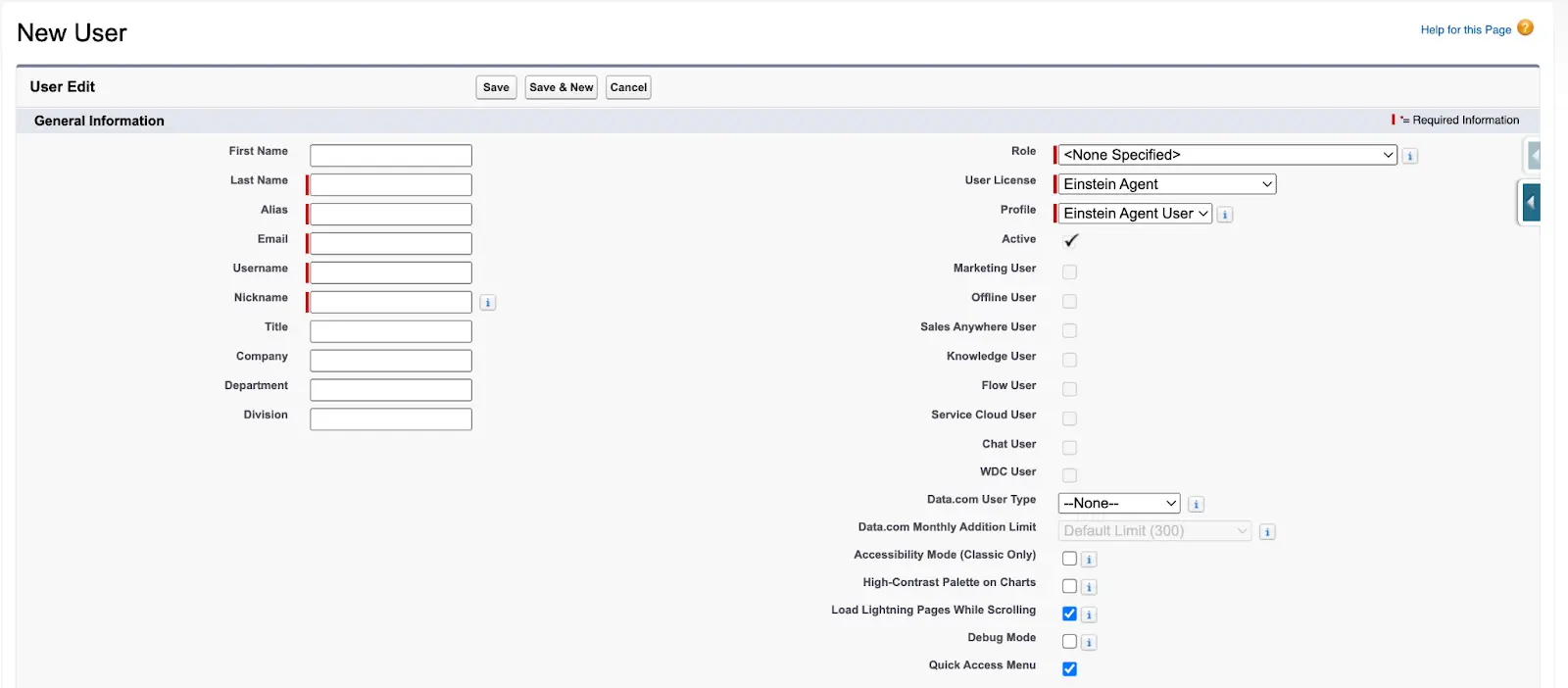
Step 2: Create an SDR Agent User. Create a dedicated Salesforce User record for the agent — essentially onboarding a new digital employee. In Setup → Users → New User, the critical step is selecting Einstein Agent as the User License and Einstein Agent User as the Profile. Enter the agent's name and email, then save. This user record appears on all outbound emails and AI disclosure statements, so choose the name and company carefully.
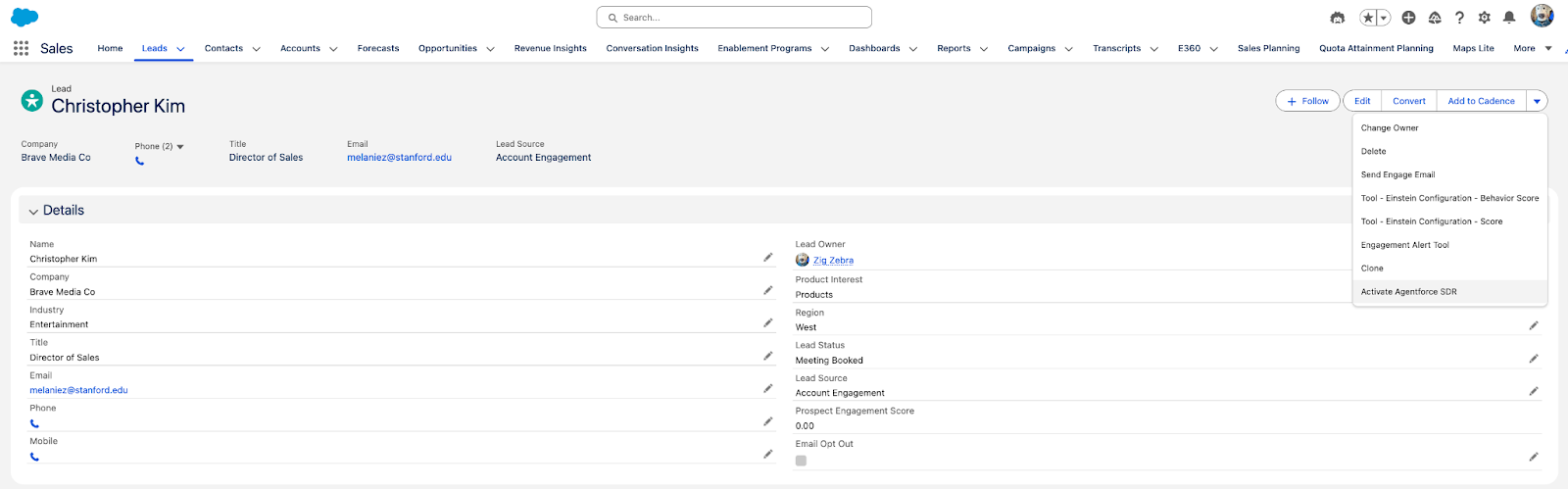
Step 3: Grant Access to Your SDR Agent. Assign SDR Manager Permissions (for admins who configure the agent) and SDR User Permissions (for reps who assign leads to the agent). Once permissions are set, sales reps will see an "Activate Agentforce SDR" option in the action menu on Lead record pages, allowing them to assign specific leads to the agent for follow-up.
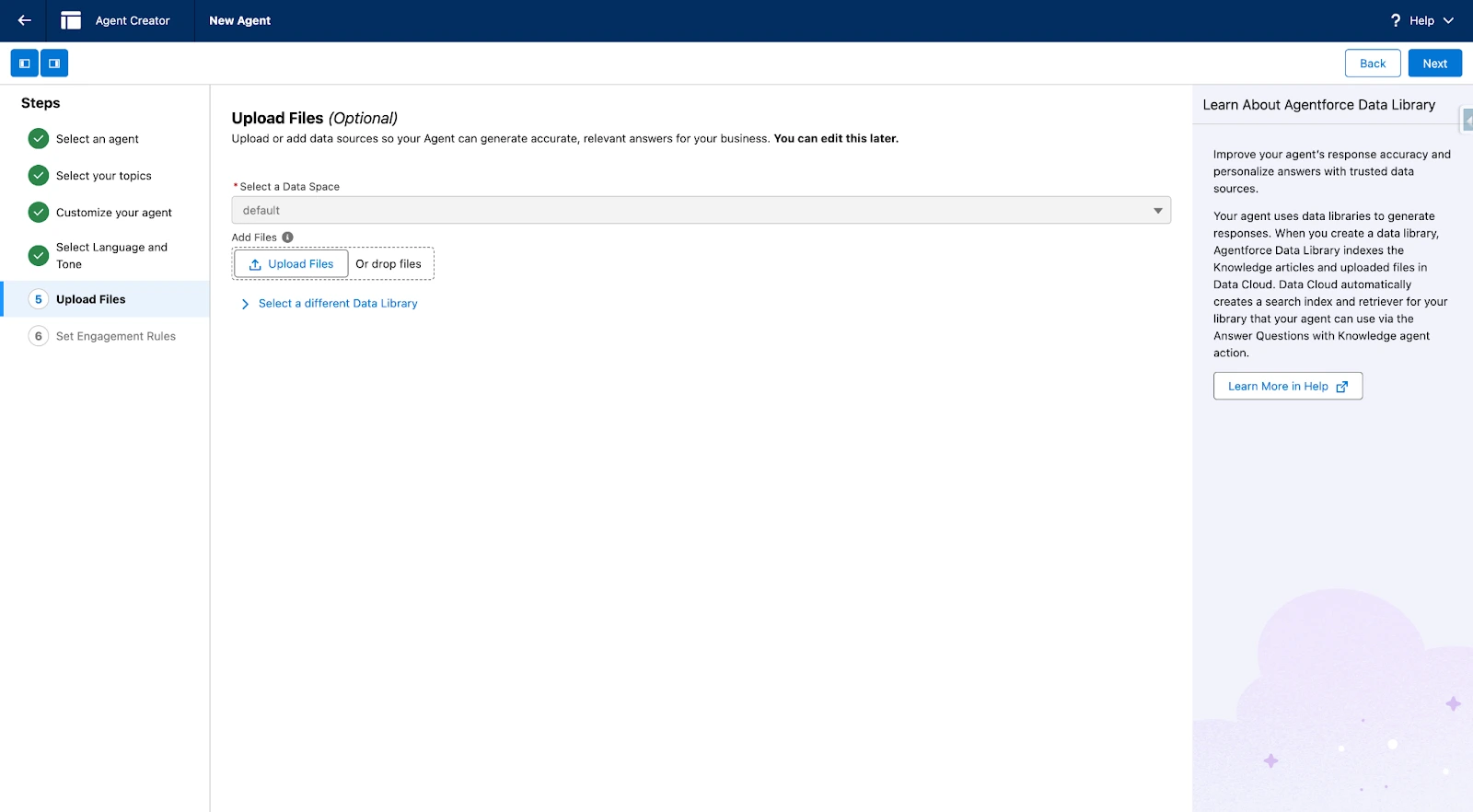
Step 4: Configure and Activate Your SDR Agent. Enter Agentforce Builder to select Topics, set Engagement Rules, and upload product documentation to the Data Library. The Data Library is the agent's knowledge source for answering product questions — uploaded PDFs, documents, and knowledge base articles are indexed and retrieved via RAG during conversations. Salesforce recommends keeping documents under 25 pages with clear metadata.
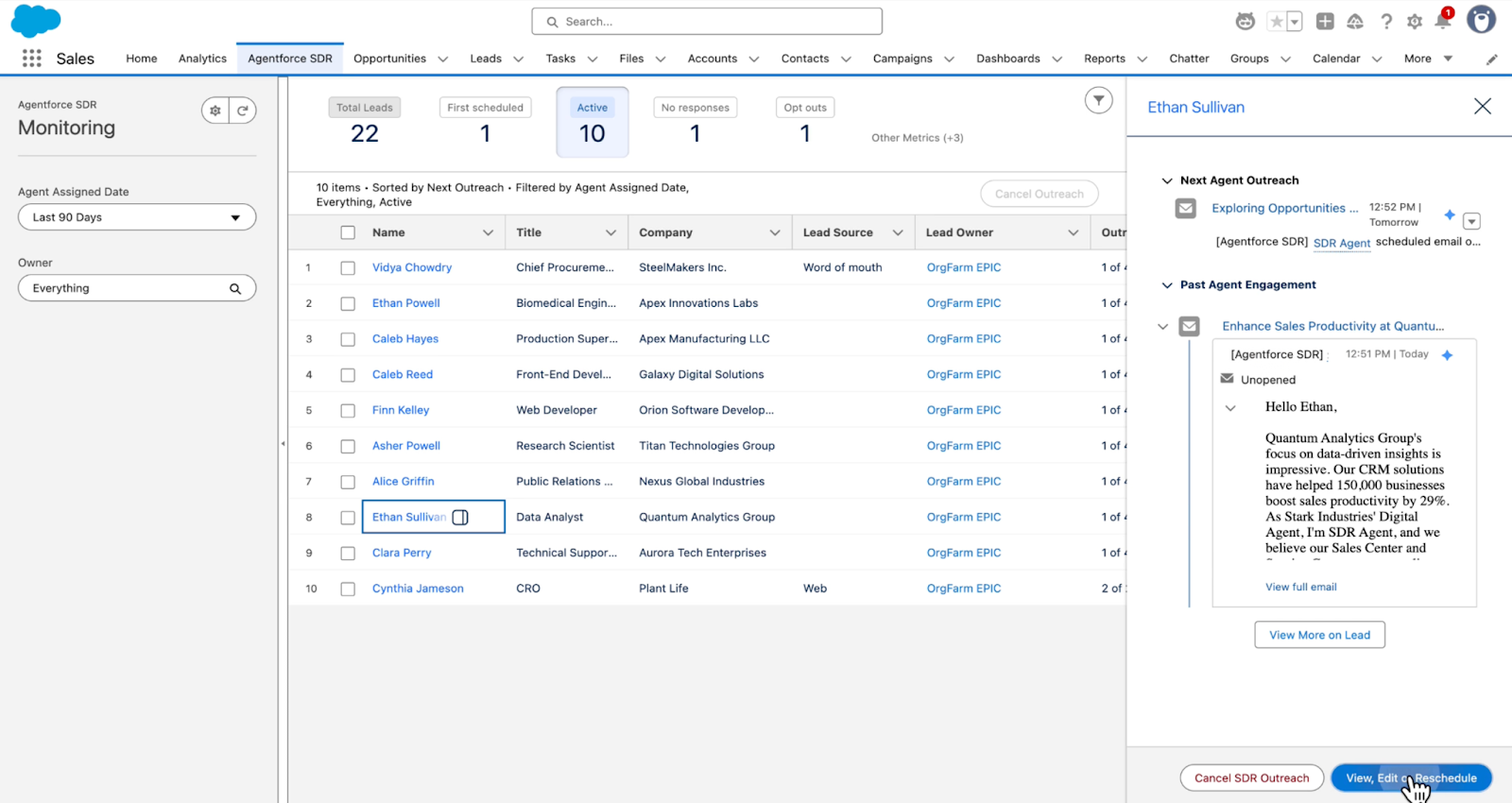
Once live, admins can monitor the agent's performance in real time through the Monitoring dashboard. The panel displays key metrics — assigned leads, contacted leads, and meetings booked. Clicking any lead reveals the agent's complete interaction history: which emails were sent, what the prospect replied, and what the agent plans to do next.
Deployment Realities
The pitch is compelling, but real-world rollouts require some clear-eyed planning to avoid common traps:
Data quality is the foundation; agents are the building. The Pipeline Management Agent's auto-updates depend on accurate parsing of conversation data. If your team doesn't use Einstein Activity Capture for email and meeting logging, or calls aren't being transcribed, the agent has limited context — and output quality suffers. The same applies to the Engagement Agent: if the product documentation in Data Cloud's Content Library is outdated or incomplete, agent responses will drift off-target. Salesforce recommends keeping indexed documents under 25 pages with clear metadata labels.
Email configuration is a silent killer. The Engagement Agent requires a dedicated Einstein Activity Capture email connection for the agent user (user-level authentication, not org-level). If this step isn't configured correctly, outbound emails will fail silently — no errors, no warnings, emails simply don't get sent. Verify test email delivery before going live.
Start with Suggestive, earn your way to Autonomous. Salesforce's own documentation recommends beginning in Suggestive mode so sellers can review agent-proposed updates, validate accuracy, and build trust before switching to Autonomous. Jumping straight to Autonomous risks corrupting CRM data — an incorrect stage or amount written to an Opportunity directly impacts Forecast accuracy.
Sales Coach depth depends on CRM richness. Role-play scenarios are generated from Opportunity fields — stage, amount, industry, interaction history, related Contacts and Activity records. If your Opportunities only have a name and dollar amount filled in, the coaching simulations won't reflect real-world conversations. This isn't an AI problem; it's a data problem.
Agent permissions require fine-grained control. Each agent runs as an independent Salesforce user and needs its own Permission Set and Profile. Don't clone an admin profile — create a minimum-privilege dedicated Profile granting only the object access the agent needs to function. Salesforce's native Sharing Rules and Field-Level Security apply to agent users just like any human user.