1. Why Understanding the Order of Execution Matters
When a user clicks Save, Apex code performs DML, or an API submits a record, Salesforce executes a large number of operations within a single transaction in a fixed sequence: Flows, Triggers, Validation Rules, Workflow Rules, Roll-Up Summaries, and more. Without understanding these 20 steps, you'll run into problems like:
- Validation Rules failing unexpectedly — because Before Triggers modified field values before validation runs
- After Triggers reading stale Roll-Up Summary values — because roll-ups are calculated at Step 16
- Workflow Field Updates causing Triggers to fire twice — because Step 11A re-fires triggers
- After-Save Flows creating infinite recursion via Update Records — because the DML re-enters the full execution cycle
This article is based on the official Apex API v64.0 (Summer '25) Order of Execution diagram, breaking down all 20 steps.
2. Official Order of Execution Diagram
The diagram below is the official Salesforce Order of Execution flowchart (Apex API v64.0, Summer '25). All step numbers in this article follow this diagram:
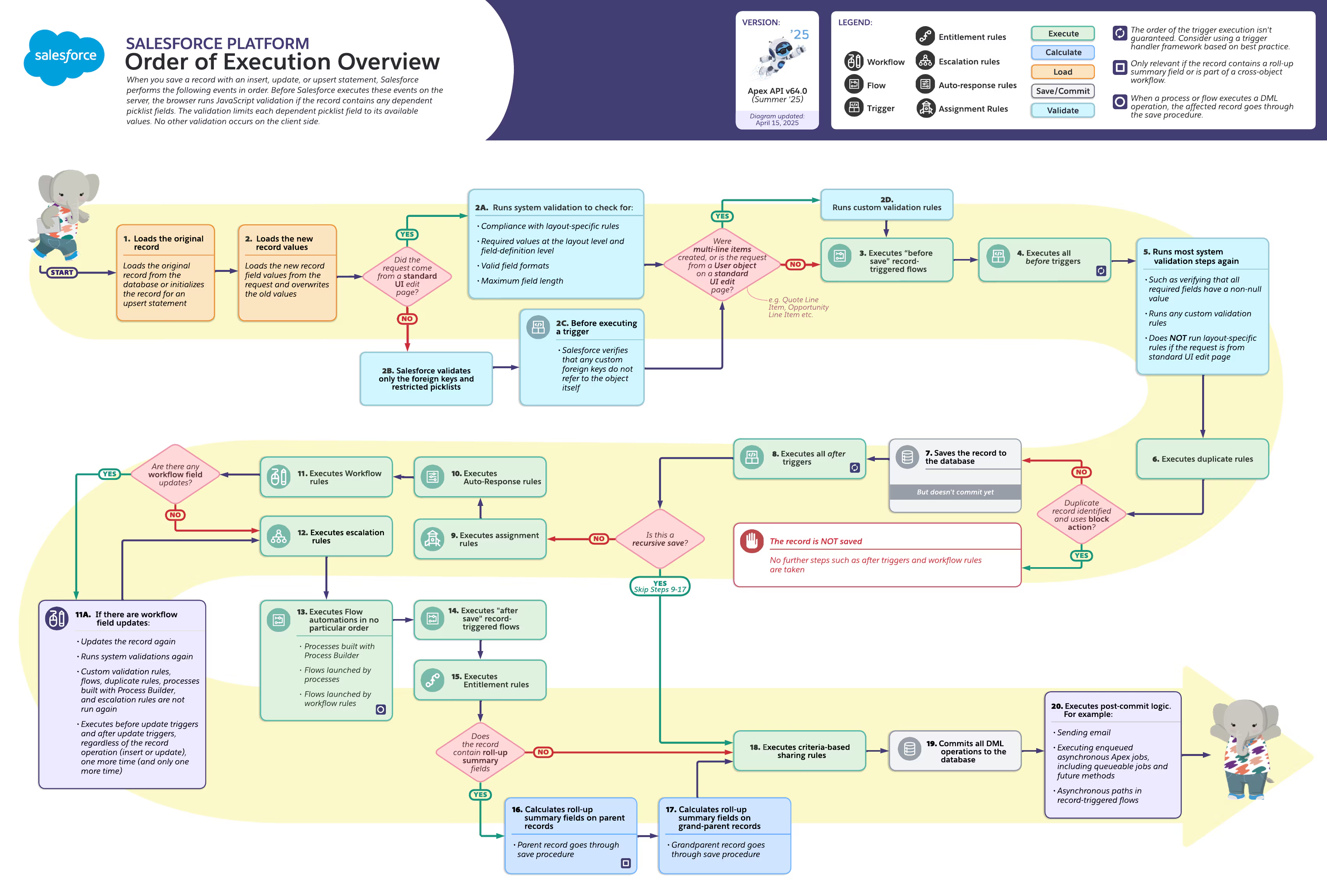
3. Complete 20-Step Breakdown
Step 1: Load Original Record
The system loads the current version of the record from the database (or initializes the record for an upsert statement). This "old value snapshot" is stored in Trigger.old for comparing field changes in subsequent triggers.
Step 2: Overwrite Fields with New Values from the Request
Field values from the UI, API, or Apex DML are written into the in-memory record copy. Different validation sub-branches execute depending on the request source:
If the request comes from a standard UI edit page:
- 2A — Runs system validation to check for: compliance with layout-specific rules, required values at the layout level and field-definition level, valid field formats, and maximum field length
If the request does NOT come from a standard UI (API / Apex):
- 2B — Salesforce validates only the foreign keys and restricted picklists
- 2C — Before executing a trigger, Salesforce verifies that any custom foreign keys do not refer to the object itself
If multi-line items were created, or the request is from a User object on a standard UI edit page:
- 2D — Runs custom validation rules (e.g., Quote Line Item, Opportunity Line Item)
Step 3: Before-Save Flow (Record-Triggered Flow — Before Save)
Executes all Record-Triggered Flows configured to run before save. Flows can directly modify $Record field values without DML, making them more performant than Before Triggers. This is Salesforce's recommended "clicks-first" entry point.
Step 4: Before Trigger
Executes all Before Insert / Before Update / Before Delete Triggers. Modifying Trigger.new field values in Before Triggers writes directly to the record without calling update(). Note: modifications made here will be validated by Validation Rules in Step 5.
Step 5: Runs Most System Validation Steps Again
Re-runs system validation steps, including: verifying that all required fields have a non-null value and running any custom validation rules. If validation fails, the transaction rolls back and displays an error message.
Important distinction: Does NOT run layout-specific rules if the request is from a standard UI edit page (those already ran in Step 2A).
Step 6: Duplicate Rules
Executes duplicate detection rules. If a Duplicate Rule is set to "Block" and a duplicate is identified, the record is NOT saved. No further steps such as After Triggers and Workflow Rules are taken. If set to "Allow + Alert", the record continues saving with a warning.
Step 7: Save to Database (Not Committed)
The record is written to the database and an Id is generated (for inserts), but the transaction is not yet committed. Other transactions cannot see this record yet. From this point on, the record can be queried via SOQL within the same transaction.
Step 8: After Trigger
Executes all After Insert / After Update / After Delete / After Undelete Triggers. The record now has an Id, so you can create child records or update related records. However, you cannot directly modify Trigger.new — use DML operations on other objects instead. Note: Roll-Up Summaries have not been updated yet (that happens at Step 16).
⚠️ Recursive Save Check: After the After Trigger completes, the system checks "Is this a recursive save?" If yes (e.g., triggered by Roll-Up Summary cascade on parent/grandparent records), Steps 9-17 are skipped entirely, jumping directly to Step 18.
Step 9: Assignment Rules
Executes Assignment Rules (Lead Assignment Rules / Case Assignment Rules) to automatically assign records to designated users or queues.
Step 10: Auto-Response Rules
Executes Auto-Response Rules for scenarios like Web-to-Lead and Web-to-Case, automatically sending confirmation emails.
Step 11: Workflow Rules
Executes Workflow Rules whose criteria are met. Workflows can trigger: immediate actions (Field Update, Email Alert, Task, Outbound Message) and time-dependent actions.
⚠️ Step 11A — If there are Workflow Field Updates:
- Updates the record again and runs system validations again
- Custom validation rules, Flows, Duplicate Rules, processes built with Process Builder, and Escalation Rules are NOT run again
- Executes Before Update and After Update Triggers, regardless of the record operation (insert or update), one more time (and only one more time)
Step 12: Escalation Rules
Executes Escalation Rules for the Case object, automatically escalating or reassigning cases that haven't been handled within a specified timeframe.
Step 13: Flow Automations (No Particular Order)
Executes Flow automations in no particular order:
- Processes built with Process Builder
- Flows launched by processes
- Flows launched by workflow rules
Note: Salesforce has marked Process Builder as a retiring feature and recommends migrating to Record-Triggered Flows.
Step 14: After-Save Flow (Record-Triggered Flow — After Save)
Executes all Record-Triggered Flows configured to run after save. If these flows use Update Records to modify the current record or other records, this triggers new DML operations that enter the full execution order again. This is one of the most common sources of recursion.
Step 15: Entitlement Rules
Executes entitlement rules for Case object SLA milestone calculation and management.
Step 16: Roll-Up Summary — Parent Record
If the record contains roll-up summary fields (Master-Detail relationship), calculates and updates Roll-Up Summary fields (SUM, COUNT, MIN, MAX) on parent records. The parent record goes through the full save procedure (triggering the parent object's Triggers, validation rules, etc.).
Step 17: Roll-Up Summary — Grandparent Record
If the parent record also contains roll-up summary fields, the cascade continues upward to update grandparent records. The grandparent record also goes through the full save procedure. Since these cascade updates are recursive saves, the recursive check after Step 8 skips Steps 9-17 to prevent infinite loops.
Step 18: Criteria-Based Sharing Rules
Evaluates criteria-based sharing rules, automatically sharing records with designated users or groups based on field values.
Step 19: DML Commit
All DML operations are finally committed to the database. If any uncaught exception was thrown anywhere in the transaction, the entire transaction rolls back and no changes persist.
Step 20: Post-Commit Logic
Executes after the transaction commits successfully. For example:
- Sending email
- Executing enqueued asynchronous Apex jobs, including Queueable Jobs and @future methods
- Asynchronous paths in Record-Triggered Flows
These operations execute outside the transaction — even if they fail, the committed data is not rolled back.
4. Key Rules Quick Reference
- Before-Save Flow (3) → Before Trigger (4) → Validation (5): If both Flow and Trigger modify the same field, the Trigger's value wins
- Workflow Field Update (11A) causes double Trigger execution: Regardless of insert or update, triggers re-fire one more time only
- Recursive save check is after Step 8: Recursive saves skip Steps 9-17 entirely
- After Trigger (8) can't read Roll-Up Summary (16-17): Summary fields are calculated after the After Trigger
- Duplicate Rule Block terminates at Step 6: All subsequent steps are skipped entirely
- Post-Commit (20) is outside the transaction: Emails and async jobs are unaffected by transaction rollback
5. Common Pitfall Scenarios
Scenario 1: Before-Save Flow and Before Trigger Modify the Same Field
Problem: Before-Save Flow (Step 3) sets Status to "Pending", and Before Trigger (Step 4) also modifies Status. The final result depends on execution order — Before Trigger overwrites the Flow's value.
Solution: Maintain an "automation map" documenting which fields are modified by which automations on each object. Flows and Triggers should not modify the same field unless there's a clear priority convention.
Scenario 2: Workflow Field Update Causes Triggers to Fire Twice
Problem: After Trigger (Step 8) syncs data to an external system. Workflow Field Update (Step 11A) triggers a second round of Trigger execution, causing the sync to run twice.
Solution: Use recursion guards in Triggers (static Set<Id>) to ensure logic runs only once per record. Also consider migrating Workflow Rules to Flows to eliminate this issue entirely.
Scenario 3: After Trigger Reads Stale Roll-Up Summary Values
Problem: In Opportunity After Insert (Step 8), you query Account's Total_Amount__c (Roll-Up Summary), but the value doesn't include the just-inserted Opportunity amount.
Solution: Roll-Up Summaries are calculated at Step 16, while After Triggers run at Step 8. To get current aggregate values, either compute them manually with SOQL aggregate queries, or use async patterns (Queueable / Platform Event) to read after Post-Commit (Step 20).
Scenario 4: After-Save Flow Update Records Causes Recursion
Problem: An After-Save Flow (Step 14) uses "Update Records" to modify a field on the current record. This DML triggers the full execution order again, including re-entering this Flow, creating an infinite loop.
Solution: Add entry conditions to the Flow — e.g., "only run when Status changes from A to B" — to prevent re-triggering after the update. Or move the logic to a Before-Save Flow (Step 3), assigning values to $Record directly with no DML and no recursion.
Scenario 5: API Writes Bypass Layout Validation
Problem: Fields required on the Page Layout don't trigger errors when records are created via API, allowing dirty data into the system.
Solution: Page Layout required fields are only enforced at Step 2A (UI validation). API requests go through Step 2B (validates only foreign keys and restricted picklists). To enforce validation across all entry points, use Validation Rules (Step 5) or set the field as Field-Level Required.
6. Common Interview Questions
Q1: Which runs first — Before-Save Flow or Before Trigger?
A: Before-Save Flow runs first (Step 3), then Before Trigger (Step 4). If both modify the same field, Before Trigger's value overwrites the Flow. This is one reason Salesforce recommends Flows first — Flows run earlier, while Triggers can serve as a "backstop" override.
Q2: Why does my Trigger sometimes fire twice?
A: The most common cause is a Workflow Rule with a Field Update (Step 11A). After the field update, the system re-executes Before Update and After Update Triggers, regardless of whether the original operation was insert or update, one more time only. Solution: use static Boolean or static Set<Id> for recursion guards, or migrate Workflows to Flows.
Q3: Can After Triggers read current Roll-Up Summary values?
A: No. Roll-Up Summaries are updated at Steps 16-17, while After Triggers run at Step 8. For current aggregate values, either use SOQL aggregate queries to calculate manually, or use async patterns (Queueable / Platform Event) to read after Post-Commit (Step 20).
Q4: Which comes first — Validation Rules or Before Triggers?
A: Before Triggers run first (Step 4), then Validation Rules (Step 5). This means field modifications in Before Triggers are subject to Validation Rule checks. If a Trigger sets a field to an invalid value, the Validation Rule will catch it.
Q5: How do you prevent recursion from Update Records in After-Save Flows?
A: Three approaches: ① Add entry conditions to prevent re-triggering after the update; ② Move logic to Before-Save Flow, assigning values to $Record directly — no DML, no recursion; ③ Use a custom field (e.g., Is_Processing__c) as a recursion flag.
7. References
- Salesforce Official: Triggers and Order of Execution — Apex Developer Guide
- Salesforce Developers: Order of Execution — Data Model Gallery