Overview
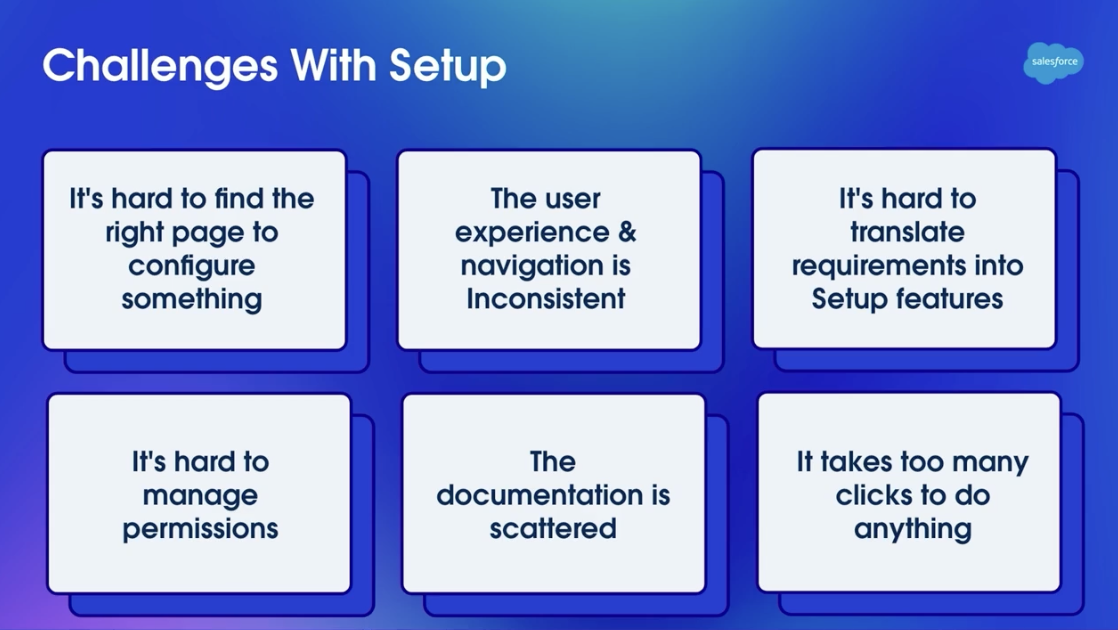
Salesforce's Setup interface has over 1,200 configuration pages. The challenge admins face daily isn't technical complexity—it's cognitive overload: finding the right page, understanding dependencies, and navigating through layers of nested menus. In a Dreamforce '25 presentation, Salesforce distilled the pain into six categories: difficulty finding the right configuration page, inconsistent navigation experiences, trouble mapping business requirements to Setup features, opaque and complex permission management, scattered documentation across different systems, and too many clicks required for any operation.
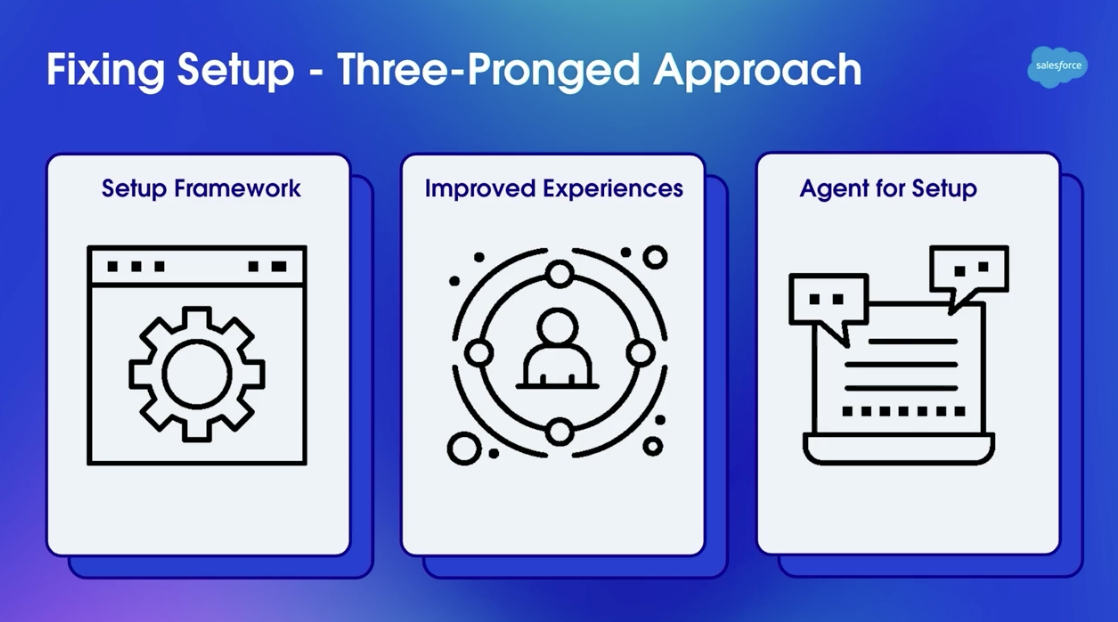
Salesforce's solution runs on three parallel tracks: rebuilding the underlying Setup Framework, improving existing Setup page experiences, and introducing Agent for Setup (an AI assistant). Setup with Agentforce (Beta), released in Spring '26, is the first product delivery on that third track—a conversational AI admin assistant embedded directly in Setup Home.
The Atlas Reasoning Engine: Technical Architecture Behind the Agent
Setup with Agentforce isn't a simple ChatGPT wrapper—it runs on Salesforce's proprietary Atlas Reasoning Engine. Here's how Atlas works: after receiving natural language input from an admin, it first classifies the query (permission troubleshooting, object creation, or information lookup?), then reasons against the current Org's metadata (schema, Permission Set configurations, license allocations, etc.), generates an execution plan, and finally breaks that plan into a set of action steps for admin confirmation.
The key phrase here is "reasoning against Org metadata." When the Agent answers permission questions, it's not guessing from general knowledge—it's actually querying the real configuration of Profiles, Permission Sets, Permission Set Groups, Field-Level Security, and Org-Wide Defaults in your specific Org. This also explains why some answers lose precision in complex nesting scenarios: the longer the reasoning chain, the higher the probability of errors at intermediate steps.
Atlas also has built-in Guardrails: all write operations (creating Objects, modifying Permission Sets, etc.) generate a "Proposal" marked as Draft before execution. The operation only runs after the admin clicks confirm in the UI. This is what Salesforce calls Human-in-the-Loop design—the Agent recommends, humans decide.
Redesigned Setup Home: The Conversation Bar Replaces the Search Box
Once Setup with Agentforce is enabled, the Setup Home page automatically switches to its new layout. The most visible change is a natural language input bar at the top of the page, replacing the traditional Quick Find search. Below the input bar sit five quick-action buttons for the highest-frequency admin tasks: Reset a Password, Freeze a User, Unfreeze a User, Show User Details, and Activate a User.
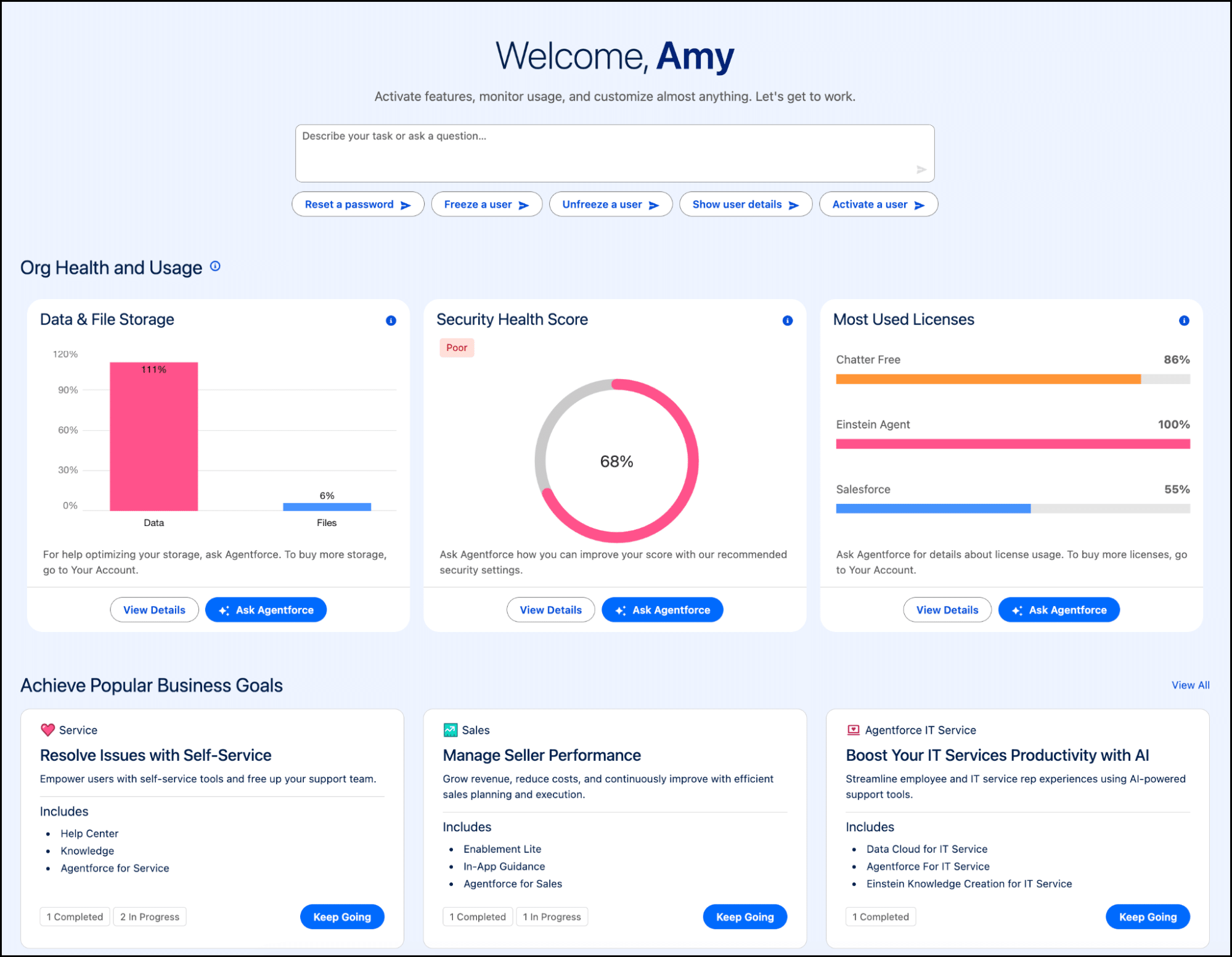
The Org Health and Usage section in the middle displays three cards with key operational metrics: Data & File Storage, Security Health Score, and Most Used Licenses. Each card has an "Ask Agentforce" button in the upper right corner that opens a conversation pre-contextualized to that metric. When storage is running over capacity, for example, you can click that button and ask "Which objects are consuming the most storage?"—the Agent will return rankings and recommendations.
The Four Action Categories in Detail
The Beta covers over 30 admin tasks. Salesforce internally classifies them into four categories: Help (navigation and documentation), Permissions (access management), Connected Apps (integration management), and Report Types (report type creation). Combined with data model and automation operations, the actual coverage extends beyond the official taxonomy.
Help: Navigation, Documentation Search, and Org Info Queries
The most basic yet most practical category. Admins can ask in natural language "How do I set up single sign-on?"—the Agent retrieves relevant content from the Help & Training documentation library and returns a summary with links. You can also request direct navigation to a configuration page: "Take me to the Permission Set Groups page"—the Agent jumps directly, saving you from typing keywords in Quick Find.
Org information queries fall under this category as well. Common questions include:
- "Is our org running out of storage?" — returns current storage usage percentages and trends
- "What licenses are available?" — lists all license types with remaining counts
- "Show me the security health score" — displays the current score and deduction items
Permissions: Access Troubleshooting and Management
This is where Setup with Agentforce shows real technical depth. Admins spend more time on permission management than you'd expect—diagnosing "why can't this user see a field" might require manually tracing through Profile → Permission Set → Permission Set Group → Field-Level Security → Org-Wide Defaults across five layers. The Agent can execute this entire troubleshooting chain.
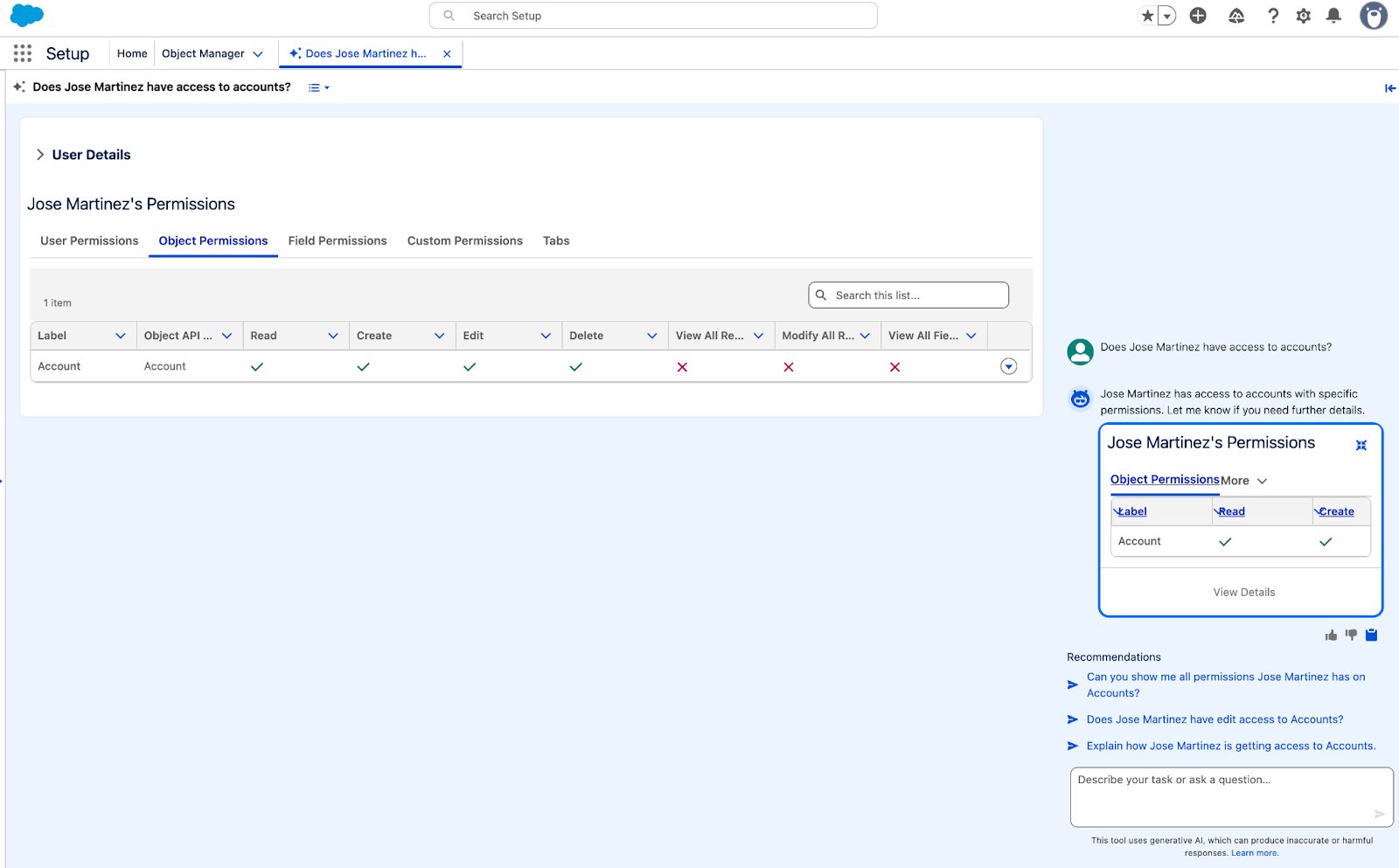
Typical permission-related prompts and actions:
| Scenario | Example Prompt | Agent Behavior |
|---|---|---|
| Object access check | "Does Jose Martinez have access to accounts?" | Retrieves all Permission Sets and Profile for the user, lists Object Permissions details |
| Field visibility diagnosis | "Why can't Candace Evans see the contact record for Jane Doe?" | Walks the permission chain step by step, pinpoints the specific FLS or Sharing Rule gap |
| Permission comparison | "Compare permissions between User A and User B" | Generates a side-by-side permission difference table |
| Permission Set creation | "Create a permission set for read-only access to Opportunity" | Generates a proposal listing Object and Field permissions to enable, awaits confirmation |
Note that the Beta's handling of deeply nested Permission Set Groups is imprecise. When a user's permissions are inherited through a "Permission Set Group A → Permission Set Group B → Permission Set C" chain, the Agent sometimes misses intermediate inheritance layers. For complex nesting scenarios, treat the Agent's troubleshooting output as a starting point and manually verify critical nodes.
Connected Apps: Migration to External Client Apps
An easy-to-overlook capability—the Agent can assist with migrating Connected Apps to External Client Apps (ECAs). With Salesforce progressively restricting new Connected App creation starting in Spring '26, this feature has practical value for teams managing numerous integrations. The Agent reads the existing Connected App's OAuth configuration and generates migration recommendations with a step-by-step checklist.
Report Types: Cross-Object Report Type Creation
Creating Custom Report Types has long been an admin pain point—it requires understanding object relationships, selecting the correct Primary/Secondary Objects, and configuring field layouts. The Agent supports natural language descriptions (e.g., "Create a report type that shows Opportunities with their related Contacts and Activities") and generates a proposal with object relationships and field selections.
There's a known issue here, though: Beta-stage Custom Report Type creation produces inconsistent results. The same prompt sometimes generates correct object relationships and sometimes reverses the Primary and Secondary Objects. Always verify object relationships in Setup → Report Types after creation.
Hands-On: Creating Custom Objects with Natural Language
Here's an end-to-end walkthrough. An admin needs to create a custom object called "Audit" with an "Audit Date" (date field) and "Audit Results" (long text field). Type the requirement into the Setup Home input bar:
"Create a custom object called Audit with fields for Start Date, End Date, and Description"
The Agent's response breaks into three parts:
- Intent confirmation: The Agent first checks whether a same-named or similar object already exists (to avoid duplicates). If none exists, it proceeds
- Data model proposal generation: It displays a structured Proposed Data Model containing Object Label, API Name (auto-generated as Audit__c), and each field's Label, API Name, Data Type, and Description—all marked as Draft
- Awaiting action: A "Create Proposed Data Model" button appears at the bottom along with follow-up suggestions (add more fields, learn more about the proposed object, etc.)
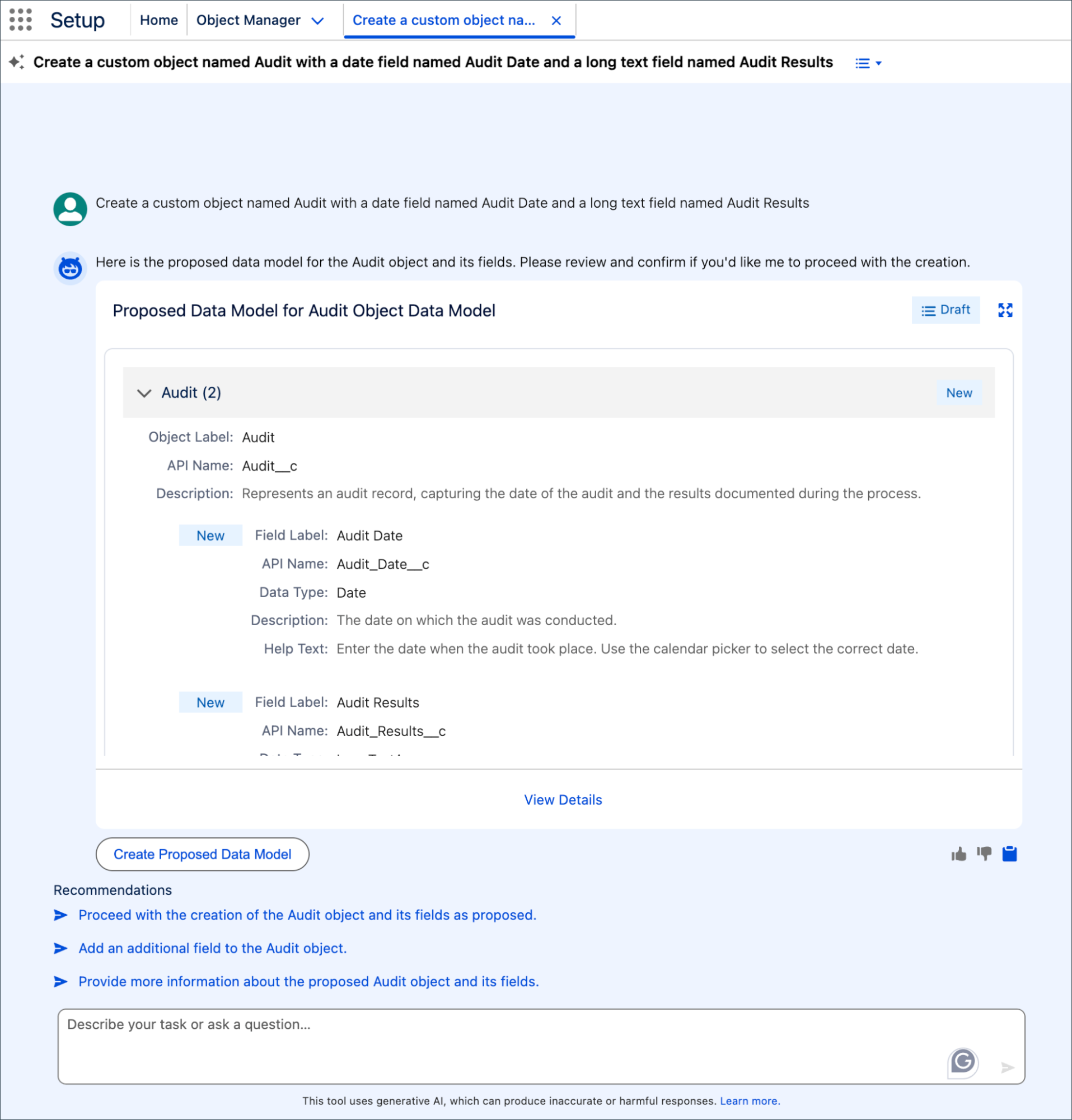
After clicking "Create," the Agent calls the Metadata API behind the scenes to create the object and fields, with the operation logged in the Setup Audit Trail. The entire process from describing the requirement to completed creation typically takes under 30 seconds—compared to manually navigating through Object Manager → New Custom Object → Add Fields with multiple page transitions.
The Recommendations section at the bottom suggests next steps: create additional fields, configure the page layout, or set up related Permission Sets. This conversational flow keeps the interaction from dead-ending at "creation complete, now what?"
Prompt Techniques and Best Practices
The Agent's response quality is heavily dependent on prompt clarity. Here are principles distilled from hands-on usage:
Specific Beats Vague
| Poor | Effective | Why |
|---|---|---|
| "Help me with permissions" | "Does Jose Martinez have edit access to the Revenue field on Opportunity?" | Specifies the user, operation type, target object, and field |
| "Create an object" | "Create a custom object called Project Milestone with a Date field and a Lookup to Project__c" | Specifies the object name, field types, and relationship |
| "Fix my flow" | "My Record-Triggered Flow on Contact is failing with a FORMULA error in the decision element" | Specifies the Flow type, trigger object, and error type |
Leverage Follow-Up Questions
The Agent supports multi-turn conversations. After the first round returns initial results, build on them with follow-ups. A typical permission troubleshooting conversation chain:
- "Does User A have access to the Revenue field on Opportunity?" → Agent lists permission details
- "Which permission set is granting this access?" → Agent identifies the specific Permission Set
- "Remove Revenue field access from that permission set" → Agent generates a modification proposal
Prompt Templates for Reference
- Permission troubleshooting:
Why can't [username] [action] the [field/object] on [object]? - Object creation:
Create a custom object called [name] with fields for [field1 type], [field2 type], and a [relationship type] to [parent object] - Flow creation:
Create a record-triggered flow on [object] that [trigger condition] and [action] - Navigation:
Take me to [configuration page name]orWhere do I configure [feature name]?
How to Enable It
Edition and License Requirements
Setup with Agentforce (Beta) is available in Lightning Experience for Enterprise, Performance, Unlimited, and Developer Editions. The prerequisite is that your Org has purchased Salesforce Foundations or Agentforce licenses (the former "Agentforce 1" has been renamed to simply "Agentforce").
Activation Steps
- Complete the Data Cloud foundational setup steps for your Org (Setup with Agentforce depends on Data Cloud infrastructure for grounding)
- Enable Einstein Generative AI and Agentforce feature toggles in Setup
- Setup → Quick Find → search "Setup with Agentforce (Beta)" → toggle on
- Refresh your browser—the Setup Home page will automatically switch to the new layout
If the toggle is on but Setup Home hasn't changed, check two common causes: whether Data Cloud Provisioning has completed (Setup → Data Cloud Setup to check status), and whether the current user has the required Permission Set.
Permission Controls
Using Setup with Agentforce requires one of the following:
- Agentforce Default Admin Permission Set — the recommended approach, includes all necessary permissions
- Customize Application permission — for more granular control
The Agent strictly respects the current user's permission boundaries. If you don't have "Create Custom Objects" permission, the Agent will tell you to request that permission rather than bypassing the restriction. In other words, the Agent's capability ceiling is your own permission scope—it's an assistant, not a super-admin.
Consumption Metering and the Digital Wallet
Each Agent interaction consumes Agentforce Conversation Credits, tracked through the Digital Wallet. Setup with Agentforce doesn't have a separate SKU—it's included with the Agentforce license.
Credit consumption varies significantly by operation type:
| Operation Type | Typical Consumption | Notes |
|---|---|---|
| Simple navigation | 1 conversation turn | "Take me to Permission Sets page" |
| Information queries | 1-2 conversation turns | "What's our current storage usage?" |
| Permission troubleshooting | 2-4 conversation turns | Multi-layer permission chain queries may require multi-step reasoning |
| Object/field creation | 2-3 conversation turns | Proposal generation + execution confirmation + follow-up suggestions |
| Multi-turn follow-ups | Cumulative | Each follow-up turn independently consumes credits |
For teams that use Setup frequently, set up usage alerts in the Digital Wallet. Permission troubleshooting queries, with their longer reasoning chains, typically consume 2-4x the credits of simple navigation requests.
Security and Compliance: The Einstein Trust Layer
All conversations with the Agent pass through the Einstein Trust Layer, which provides four layers of protection:
- Zero data retention: User inputs and Org metadata are not used for LLM model training, and conversation data is not retained in Salesforce's AI infrastructure
- Transport encryption: Conversation content is encrypted via TLS in transit, and the data channel to the LLM provider is also encrypted
- Output review: Agent-generated responses undergo Toxicity Detection and Hallucination Filtering
- Audit trail: All write operations executed through the Agent are logged in the Setup Audit Trail, including timestamps, executing users, and change details
For regulated industries like financial services and healthcare, the Trust Layer means the Agent can be used in production Orgs without concerns about sensitive configuration data leaking into external training pipelines. However, note that the Trust Layer guards against data leakage, not admin error—which is why the Human-in-the-Loop confirmation mechanism is equally important.
Known Limitations and Mitigation Strategies
Accuracy Boundaries
The Beta-stage Agent is prone to errors in these scenarios:
- Deeply nested Permission Set Groups: When permissions are inherited through a PSG → PSG → PS chain three or more levels deep, the Agent may miss intermediate layers
- Custom Report Type creation: Object relationship configuration (Primary vs. Secondary) is inconsistent—the same prompt may produce different results
- Help documentation search: Sometimes references outdated documentation versions that don't fully match current Release behavior
Mitigation strategy: treat the Agent as a "first-pass filter" to quickly narrow down the problem scope, then manually verify at critical nodes. For permission troubleshooting, the Agent's diagnosis can save 80% of investigation time, but the final confirmation step still needs human eyes.
Feature Coverage Gaps
The following high-frequency admin operations are not covered in the Beta:
- Advanced Flow Builder features (Subflows, Collection variable operations, Orchestrator)
- Approval Process configuration
- Sharing Rules and Criteria-Based Sharing management
- Validation Rule creation and modification
- Page Layout and Lightning Record Page customization
Language and Stability
English works best. Other languages like Chinese and Japanese can be understood as input, but response quality and accuracy degrade—particularly around precise translation of technical terms. When working across languages, keep critical terminology in English (e.g., use "Permission Set" directly rather than its translated equivalent).
The Beta occasionally experiences timeouts or non-responses. If the Agent hasn't replied for more than 15 seconds, refreshing the page and retrying usually resolves the issue. Don't rely solely on the Agent for time-critical operations like production Org permission changes.
Custom Extensions: Topics and Actions
An underappreciated aspect of Setup with Agentforce is its extensibility. Admins can extend the Agent's capabilities by creating custom Topics and Actions. Topics define the subject areas the Agent can converse about; Actions define the specific operations it can execute.
For example, if your Org has a custom user onboarding workflow (create user → assign Permission Set Group → configure Queue membership → send welcome email), you can package that workflow as a custom Action linked to a Topic. After that, an admin just says "Onboard new user John Smith as a Support Agent," and the Agent executes the predefined workflow step by step.
Custom extensions require some development effort (defining Invocable Actions, configuring Topic Mapping), but they expand the Agent from "30 preset tasks" to "whatever your Org needs." For organizations with dedicated Salesforce development teams, this is the critical path to making the Agent deliver real operational value.
Roadmap Outlook
According to Salesforce's public roadmap, upcoming releases will add: Formula building assistance (describe logic in natural language, Agent generates formula syntax), Auth Provider configuration wizards, deeper navigation guidance (jumping directly to target configuration items with highlighting), and broader Flow scenario support.
The long-term vision is for the Agent to cover most of an admin's daily Setup operations. The admin role won't disappear, but the center of gravity shifts—from "navigating 1,200+ pages to find the right setting" to "describing requirements in natural language, reviewing AI output, and handling edge cases the Agent can't cover." For admins, building familiarity with the Agent's capability boundaries and interaction patterns now is the best preparation for that transition.