What Actually Changed in Spring '26 for Agentforce
From Winter '26 to Spring '26, Agentforce improvements fall into three categories: a rebuilt authoring experience (new Agentforce Builder + Agent Script), upgraded testing tools (Testing Center for batch testing + Agentforce Grid for interactive validation), and production observability at last (Agent Analytics / Optimization / Health Monitoring). None of these individually qualify as groundbreaking, but together they mean Agentforce finally has a complete toolchain from development through operations.
This article isn't a Release Notes recap. It's organized around one question: what does it take to move an Agentforce agent from Sandbox to Production, and what new capabilities does Spring '26 provide to get there?
The New Agentforce Builder: A Turning Point in the Authoring Experience
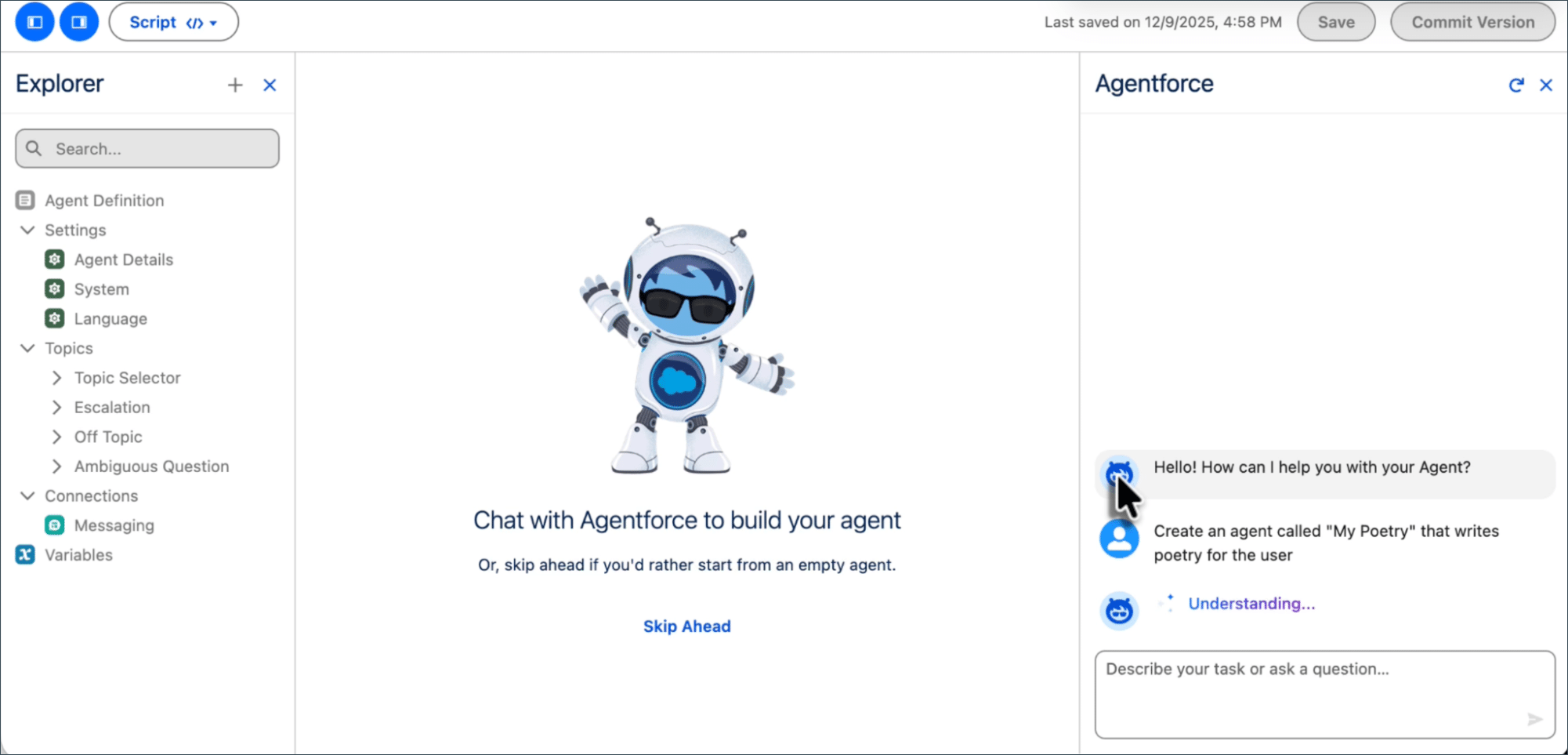
The new Agentforce Builder (Beta) in Spring '26 is a ground-up rewrite of the old builder, not a cosmetic refresh. The core change is a code-editor-inspired layout: an Explorer panel on the left managing all agent assets (Topics, Actions, Variables, Connections), an editing area in the center, and an Agentforce Assistant on the right—an AI that helps you build the agent itself.
The Explorer panel on the left organizes the agent's structure: Agent Definition, Settings (Agent Details / System / Language), Topics (Topic Selector / Escalation / Off Topic, etc.), Connections, and Variables. The center canvas supports conversational assembly, while the Agentforce Assistant on the right accepts natural language commands to create and modify agent components.
The editing area offers two switchable views:
- Canvas View: Abstracts Agent Script logic into visual blocks for quick assembly and review. Type
/to add conditional expressions,@to reference Topics, Actions, or Variables. - Script View: Write Agent Script code directly with syntax highlighting, autocompletion, and real-time validation. Changes sync between views instantly.
The built-in Preview panel is where this gets practical. Enter a user utterance, and the right panel renders a complete reasoning trace: Input → Reasoning → Topic Selector → Transition to Topic → Output Evaluation, plus an AI-generated Summary explaining why the agent made that decision.
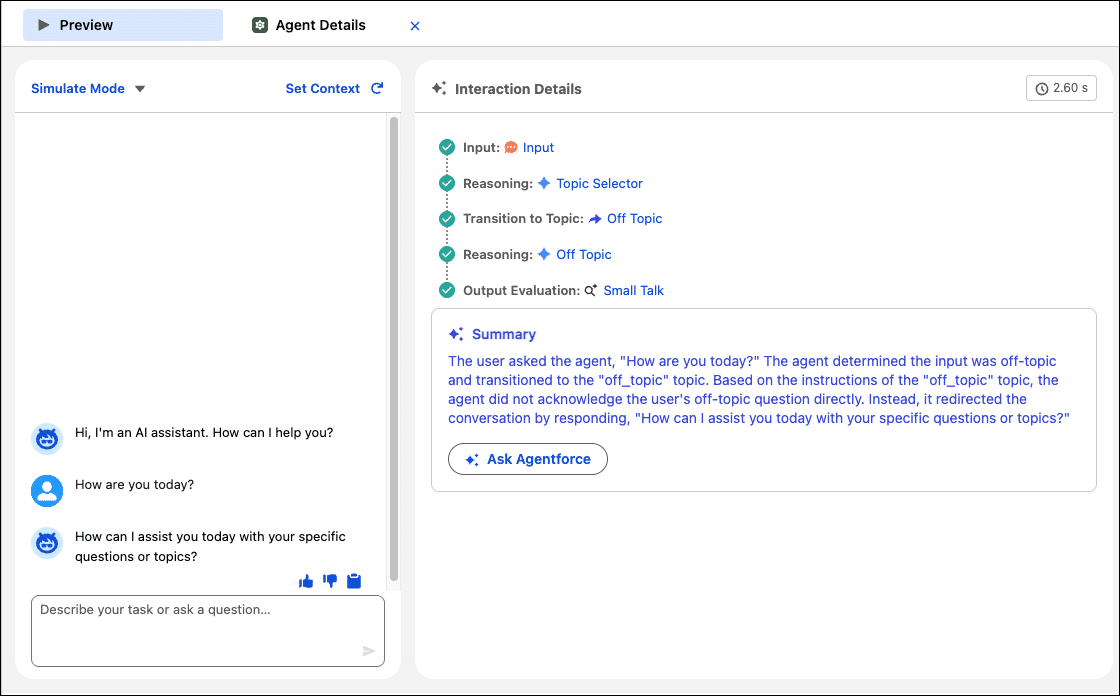
This Preview isn't a substitute for production testing, but during development it quickly surfaces Topic routing errors or Action parameter mapping issues—saving repeated Sandbox deployments.
Agent Script: Controlling Agent Reasoning with Code
Agent Script is a Beta feature introduced in Spring '26 and serves as the underlying language of the new Builder. Its purpose is explicit: let natural language handle conversations, let code handle business logic. The traditional approach of embedding all rules in a single prompt breaks down once conditional branches exceed three layers—LLM execution becomes unreliable. Agent Script extracts conditional logic and variable operations out of the prompt into deterministic expressions.
Agent Script mixes natural language instructions with deterministic code. If @variables.is_late == None triggers the @actions.check_if_late action to query order status. The result gets written to a variable, and if @variables.is_late == "true" routes into an apology response—conditional branching is entirely code-controlled, while only the final reply is generated by the LLM.
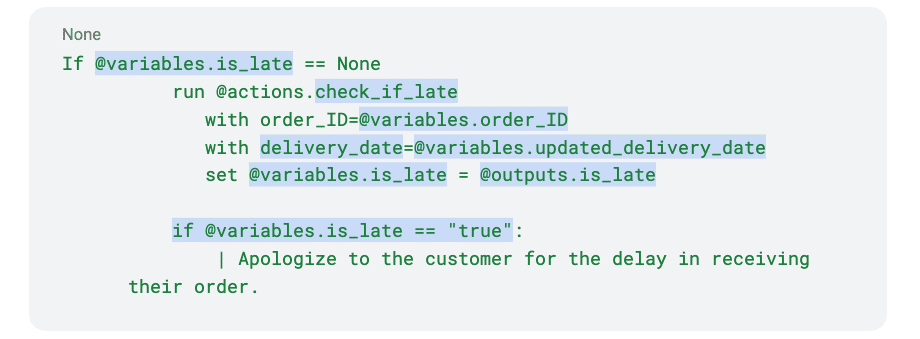
Key design decisions in Agent Script:
- Expression-driven branching:
if/elseconditions, variable assignment, and loops are executed by the expression engine, never by the LLM. Results are deterministic. - Variables as state containers:
@variablespass context between Topics. Action outputs are written back to variables via@outputs. - Pipe prefix for natural language: Content after
|is processed by the LLM; everything else is handled by the expression engine. The boundary is unambiguous. - Deep integration with Agentforce DX: Agent Script files can be edited in VS Code (Agentforce DX Extension v1.6.0+) with syntax highlighting, validation, and local Preview (both Simulated and Live modes), then deployed to the org via Salesforce CLI.
For existing agent projects, there's no need to migrate everything to Agent Script at once. The recommended approach: rewrite your most error-prone conditional branches in Script first—returns and refunds logic, permission checks, multi-step workflow state machines. Keep conversational Topics on natural language Instructions.
Topic / Instruction / Action Design: Stop Leading with Prompts
Better tooling doesn't fix bad design. Agentforce's three-layer structure appears repeatedly in the documentation, but in practice the most common anti-pattern is building it backwards—writing a massive prompt that tries to cover everything, bolting on a few Actions, and only then thinking about Topic boundaries. This produces blurry intent boundaries, low match rates, and fragile behavior where fixing one thing breaks three others.
The correct design sequence:
- Topics first: One Topic covers one clear business intent. Mixing "presales inquiry + support ticket + billing explanation" into a single Topic is a recipe for chaos. Topics are audit units and permission boundaries—which user groups can trigger which Topic gets decided here.
- Instructions set the rules: Instructions under each Topic answer "what constraints apply when handling this type of request." Tone requirements, sensitive information filters, and output format restrictions belong here, not scattered across a System Prompt.
- Actions execute: Actions expose capabilities via Apex Class, Flow, or Prompt Template. Action descriptions should use business semantics, not technical labels—"Get latest fulfillment status with human-readable summary" is far more effective for LLM intent matching than "invokeOrderApi."
The new Builder in Spring '26 offers prebuilt Topics and Actions to accelerate prototyping. The recommended strategy is "borrow first, narrow fast":
| Phase | Approach | Output |
|---|---|---|
| Bootstrap | Use prebuilt Topics / Actions to prove critical journeys | Minimum Viable Agent (MVP) |
| Narrowing | Remove low-hit or high-risk intents, add org-specific rules | Lean Topic inventory + Instruction baseline |
| Operations | Iterate from failed transcripts and action errors | Versioned improvement log |
Engineering the Action Layer: The Real Stability Divide
Many teams blame agent instability on "that's just how AI works," but actual debugging reveals that much of the unreliability originates from incomplete contracts in the Action layer. Treat each Action like a public API, and many problems disappear:
- Strong input validation: Required fields, enum values, format constraints. LLM-extracted parameters aren't always correct—Actions need defensive logic internally.
- Distinguishable error codes: Separate "permission denied" from "record not found" from "system error." A generic "operation failed" message makes the agent's response completely uninformative.
- Traceable side effects: Log who triggered which Action under what context to audit trails. Spring '26 supports persisting Flow execution logs to Data 360 (formerly Data Cloud) via the
ssot__FlowRun__dlmDMO, linkable to specific agent sessions. - Idempotent by default: Agents may retry Actions due to timeouts. Non-idempotent Actions will produce duplicate business outcomes.
For Apex-based Actions, Spring '26 delivers a practical improvement: Apex Cursors GA. For Actions that process large datasets (such as bulk order queries), Cursors enable server-side pagination beyond the traditional 2,000 record limit—up to 100 million rows within a 24-hour period.
Testing Center: From "A Few Happy Paths" to Systematic Regression
Manually chatting a few rounds before deployment is dangerously inadequate for agents—one untested edge-case utterance can cause an agent to take bizarre actions in production. Agentforce Testing Center provides batch testing capabilities, transforming testing from ad-hoc conversations into repeatable, trackable engineering practice.
The Testing Center results overview displays five core metrics: Status, Duration, Topic Pass %, Action Pass %, and Response Pass %. These three percentages are your go/no-go gate for production deployment.
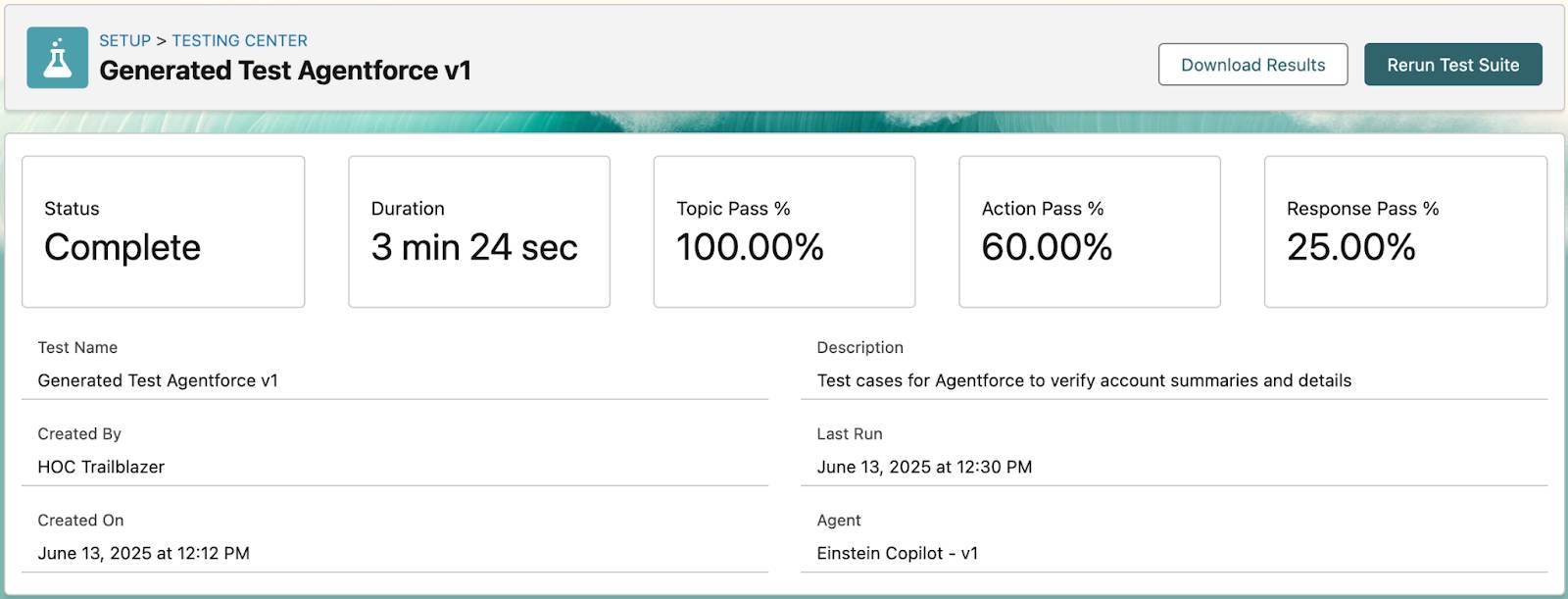
Drilling into individual test cases, each record shows: Utterance (test input), Expected Topic vs. Actual Topic, Expected Actions vs. Actual Actions, and Topic Test Result (Pass/Fail).
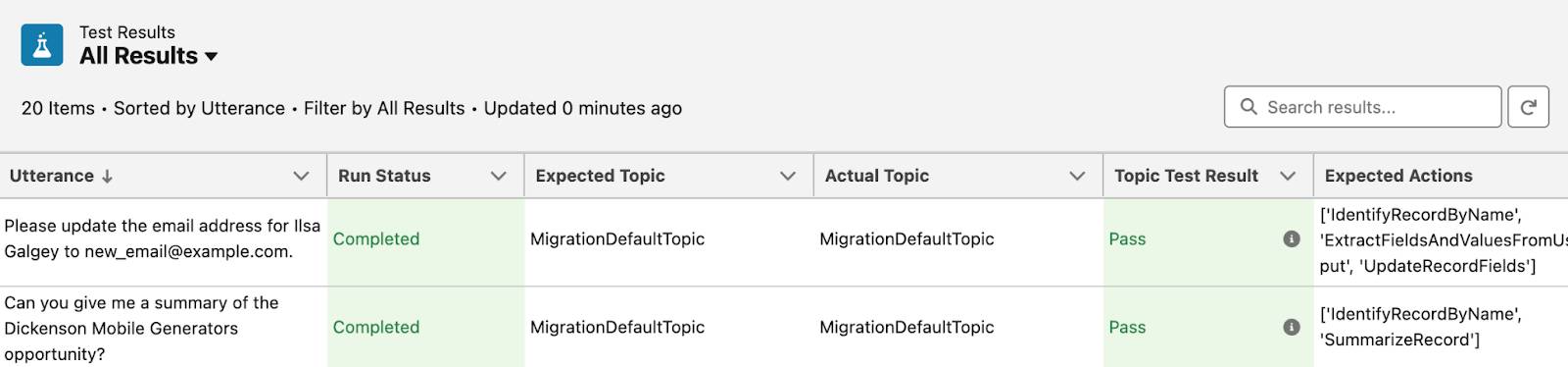
In practice, structure your tests in three layers:
- Intent robustness tests: Synonyms, colloquial phrasing, mixed languages, typos. The goal is ensuring Topic routing remains stable.
- Action correctness tests: Are parameters extracted and mapped correctly? Are error inputs handled gracefully? Are results properly assembled into responses?
- Security boundary tests: Cross-user data access attempts, sensitive field exposure, prompt injection attacks.
One current limitation: Testing Center only supports single-turn interactions. Multi-turn conversation context can't be validated in batch tests yet. For multi-turn scenarios, you'll still need Preview or Agentforce Grid for manual testing.
Agentforce Grid is another Spring '26 testing tool worth tracking (Beta). It provides a spreadsheet-like interface that chains CRM data, Prompts, Actions, and Agents for bulk execution, with support for A/B testing different Prompt variants and comparing results. For scenarios requiring large-scale agent validation with real data, Grid is more flexible than Testing Center.
Agent Observability: What to Watch After Go-Live
Deployment is just the beginning. Without observability, agent systems typically degrade into black boxes within three months—too risky to improve, too costly to retire. Salesforce integrated three layers of observability tools into Agentforce Studio:
Agent Analytics
A Tableau-powered KPI dashboard under the Observe navigation in Agentforce Studio. The Agent Analytics panel displays five key metric cards under Performance Overview: Engagement Rate (31.36%), Escalation Rate (19.86%), Deflection Rate (34.49%), Abandonment Rate (45.64%), and Avg. Time to Deflection, each with trend line charts. Filters above support slicing by Agent, Timeframe, Channel, Topic, and Action.
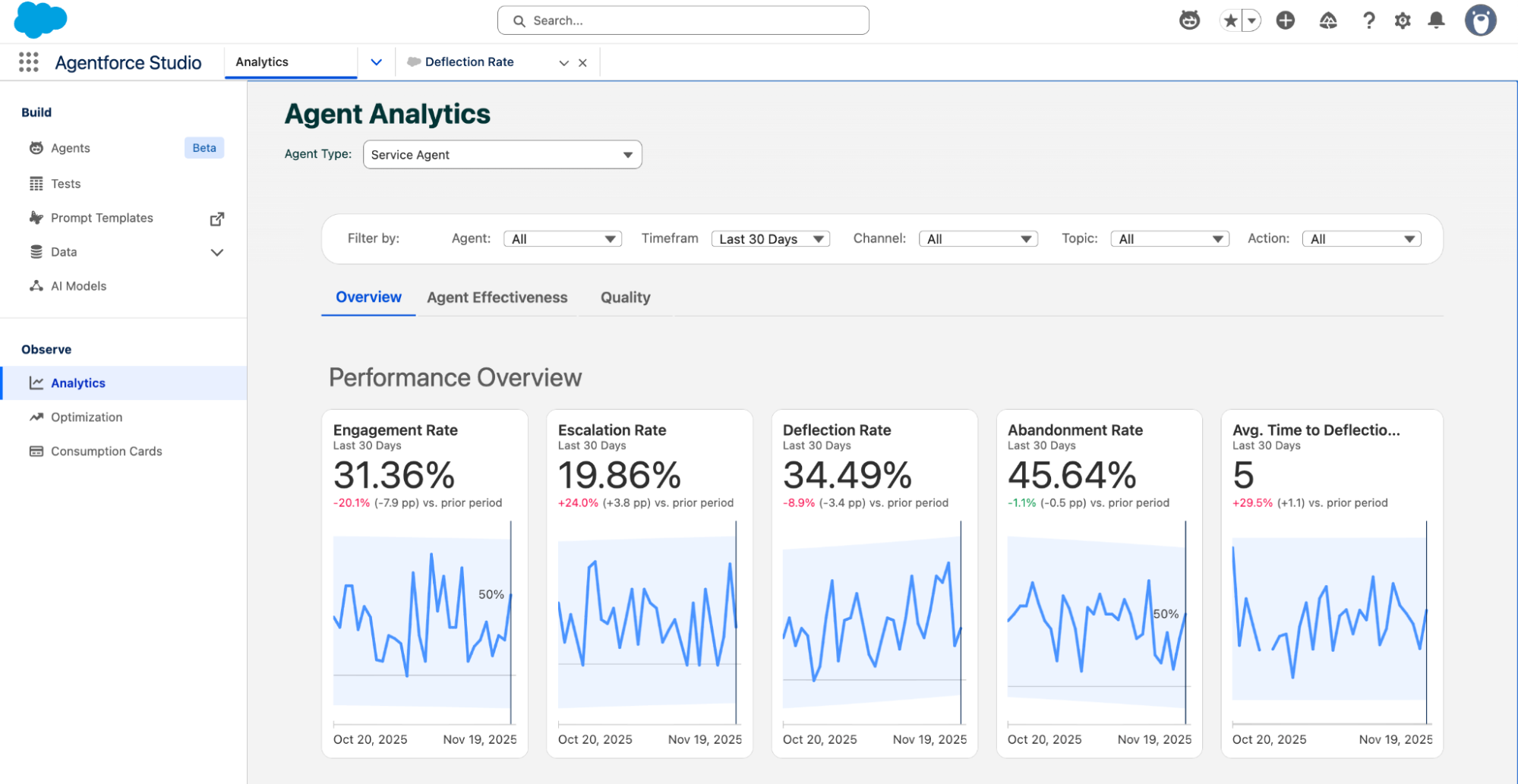
Beyond Overview, the Agent Effectiveness and Quality sub-tabs focus on task completion efficiency and response quality respectively. The value of this data isn't in individual numbers—it's in trend changes. A three-day decline in Deflection Rate might indicate a recent Instruction update introduced side effects.
Agent Optimization
If Analytics answers "how is it performing," Optimization answers "why is it underperforming." It records the full reasoning chain for every interaction: user inputs, LLM calls, tool invocations, guardrail evaluations, and response latency. More critically, it automatically clusters real production user intents—you designed 10 Topics, but users may be asking an 11th type of question you never anticipated. The system applies "LLM-as-judge" quality scoring (high / medium / low / very low) with explanations to both individual sessions and intent clusters.
Operations teams can navigate from a KPI anomaly in Analytics, drill into low-quality intent clusters in Optimization, pinpoint a specific Instruction or Action issue, and ship a fix the same day. This is what Salesforce calls the "Agentic SDLC"—production data driving development iterations.
Agent Health Monitoring (Spring '26 GA)
This is the final piece Spring '26 fills in: near-real-time health monitoring. The Agent Health Monitoring panel under Observe > Monitoring in Agentforce Studio shows an Alerts list at the top (e.g., "Error Rate Threshold 2," "Escalation Rate Service") and three real-time metric charts at the bottom: Agent Error Rate (13%), Avg. Latency (34ms), and Escalation Rate (14%), filterable by Agent ID, Agent Type, and Channel.
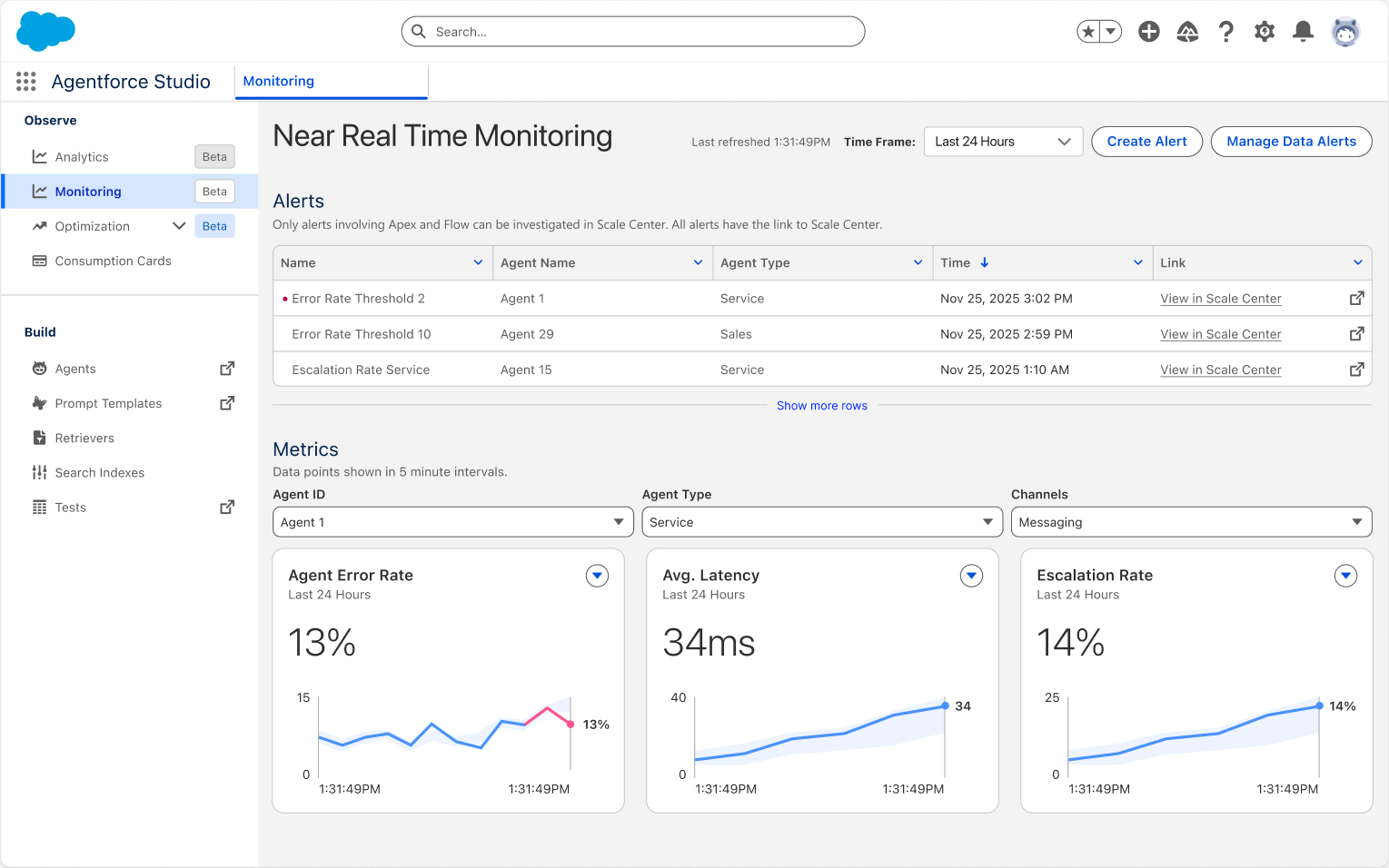
Alerts can be configured with thresholds and linked to Scale Center for deeper investigation. For example, setting "Error Rate exceeds 10% for 5 minutes" as a trigger lets operations teams respond immediately.
MCP Governance and Security Hardening
Spring '26 formally adopted Anthropic's Model Context Protocol (MCP) standard for governing how agents access external tools and data sources. MCP introduces governance controls at two levels:
- Integration layer: API Catalog serves as the control plane for MCP Servers. Through MuleSoft sync, administrators can explicitly activate or deactivate specific MCP Servers, governing which enterprise data sources agents can reach.
- Build layer: The new Salesforce DX MCP Server enables developers to interact with org metadata via natural language in their IDE. An important security decision here: Agentforce Vibes (the web-based IDE) is now restricted to sandboxes only—production access has been disabled.
On the security front, Spring '26 introduces several notable changes:
- Connected App creation blocked by default: Neither UI nor Metadata API allows creating new Connected Apps (except via package installation). Re-enabling requires Salesforce Support approval. The replacement is External Client Apps (ECAs), which enforce modern OAuth flows and are secure by default.
- Legacy authentication phase-out: Platform SOAP API
login()is disabled by default in new orgs, with complete removal planned for Summer '27. - Shorter certificate lifecycles: New CA-signed certificates are limited to 6.5 months (200 days), decreasing to 100 days in 2027.
The Einstein Trust Layer underpins all of this. It acts as a security intermediary between agents and LLMs, providing configurable Data Masking, Zero Data Retention, input/output Toxicity Detection, and Secure Data Retriever. Supervisory LLMs function as runtime monitors, scanning prompts and responses for policy violations before they reach users.
A Reusable Production Readiness Checklist
Compressing everything above into a checklist you can apply directly:
| Phase | Checklist Item | Spring '26 Tool Support |
|---|---|---|
| Design | Each Topic covers one business intent with a clear owner | New Builder Explorer panel |
| Each Action has I/O contracts, error semantics, and audit fields | Flow Persistent Logging → Data 360 | |
| High-frequency conditional branches use Agent Script, not pure prompts | Agent Script (Beta) + VS Code Extension | |
| Testing | Batch tests covering at least 20 real user utterances | Testing Center batch testing |
| Security boundary tests: cross-user access, sensitive fields, prompt injection | Testing Center + Preview Interaction Details | |
| A/B comparison of multiple Prompt variants | Agentforce Grid (Beta) | |
| Operations | Continuous monitoring of Deflection Rate / Escalation Rate / Error Rate | Agent Analytics + Health Monitoring |
| Low-quality intent clusters → Instruction fixes → regression testing weekly | Agent Optimization → Testing Center | |
| Version every release: what changed, why, and impact scope | Agentforce DX + Commit Version |
Default high-risk capabilities (data modification, refund initiation, permission changes) to human fallback. Only open the gate to full automation once Deflection Rate and Action Success Rate stabilize within acceptable ranges.
References
- Salesforce Spring '26 Release Notes
- The Salesforce Developer's Guide to the Spring '26 Release
- Build With Confidence: Inside the New Agentforce Builder (Salesforce Admins)
- 4 Critical Features for Agentforce Architecture in 2026 (Salesforce Ben)
- Spring '26 Release Architect Highlights (Salesforce Blog)
- Automate AI Agent Testing at Scale with Agentforce Testing Center (Gearset)
- Agentforce Studio Observability Tools Announcement (Salesforce News)
- Agentforce Testing Center (Trailhead)
- Agent Script | Agentforce Developer Guide
- 7 Support Metrics We Monitor for Agentforce (Salesforce Blog)