What Governor Limits Are and Why You Can't Avoid Them
Salesforce runs on a multitenant architecture — every customer's code shares the same pool of servers. To prevent any single tenant's code from hogging all the resources, Salesforce imposes a set of hard caps on every Apex transaction. These are Governor Limits. Exceed any one of them and your code throws a System.LimitException that can't be caught by try-catch.
Governor Limits aren't suggestions — they're hard boundaries. The real challenge of writing Apex isn't the syntax; it's getting the job done within these constraints.
Per-Transaction Limits Quick Reference
Here are the limits you'll run into most often. Synchronous transactions (Triggers, Visualforce Controllers, REST APIs) and asynchronous transactions (Batch, Queueable, Future) have different quotas, with async being more generous.
| Limit Type | Synchronous | Asynchronous | How Often You'll Hit It |
|---|---|---|---|
| SOQL Queries | 100 | 200 | ★★★★★ |
| SOQL Rows Retrieved | 50,000 | ★★★★ | |
| DML Statements | 150 | ★★★★★ | |
| DML Rows | 10,000 | ★★★ | |
| CPU Time | 10,000 ms | 60,000 ms | ★★★ |
| Heap Size | 6 MB | 12 MB | ★★★ |
| Callouts | 100 | ★★ | |
| Total Callout Timeout | 120 seconds | ★★ | |
| Future Invocations | 50 | ★★ | |
| Queueable Jobs Enqueued | 50 | ★★ | |
| SOSL Queries | 20 | ★ | |
| Email Invocations | 10 | ★ | |
One detail that trips people up: the 100-SOQL-query limit is cumulative across the entire transaction — that includes your Trigger, any Flows triggered by Process Builder, Workflow Rules calling Apex, and everything else that fires in the same execution context.
The Five Most Common Ways to Hit the Wall
Scenario 1: SOQL in a Loop
The #1 governor limit killer. You'll find it in virtually every beginner's Apex code.
// Don't do this: one query per record
trigger AccountTrigger on Account (before update) {
    for (Account acc : Trigger.new) {
        List<Contact> contacts = [
            SELECT Id, Email FROM Contact WHERE AccountId = :acc.Id
        ];
        // process contacts...
    }
}
// 200 Accounts trigger → 200 SOQL queries → exceeds 100 limit → crash
The fix — move the query outside the loop, fetch everything in one shot, and use a Map to group by AccountId:
trigger AccountTrigger on Account (before update) {
    Set<Id> accountIds = Trigger.newMap.keySet();

    Map<Id, List<Contact>> contactsByAccount = new Map<Id, List<Contact>>();
    for (Contact c : [
        SELECT Id, Email, AccountId FROM Contact WHERE AccountId IN :accountIds
    ]) {
        if (!contactsByAccount.containsKey(c.AccountId)) {
            contactsByAccount.put(c.AccountId, new List<Contact>());
        }
        contactsByAccount.get(c.AccountId).add(c);
    }

    for (Account acc : Trigger.new) {
        List<Contact> contacts = contactsByAccount.get(acc.Id);
        if (contacts != null) {
            // process contacts...
        }
    }
}
// Regardless of how many Accounts — only 1 SOQL query
Scenario 2: DML in a Loop
Same anti-pattern as SOQL in a loop, but with insert/update/delete operations:
// Don't do this
for (Account acc : accounts) {
    Contact c = new Contact(LastName = acc.Name + ' Primary', AccountId = acc.Id);
    insert c;  // one DML per iteration
}

// Do this instead: collect and insert once
List<Contact> newContacts = new List<Contact>();
for (Account acc : accounts) {
    newContacts.add(new Contact(
        LastName = acc.Name + ' Primary',
        AccountId = acc.Id
    ));
}
insert newContacts;  // 1 DML statement, done
Scenario 3: Trigger Recursion
Object A's trigger updates Object B, Object B's trigger updates Object A, creating an infinite loop. Each round burns through SOQL and DML quota until you hit the wall.
// Use a static variable to prevent recursion
public class TriggerHandler {
    private static Boolean isExecuting = false;

    public static void handleAfterUpdate(List<Account> accounts) {
        if (isExecuting) return;
        isExecuting = true;

        // business logic...

        isExecuting = false;
    }
}
A more robust approach uses a Set<Id> to track which records have already been processed, rather than a simple boolean flag — the boolean approach can break down with bulk operations and partial retry scenarios.
Scenario 4: The 50,000-Row Query Limit
A single transaction can retrieve at most 50,000 rows via SOQL. For high-volume objects (millions of Activity or Log records), an unfiltered query blows past this limit effortlessly.
Strategies:
- Add indexed fields to your WHERE clause (foreign keys, standard fields, Custom Indexes) to narrow scope
- Use SOSL where applicable (separate row limits, doesn't share with SOQL)
- Move large-scale operations to Batch Apex, where each
executemethod runs in its own transaction - The new Apex Cursor in Spring '26 can handle up to 50 million rows — more on this below
Scenario 5: CPU Time Exceeded
10 seconds for synchronous, 60 seconds for async. Complex business logic, nested loops, and heavy string concatenation are all CPU killers.
// CPU killer: nested loop matching
for (Account acc : accounts) {           // 200 records
    for (Contact c : allContacts) {       // 5000 records
        if (c.AccountId == acc.Id) {
            // 200 × 5000 = 1 million comparisons
        }
    }
}

// Use a Map to drop from O(n²) to O(n)
Map<Id, List<Contact>> contactMap = new Map<Id, List<Contact>>();
for (Contact c : allContacts) {
    if (!contactMap.containsKey(c.AccountId)) {
        contactMap.put(c.AccountId, new List<Contact>());
    }
    contactMap.get(c.AccountId).add(c);
}
for (Account acc : accounts) {
    List<Contact> related = contactMap.get(acc.Id);
    // Direct lookup, no scanning required
}
The Core Principles of Bulkification
The antidote to Governor Limits comes down to one word: bulkification. When a Trigger fires, it doesn't receive a single record — it receives a batch (up to 200). Your code needs to handle the entire batch in one go, not record by record.
Three rules to live by:
- SOQL and DML always go outside the loop — query once, operate once, use loops only for in-memory computation
- Replace nested loops with Maps and Sets — bring O(n²) down to O(n)
- One Trigger per object — use a Handler pattern to dispatch logic, avoiding unpredictable execution order with multiple Triggers
The Trigger Handler Pattern
Move all logic out of the Trigger and into a dedicated Handler class. The Trigger only dispatches:
trigger AccountTrigger on Account (before insert, before update, after insert, after update) {
    AccountTriggerHandler handler = new AccountTriggerHandler();

    if (Trigger.isBefore && Trigger.isInsert) handler.beforeInsert(Trigger.new);
    if (Trigger.isBefore && Trigger.isUpdate) handler.beforeUpdate(Trigger.new, Trigger.oldMap);
    if (Trigger.isAfter && Trigger.isInsert) handler.afterInsert(Trigger.new);
    if (Trigger.isAfter && Trigger.isUpdate) handler.afterUpdate(Trigger.new, Trigger.oldMap);
}
public class AccountTriggerHandler {
public void beforeUpdate(List<Account> newAccounts, Map<Id, Account> oldMap) {
// All queries at the top of the method
Set<Id> accountIds = new Set<Id>();
for (Account acc : newAccounts) {
if (acc.Industry != oldMap.get(acc.Id).Industry) {
accountIds.add(acc.Id);
}
}
if (accountIds.isEmpty()) return;
Map<Id, List<Contact>> contactMap = getContactsByAccountId(accountIds);
// Loop body: in-memory operations only
List<Contact> contactsToUpdate = new List<Contact>();
for (Account acc : newAccounts) {
List<Contact> contacts = contactMap.get(acc.Id);
if (contacts != null) {
for (Contact c : contacts) {
c.Description = 'Industry changed to ' + acc.Industry;
contactsToUpdate.add(c);
}
}
}
// DML at the end, in one shot
if (!contactsToUpdate.isEmpty()) {
update contactsToUpdate;
}
}
private Map<Id, List<Contact>> getContactsByAccountId(Set<Id> accountIds) {
Map<Id, List<Contact>> result = new Map<Id, List<Contact>>();
for (Contact c : [SELECT Id, AccountId, Description FROM Contact WHERE AccountId IN :accountIds]) {
if (!result.containsKey(c.AccountId)) {
result.put(c.AccountId, new List<Contact>());
}
result.get(c.AccountId).add(c);
}
return result;
}
}Runtime Monitoring with the Limits Class
Apex provides the Limits class to check how much of your quota has been consumed within the current transaction. Invaluable for troubleshooting and defensive coding.
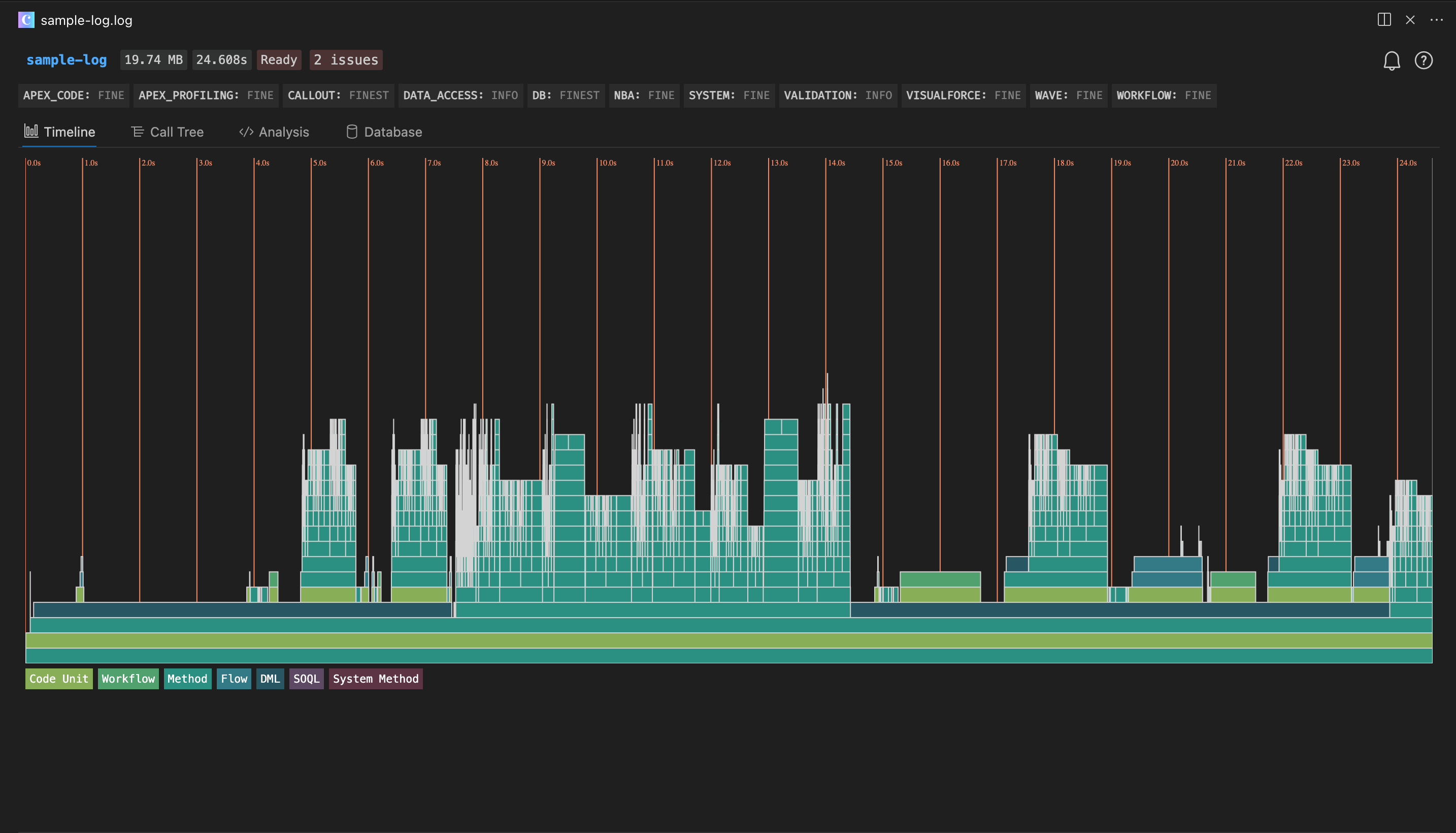
For visual analysis, the Apex Log Analyzer VS Code extension (by Certinia) is the go-to tool. It parses debug logs into a flame chart (Timeline view), making it immediately obvious which methods are burning the most CPU time. Different colors represent Code Units, Workflows, Methods, Flows, DML, SOQL, and System Methods:
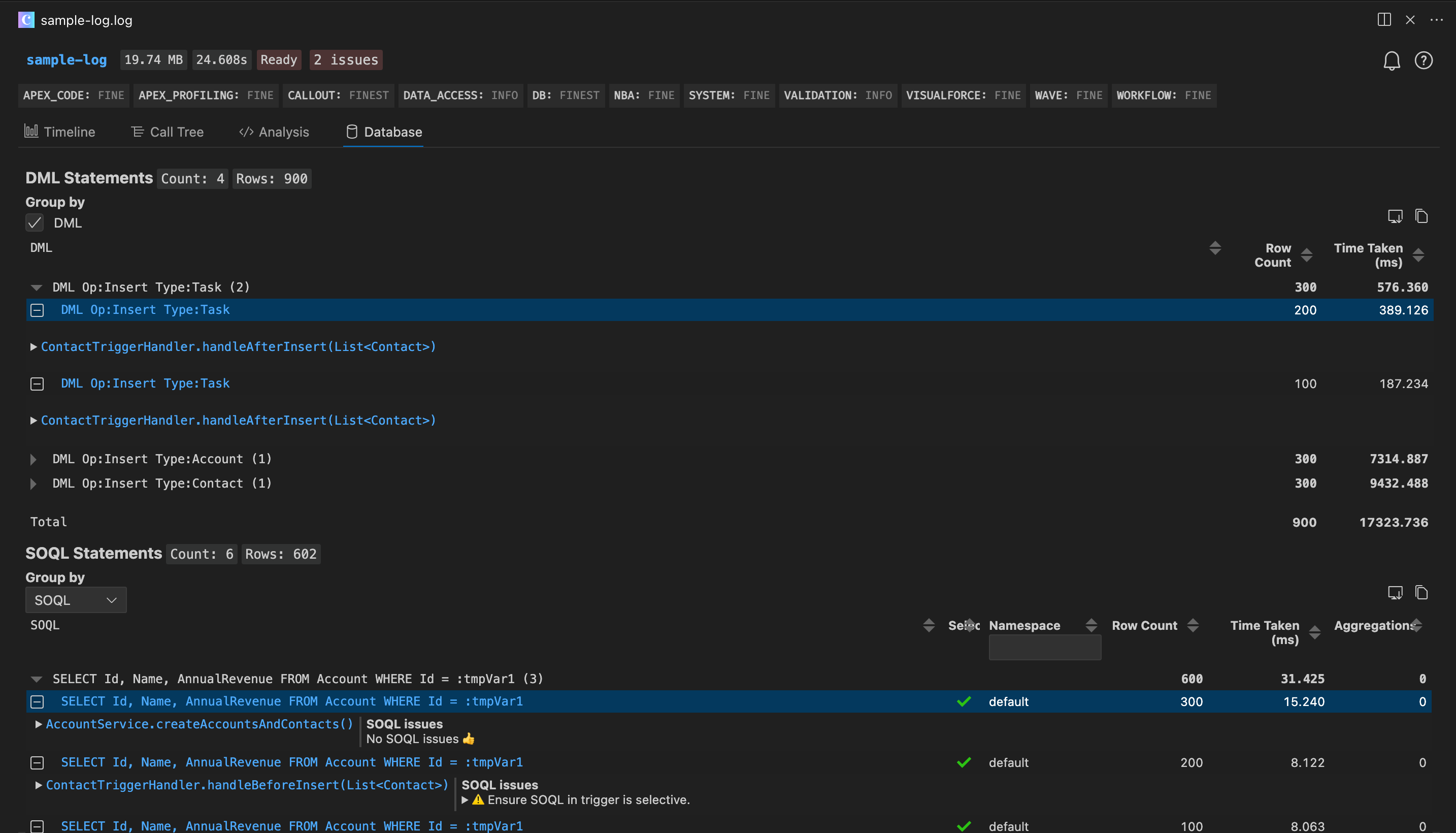
The Database tab is particularly powerful for governor limit debugging — it lists every DML and SOQL statement with row counts and timing, and flags queries with potential limit issues:
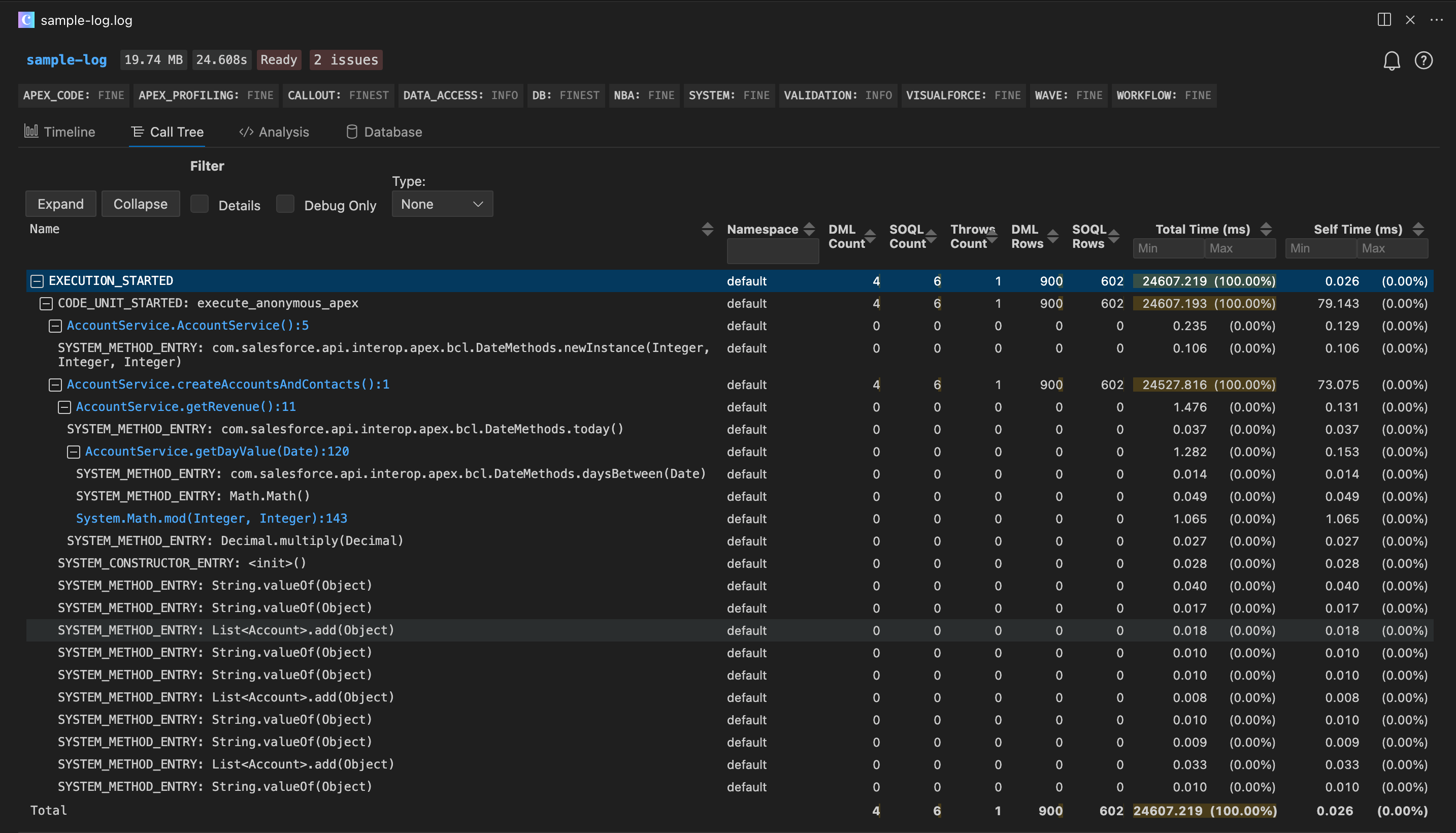
The Call Tree view shows the execution hierarchy with DML count, SOQL count, row counts, and other key metrics annotated at each level:
System.debug('SOQL queries used: ' + Limits.getQueries() + ' / ' + Limits.getLimitQueries());
System.debug('DML statements used: ' + Limits.getDmlStatements() + ' / ' + Limits.getLimitDmlStatements());
System.debug('CPU time used: ' + Limits.getCpuTime() + 'ms / ' + Limits.getLimitCpuTime() + 'ms');
System.debug('Heap size used: ' + Limits.getHeapSize() + ' / ' + Limits.getLimitHeapSize());
When troubleshooting limit issues, set the ApexCode debug level to FINEST to get the full picture of execution details and resource consumption. Configure this in Setup → Debug Logs, or directly through the Salesforce extensions in VS Code.
In complex business logic, place these checkpoints at key stages to identify which section is consuming the most. You can also assert resource usage in tests:
@isTest
static void testBulkOperation() {
    // Insert 200 records to simulate bulk trigger execution
    List<Account> accounts = new List<Account>();
    for (Integer i = 0; i < 200; i++) {
        accounts.add(new Account(Name = 'Test ' + i));
    }

    Test.startTest();
    insert accounts;
    Test.stopTest();

    // Assert SOQL usage is within reasonable bounds
    System.assert(Limits.getQueries() < 10,
        'SOQL usage too high: ' + Limits.getQueries());
}
When Synchronous Limits Aren't Enough: Asynchronous Apex
When synchronous limits won't cut it, Salesforce offers several asynchronous processing options, each suited to different use cases:
| Type | Best For | Characteristics |
|---|---|---|
@future | Simple background tasks, Callouts | No chaining, parameters limited to primitives |
| Queueable | Chained processing, complex parameters | Supports sObject params, can chain to next Queueable |
| Batch Apex | Large data volumes (hundreds of thousands to millions) | Each execute runs in its own transaction with fresh limits |
| Scheduled Apex | Recurring jobs | Typically paired with Batch Apex |
Batch Apex is the standard solution for large data volumes. Each execute invocation processes a batch of records (default 200, adjustable up to 2000), with its own complete Governor Limits quota:
global class AccountCleanupBatch implements Database.Batchable<SObject> {

    global Database.QueryLocator start(Database.BatchableContext bc) {
        return Database.getQueryLocator(
            'SELECT Id, Name, LastActivityDate FROM Account WHERE LastActivityDate < LAST_N_YEARS:2'
        );
    }

    global void execute(Database.BatchableContext bc, List<Account> scope) {
        // Fresh set of limits: 100 SOQL queries, 150 DML statements
        for (Account acc : scope) {
            acc.Description = 'Inactive - last activity over 2 years ago';
        }
        update scope;
    }

    global void finish(Database.BatchableContext bc) {
        System.debug('Batch completed');
    }
}
New Tools in Spring '26
Apex Cursor (GA)
The Cursor class, now generally available in Spring '26, tackles a longstanding pain point — the 50,000-row-per-transaction query limit. Previously, Batch Apex was the only escape hatch, but it carries startup overhead and is harder to debug. Cursor lets you fetch data in chunks within a single context, with a total capacity of 50 million rows and a limit of 10,000 Cursor instances per 24-hour period.
Database.Cursor cursor = Database.getCursor(
    'SELECT Id, Name FROM Lead WHERE Status = \'Open\''
);

Integer totalSize = cursor.getNumRecords();
Integer batchSize = 2000;

for (Integer offset = 0; offset < totalSize; offset += batchSize) {
    List<SObject> records = cursor.fetch(offset, batchSize);
    // process this chunk...
}
The companion PaginationCursor class is designed for UI pagination scenarios, supporting consistent page sizes across 100,000 records with a higher daily limit of 200,000 instances.
RunRelevantTests (Beta)
Choosing "Run All Tests" during deployment is notoriously slow; choosing "Run Specified Tests" risks missing something. The new RunRelevantTests deployment level in Spring '26 has Salesforce automatically analyze dependencies to run only the tests affected by your changes. It determines scope through three mechanisms:
- Test classes included in the deployment payload
- Automated dependency graph analysis by Salesforce
- Developer-specified associations via the
@testForparameter in@isTestannotations
For large projects, this can shrink deployment time from tens of minutes down to a few.
Code Review Checklist
Run through this list during every code review:
| # | Check | How to Verify |
|---|---|---|
| 1 | Any SOQL inside loops? | Search for [SELECT inside for blocks |
| 2 | Any DML inside loops? | Search for insert/update/delete/upsert inside for blocks |
| 3 | Any nested loops? | Two-level for nesting → consider using a Map |
| 4 | Trigger recursion protection? | Check for static variable guards |
| 5 | Bulk testing in test methods? | Insert at least 200 records to trigger bulk execution |
| 6 | Selective WHERE clauses on SOQL? | Avoid full table scans that hit the row limit |
| 7 | Async for large data operations? | Over 10,000 records → consider Batch or Cursor |
| 8 | No hardcoded IDs or config? | Use Custom Metadata Types or Custom Settings instead |