Why Connected Apps Are Being Retired
Starting with Spring '26 (January 2026), Salesforce disabled new Connected App creation by default across all Orgs—whether through the Setup UI or Metadata API. Creating a new Connected App now requires contacting Salesforce Support to manually unlock the capability. Existing Connected Apps continue to function and can be edited, installed, or deleted, but the roadmap is clear: Connected Apps are in maintenance mode while External Client Apps (ECAs) receive active investment.
This isn't just a UI reshuffling. Salesforce's motivation is addressing structural issues in Connected Apps: the "accessible to all users by default" security posture increasingly fails enterprise compliance audits; developers and admins sharing the same configuration interface creates unclear ownership boundaries; and 1GP packaging doesn't fit modern DevOps workflows. ECAs redesign all of these from the ground up.
Timeline reference: Spring '26 (January 2026) blocks new creation by default. Summer '26 (estimated June 2026) is the community-expected full enforcement deadline. Teams with extensive integrations should complete migration before Summer '26.
Comprehensive Technical Comparison: ECA vs. Connected App
During proof-of-concept work, both look nearly identical—both issue OAuth tokens, both call REST APIs. The differences surface in production: multi-org promotion, key rotation, least-privilege enforcement, audit controls, and CI/CD automation are where ECA's governance model pulls ahead.
| Dimension | Connected App | External Client App |
|---|---|---|
| Default security posture | Accessible to all users after creation; requires manual "Admin approved users are pre-authorized" to restrict | Closed by default; requires explicit Permission Set or Profile grant—no API Access Control needed |
| Admin-developer separation | Single configuration interface for both roles | Settings (developer-managed) and Policies (admin-managed) physically separated in different UI pages |
| OAuth flows | All flows + Username-Password Flow + SAML Bearer Assertion | All modern flows (JWT Bearer, Client Credentials, Device, Token Exchange, etc.); Username-Password Flow removed |
| Packaging | Both 1GP and 2GP; 2GP requires manual steps | 2GP Managed Packages only, with native support |
| Sandbox cloning | Automatically copied to Sandbox | Only packaged ECAs are copied; Local ECAs are not |
| Metadata API | Limited—some ConnectedApp fields aren't deployable | Comprehensive—4 independent metadata types with source org global setting association/disassociation |
| Canvas App / Notifications / User Provisioning | Supports Canvas Apps, Push Notifications, User Provisioning | Not supported—integrations dependent on these cannot migrate yet |
| Session management | Supports session monitoring, revocation, Mobile PIN security | Not supported—controlled indirectly through OAuth policies and token validity |
| Custom launch logic | Supports Custom Apex Handler for launch control | Not supported |
| Roadmap | Maintenance mode; new creation blocked after Spring '26 | Active enhancement; new features like Hosted MCP Server require ECAs |
Key migration blockers: ECAs don't support Canvas Apps, Push Notifications, or User Provisioning. Integrations relying on these three capabilities cannot migrate yet. Also, ECA's "closed by default" security model means it doesn't need Connected App's API Access Control feature—closed-default is inherently more secure than open-default without requiring an additional access control layer.
Creating an ECA: Three Configuration Steps
Step 1: Basic Information
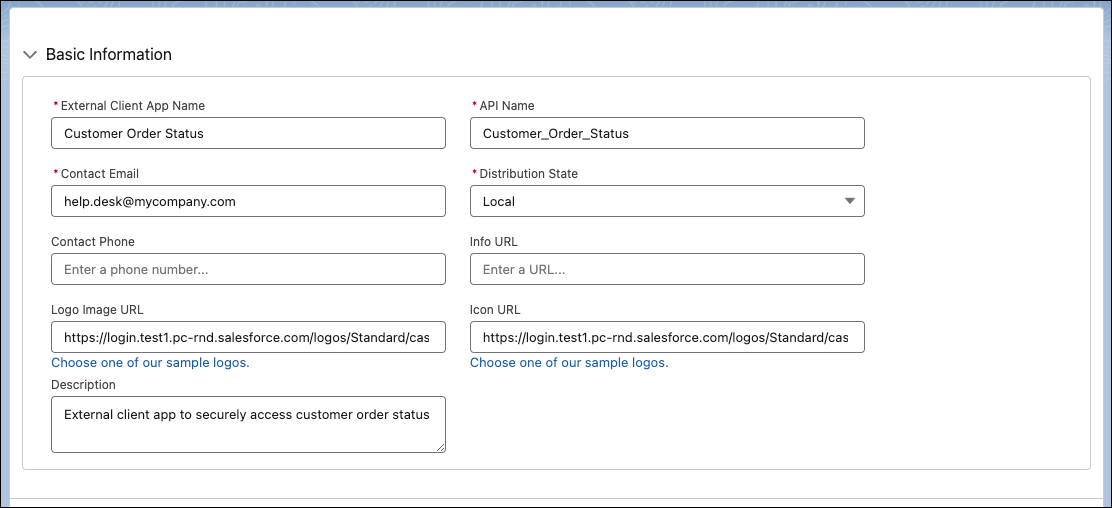
Navigate to Setup → search "External Client App Manager" → New. Required fields: app name, API Name, Contact Email, and Distribution State. Distribution State has two options: Local (single-org use) and Distributed (AppExchange distribution). Most internal integrations use Local. But note: Local ECAs won't survive sandbox clones—you'd need to recreate them after every refresh unless they're packaged in a 2GP bundle.
Step 2: OAuth Settings
Expand API (Enable OAuth Settings) and check Enable OAuth. Enter your Callback URL and move required scopes from Available to Selected. The Flow Enablement section controls which OAuth flows are available: Client Credentials Flow, Code and Credential Flow (Web Server Flow), Device Flow, JWT Bearer Flow, and Token Exchange Flow. Enable only what you need—don't check everything.
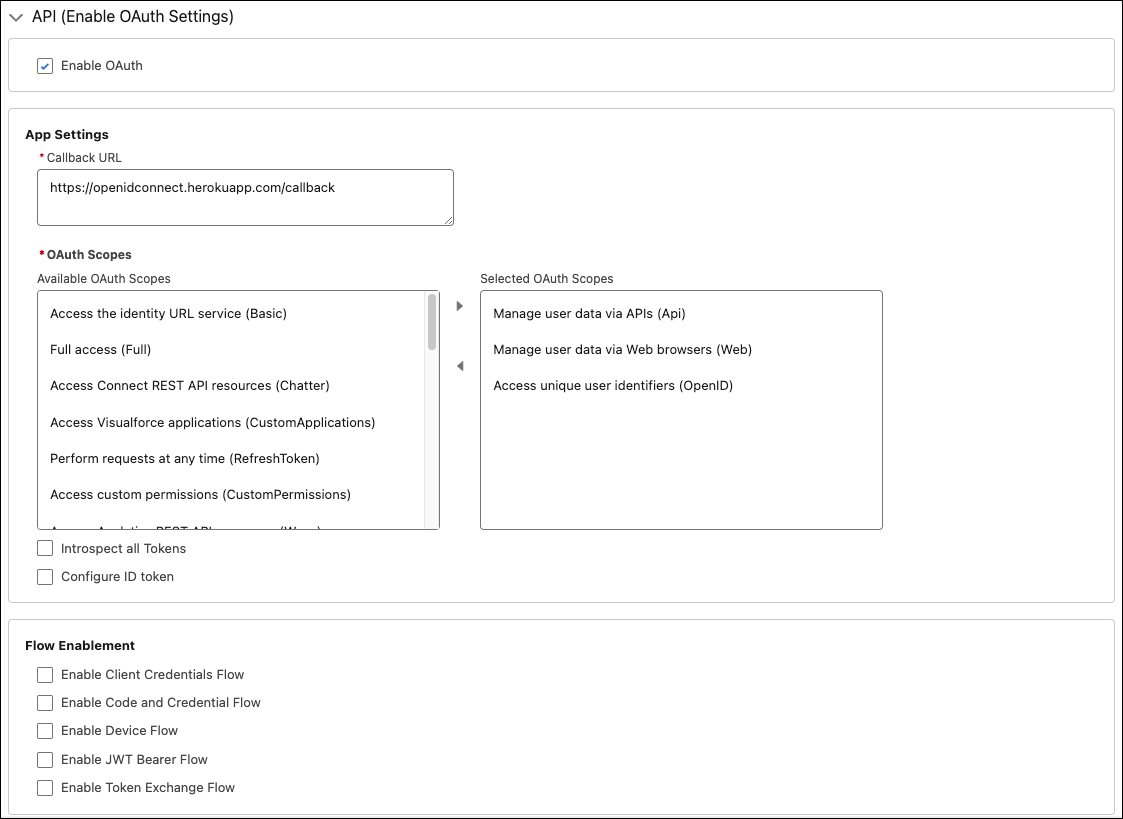
The most significant difference from Connected Apps: ECAs have no Username-Password Flow option. If your existing integration uses this flow, it's a hard migration blocker that must be resolved first by switching to JWT Bearer or Client Credentials.
Step 3: Policies
After creation, go to Manage External Client Apps → select your ECA → Policies tab. This interface is admin-only—developers can't access it. This is ECA's role-separation design in action: developers manage Settings, admins manage Policies.
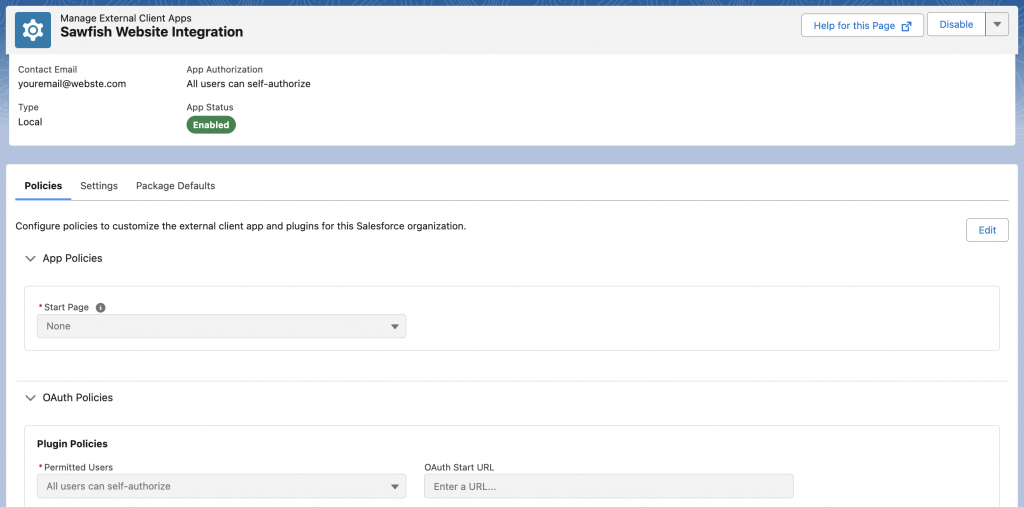
Key policy settings: Permitted Users (who can use this ECA), Refresh Token validity (consider "valid until revoked" or a specific duration), and IP Relaxation. In Connected Apps, these were mixed with OAuth configuration. ECAs break them out into a dedicated admin interface, making audit trails cleaner.
Metadata API and CI/CD Deployment
Clicking through Setup works for PoCs. Production ECAs should be deployed via Metadata API with source control. ECA's metadata coverage is far more complete than Connected Apps, comprising 4 independent types:
| Metadata Type | Purpose | Packageable (2GP) | Contains Sensitive Data |
|---|---|---|---|
ExternalClientApplication | ECA definition (name, API Name, Distribution State) | Yes | No |
ExtlClntAppOauthSettings | OAuth plugin config (Callback URL, Scopes, Flow Enablement) | Yes | No |
ExtlClntAppGlobalOauthSettings | Global OAuth settings (Consumer Key/Secret, certificates) | No | Yes—contains Consumer Secret |
ExtlClntAppConfigurablePolicies | Policy config (Permitted Users, IP Relaxation, Token validity) | No | No |
Deployment Workflow
Standard SFDX deployment flow for ECAs:
# 1. Declare ECA metadata in package.xml
# 2. Deploy to target Org
sf project deploy start --manifest package.xml --target-org myOrg

# 3. Consumer ID is only generated AFTER deployment completes
#    Named Credentials or anything referencing Consumer ID must be in a separate deployment

# 4. Retrieve the auto-generated Policies file after deployment
sf project retrieve start --manifest package.xml --target-org myOrg
A common gotcha: the Consumer ID doesn't exist until deployment completes. If your CI/CD pipeline tries to create both the ECA and a Named Credential referencing its Consumer ID in the same transaction, the deployment will fail. Split them into two sequential deployments.
CI/CD Best Practices
ExternalClientApplicationandExtlClntAppOauthSettingsgo into your Git repo alongside other 2GP sourceExtlClntAppGlobalOauthSettingsmust be added to.forceignore—it contains the Consumer Secret and must never be committed to source controlExtlClntAppConfigurablePoliciesis auto-generated on deployment; retrieve it for reference but typically manage it independently per environment- Key rotation uses
ExtlClntAppGlobalOauthSettingsvia a separate CI job, not the regular deployment pipeline - Scope and OAuth setting changes follow the standard PR → Review → Test → Deploy workflow like any other code change
2GP Packaging Notes
Only ExternalClientApplication and ExtlClntAppOauthSettings can be included in 2GP Managed Packages. Policies and Global OAuth Settings are managed independently on each subscriber Org—this is the natural extension of ECA's "developers manage Settings, admins manage Policies" design: ISVs package application logic while customers manage their own security policies.
Packaged ECAs are automatically copied during sandbox clones (Local ECAs are not), making 2GP packaging the recommended approach for integrations that need multi-environment deployment.
OAuth Flow Migration
Consumer Key and Secret Handling
Migration isn't copying your old Consumer Key. Each ECA generates a brand-new Consumer Key and Consumer Secret, and every caller—middleware, third-party systems, scripts—needs credential updates. This is the highest-effort, highest-risk phase of migration, especially when a dozen middleware systems share the same Connected App credentials.
Retrieve new credentials: Manage External Client Apps → your ECA → Settings → OAuth Settings → "Consumer Key and Secret."
Flow-by-Flow Migration Reference
| OAuth Flow | Connected App | ECA | Migration Notes |
|---|---|---|---|
| Web Server Flow | Supported | Supported (Code and Credential Flow) | Update Callback URL and Consumer Key |
| JWT Bearer Flow | Supported | Supported | Re-upload certificate, update Consumer Key |
| Client Credentials Flow | Supported | Supported | Update Consumer Key/Secret, confirm Execution User config |
| Device Flow | Supported | Supported | Update Consumer Key |
| Token Exchange Flow | Supported | Supported | Update Consumer Key, confirm Subject Token config |
| Refresh Token Flow | Supported | Supported | All old Refresh Tokens become invalid; re-authorization required |
| SAML Bearer Assertion | Supported | Supported | Reconfigure SAML Assertion |
| Username-Password Flow | Supported (not recommended) | Not supported | Must migrate to JWT Bearer or Client Credentials |
JWT Bearer Flow Migration Example
JWT Bearer is the most common server-to-server integration flow. The code change is minimal—just swap the Consumer Key. But don't forget to re-upload the certificate in ECA Settings and check "Enable JWT Bearer Flow" in Flow Enablement.
import jwt, time, requests

# Only the Consumer Key changes after migration
ECA_CONSUMER_KEY = "3MVG9new_eca_consumer_key..."
TOKEN_URL = "https://login.salesforce.com/services/oauth2/token"

claim = {
    "iss": ECA_CONSUMER_KEY,
    "sub": "integration-user@yourcompany.com",
    "aud": "https://login.salesforce.com",
    "exp": int(time.time()) + 300
}

with open("server.key", "r") as f:
    private_key = f.read()

assertion = jwt.encode(claim, private_key, algorithm="RS256")

resp = requests.post(TOKEN_URL, data={
    "grant_type": "urn:ietf:params:oauth:grant-type:jwt-bearer",
    "assertion": assertion
})

token = resp.json()
print(f"access_token: {token['access_token'][:20]}...")
print(f"instance_url: {token['instance_url']}")
Client Credentials Flow Migration Example
Client Credentials Flow is suited for M2M (Machine-to-Machine) scenarios that don't require user context. Beyond swapping credentials, you must configure the Execution User in ECA Policies—this user determines the permission context for all API calls.
import requests

ECA_CLIENT_ID = "3MVG9new_eca_client_id..."
ECA_CLIENT_SECRET = "new_eca_secret..."
TOKEN_URL = "https://login.salesforce.com/services/oauth2/token"

resp = requests.post(TOKEN_URL, data={
    "grant_type": "client_credentials",
    "client_id": ECA_CLIENT_ID,
    "client_secret": ECA_CLIENT_SECRET
})

token = resp.json()
print(f"access_token: {token['access_token'][:20]}...")
print(f"instance_url: {token['instance_url']}")
Permission Model Redesign
Connected Apps default to open: all users can access them after creation. Restricting access requires an explicit "Admin approved users are pre-authorized" configuration. ECAs flip this—nobody can use the app until explicitly granted access via Permission Set or Profile. This "closed by default" model is one of the core security motivations behind the entire migration.
Permission Governance Best Practices
- Split ECAs by integration domain: One ECA per external system or call pattern—ERP integration gets one, reporting system gets one, MCP Server gets one. No single ECA handling all API traffic
- Permission Sets over Profiles: Finer granularity and easier CI/CD management. Each ECA should map to one or more dedicated Permission Sets
- Minimize scopes:
api+refresh_tokencovers most REST API use cases. Addstreaming_apifor Streaming API,bulk_apifor Bulk API. Never selectfullfor convenience - Audit high-risk APIs separately: Data export, bulk updates, and financial objects should use dedicated Permission Sets with Event Monitoring real-time alerts
- Dedicated Integration Users: Each ECA should use its own Integration User—no sharing personal accounts. Naming convention:
eca-{system}-integ@yourcompany.com
Migration Strategy: Dual-Run Cutover
Phased Traffic Switching
Killing the old Connected App in production on day one isn't realistic. A dual-run approach works:
- Asset inventory: List all Connected Apps with owner, OAuth flow type, scopes, and caller inventory. Use Setup Audit Trail or
SELECT Id, Name, OptionsAllowAdminApprovedUsersOnly FROM ConnectedApplicationfor assistance - Sandbox validation: Create the ECA in a Sandbox, replicate the old Connected App's OAuth config and scopes, run end-to-end auth tests
- Canary rollout: Pick one low-risk caller (internal reporting, data sync, etc.) and switch it to the ECA. Monitor for 1-2 weeks
- Progressive cutover: Switch callers one by one (10% → 30% → 100%), maintaining rollback capability at every stage
- Freeze legacy app: After all callers are migrated and stable for 30 days, freeze the old Connected App (don't rush to delete it)
Monitoring and Rollback
During the dual-run period, your logs must distinguish old Connected App token requests from new ECA token requests. Without this separation, incident response becomes guesswork.
| Monitoring Area | Minimum Requirement |
|---|---|
| Auth success rate | Track separately for Connected App vs ECA; alert if rate drops below 99.5% |
| Error code distribution | Monitor 5xx, 401, 403, and timeouts independently; 401/403 spikes usually indicate credential or permission misconfiguration |
| Refresh Token renewal | Track refresh failure rate, especially in the first 48 hours post-cutover—old Refresh Tokens become invalid after migration |
| Event Monitoring | Filter Login Events and API Events by Client ID to compare old vs new traffic |
| Rollback readiness | Keep old Connected App config and certificates for at least 90 days; document and rehearse restoration steps |
Team Ownership
- Admins: Policies configuration, Permission Set assignments, environment consistency checks, rollback operations
- Developers: OAuth client refactoring, Consumer Key replacement, Metadata API deployment scripts, retry and idempotency logic
- Architects / Security: Migration wave planning, risk threshold definition, compliance audit alignment
The biggest schedule risk in these projects isn't code refactoring—it's ambiguity around who owns Policies versus Settings. ECA's role-separation design actually pushes you to resolve this upfront—use the migration as an opportunity to formalize the RACI matrix.
ECAs in the MCP Era: Hosted MCP Server Integration
ECAs aren't just a Connected App replacement—they're the infrastructure for new capabilities. The Salesforce Hosted MCP Server (GA February 2026) requires External Client Apps for OAuth authentication—old Connected Apps aren't supported.
The ECA configuration for Hosted MCP Server access follows the same pattern as regular integrations, with two additional requirements:
- OAuth Scopes must include at minimum
api,sfap_api,refresh_token, andeinstein_gpt_api - Flow Enablement must enable the appropriate flow for your AI Client—Claude Desktop uses Code and Credential Flow, server-side Agents use Client Credentials Flow or JWT Bearer Flow
Once configured, AI Agents (Claude, ChatGPT, Copilot, etc.) can query CRM data directly through the MCP protocol. ECA's "closed by default + Permission Set authorization" security model is especially critical in AI scenarios—you absolutely don't want an AI Agent's token to have unrestricted access to every object in the Org.
This means ECA migration isn't just "tech debt cleanup"—it's a prerequisite for entering the AI Agent ecosystem. The sooner migration is complete, the sooner you can leverage Salesforce's MCP infrastructure.
Upgrade Checklist
| # | Check Item | Completion Criteria |
|---|---|---|
| 1 | Asset inventory | All Connected Apps listed with owner, OAuth flow, scopes, callers, and Canvas/Notification/User Provisioning dependency flags |
| 2 | Blocker audit | Integrations using Username-Password Flow, Canvas Apps, or User Provisioning are flagged with alternative plans documented |
| 3 | ECA creation and configuration | Basic Info + OAuth Settings + Policies completed; Flow Enablement configured per integration needs |
| 4 | Metadata API deployment | ECA metadata in Git; ExtlClntAppGlobalOauthSettings in .forceignore; CI/CD pipeline passing |
| 5 | Consumer Key replacement | All callers updated with new ECA Consumer Key/Secret |
| 6 | Permission Set configuration | Assigned by integration domain; scopes minimized; Profile-level bindings removed |
| 7 | Sandbox end-to-end validation | All OAuth flows tested successfully in Sandbox; Named Credential split-deployment verified |
| 8 | Canary rollout | Low-risk caller switched first; monitored for at least 1 week |
| 9 | Monitoring and alerting | Auth success rate, error code distribution, refresh token failure rate, and Event Monitoring Client ID filtering all operational |
| 10 | MCP integration validation | If planning Hosted MCP Server access, verify ECA scopes and flow configuration meet MCP requirements |
| 11 | Rollback plan | Old Connected App config and certificates retained 90 days; restoration steps documented and rehearsed at least once |
| 12 | Legacy app freeze | Frozen after full cutover and 30-day stability period |