What MCP Is and Why Salesforce Is Going All In
MCP (Model Context Protocol) is an open standard released by Anthropic in late 2024 that defines how AI models communicate with external tools and data sources. Salesforce calls it "USB-C for AI"—just as USB-C unified charging interfaces, MCP lets different AI Agents discover, call, and compose enterprise capabilities through a single standard.
The Three-Role Architecture and Communication Protocol
MCP is built on a Host-Client-Server model:
- Host (application): The user-facing AI application—Claude Desktop, VS Code, Cursor, or Agentforce. The Host initiates interactions and presents results
- Client: A communication layer running inside the Host that establishes connections with one or more Servers, translating the AI's intent into standardized MCP format
- Server: Exposes three types of capabilities—Tools (executable functions), Resources (readable data), and Prompts (predefined templates)
Communication runs on JSON-RPC 2.0, with two transport options: HTTP + SSE (Server-Sent Events) for streaming updates, and Streamable HTTP for newer implementations (like the Slack MCP Server). A single Host can connect to multiple Servers simultaneously, each independently exposing its own Tool set.
Salesforce's Three-Layer MCP Strategy
Salesforce's MCP play isn't a single product—it's a systematic approach across three layers:
- Opening data externally: Providing Hosted MCP Servers so Claude, ChatGPT, Copilot, and other external AI Agents can directly access Salesforce CRM data
- Consuming external capabilities internally: Embedding a Native MCP Client in Agentforce so its own Agents can call any MCP-compliant external service
- Providing infrastructure: Using MuleSoft to convert existing enterprise APIs into MCP Servers, and Heroku to host custom MCP Servers
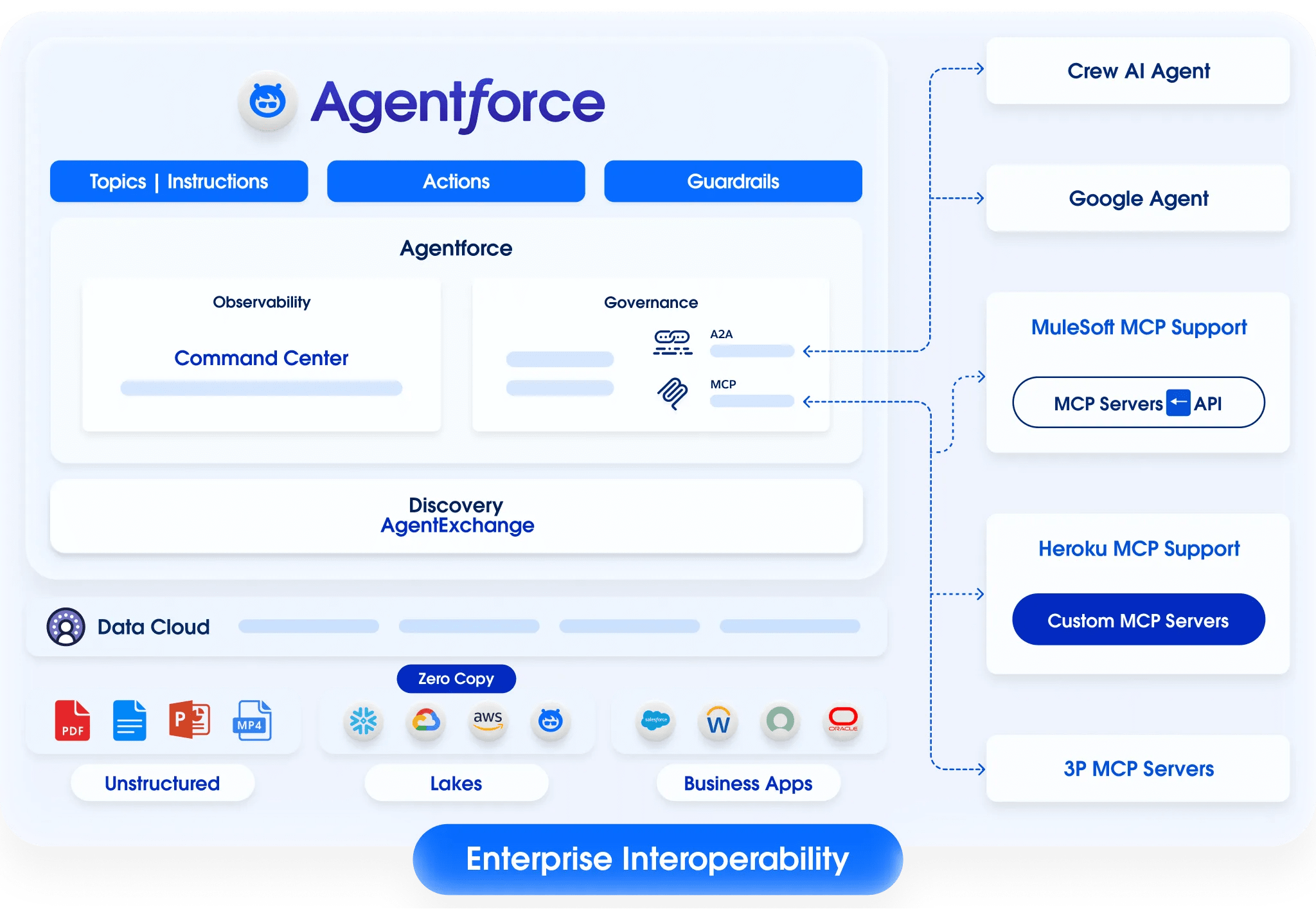
Salesforce Hosted MCP Server: Zero-Code CRM Data Access
The Salesforce Hosted MCP Server is Salesforce's officially managed MCP service instance, entering Beta in October 2025 and reaching GA in February 2026. Admins don't need to write a single line of code—create an External Client App in Setup, configure OAuth permissions, and external AI Agents can query and operate on Salesforce data through the standard MCP protocol.
Supported APIs and Tools
The GA release exposes Tools across two domains:
Core CRM: Includes find_contact(email) (look up contacts by email), create_case(contactId, subject, description) (create support cases), list_open_cases(contactId) (query open cases), plus generic getRecord(), queryRecords(), and createRecord() operations supporting Account, Contact, Opportunity, Case, and other standard objects.
B2C Commerce: Includes search_product (catalog search) and add_product_to_cart (shopping cart operations), returning product pricing, inventory, and details. Commerce Cloud scenarios use the sfcc.shopper-mcpagent scope.
Six-Step Setup Process
The complete setup flow for Hosted MCP Server:
- Environment preparation: Confirm your Org has Hosted MCP Server enabled (available by default post-GA), verify outbound HTTPS connectivity
- Create External Client App: In Setup → App Manager, configure OAuth scopes (minimum:
api,sfap_api,refresh_token,einstein_gpt_api) - Provision Integration User: Create a dedicated Integration User with a least-privilege Permission Set, restricting access to only necessary objects and fields
- Acquire Token: Obtain an Access Token through JWT Bearer or OAuth Client Credentials flow
- Connect to MCP Server: The AI Client subscribes to the SSE endpoint, sends Authorization headers for the handshake, and receives a Session ID
- Call Tools: Send method invocations via JSON-RPC 2.0
Example call format:
{
  "jsonrpc": "2.0",
  "id": "1",
  "method": "find_contact",
  "params": { "email": "user@example.com" }
}
Security Model and Performance
The Hosted MCP Server's security layer fully inherits Salesforce platform capabilities: Field-Level Security automatically filters invisible fields, Org-Wide Defaults and Sharing Rules apply as expected, and Event Monitoring captures all MCP interactions. Every API call executes within the authorized user's context—no permission checks are bypassed.
Performance benchmarks from the Pilot phase:
| Operation | Latency | Notes |
|---|---|---|
| Simple record query | 300-500ms | Includes JSON-RPC overhead |
| Product search (thousands) | ~400ms | Commerce Cloud catalog search |
| 360° customer view | ~800ms | Multi-object aggregation |
| Cached hot query | <100ms | With Heroku Redis |
Default rate limit is 50 requests/minute/Agent. The underlying Salesforce APIs support hundreds of calls per second per Org; the MCP-layer rate limit is an additional safety barrier.
Salesforce DX MCP Server: AI-Powered Developer Toolchain
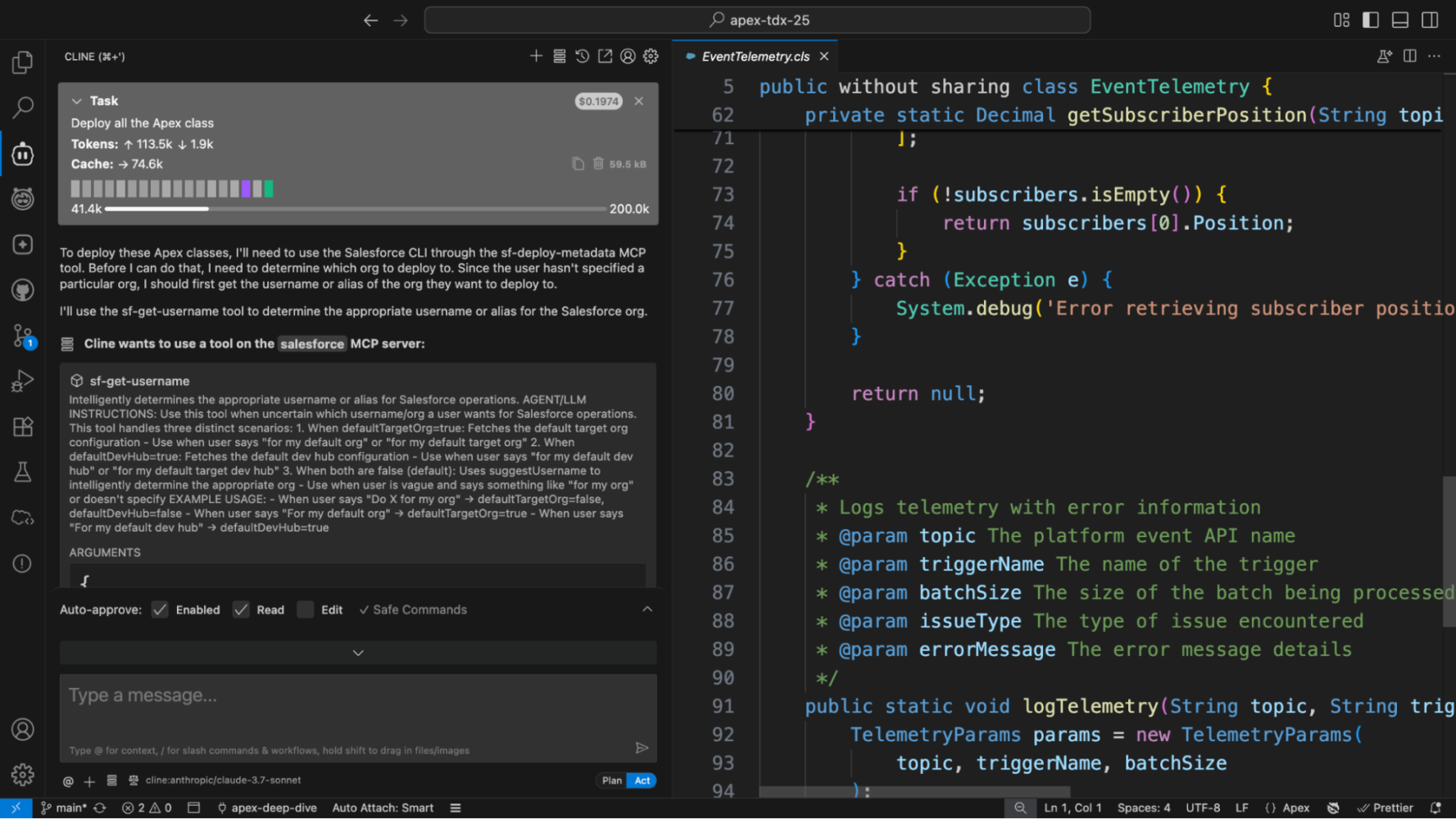
The DX MCP Server targets Salesforce developers, enabling AI coding assistants to directly execute Salesforce CLI operations. It's an open-source project hosted on GitHub at salesforcecli/mcp, currently in Developer Preview.
Capabilities and Configuration
Supported operations include: deploying Apex/LWC code, creating Scratch Orgs, running Apex tests, and viewing Org configuration. Specific Tools include sf-get-org-info (retrieve Org info), sf-run-apex-tests (run tests), sf-deploy-source (deploy source), and more.
Configuration in Claude Desktop requires just one addition to claude_desktop_config.json:
{
  "mcpServers": {
    "salesforce-dx": {
      "command": "npx",
      "args": ["-y", "@salesforce/mcp"],
      "env": {
        "SALESFORCE_INSTANCE_URL": "https://your-domain.my.salesforce.com"
      }
    }
  }
}
Prerequisites: Salesforce CLI (sf) must be installed locally with Org authentication complete. The DX MCP Server automatically retrieves the Access Token from the CLI.
The screenshot below shows the DX MCP Server in action within VS Code—a developer uses natural language to request an Apex class deployment, and the AI assistant automatically identifies available Salesforce CLI Tools and executes the operation, with the target code file visible in the right-side editor.
Heroku Platform MCP Server: Natural Language Cloud Management
The GA Heroku Platform MCP Server (GitHub: heroku/heroku-mcp-server) lets AI Agents manage Heroku applications through natural language: start/stop Dynos, check app status, add Add-ons, and view live logs. DevOps teams can accomplish in one sentence what used to require switching between the Dashboard and CLI.
More importantly, Heroku AppLink plays a critical infrastructure role: developers can host custom MCP Servers on Heroku, connect them to Agentforce via AppLink, and leverage Heroku's elastic scaling (automatic Dyno scaling) to handle unpredictable Agent request volumes. This transforms Heroku from an application hosting platform into runtime infrastructure for MCP Servers.
MuleSoft: Turning Enterprise API Assets Into MCP Servers
MuleSoft serves as the "bridge" in the MCP ecosystem—converting existing enterprise APIs and integration assets into MCP Servers that AI Agents can consume directly. This capability is already GA.
Two Integration Paths
Path one: Convert via Anypoint Platform UI. If your enterprise already manages APIs on MuleSoft, simply enable the MCP protocol layer in Anypoint. No rewriting integration logic—existing API Specs automatically convert to MCP Tool definitions, and existing security policies (API Manager rate limits, OAuth policies) remain in effect. This is what MuleSoft calls "Agent Fabric."
Path two: Install via npm package locally. After installing @mulesoft/mcp-server (requires Node.js 20+), configure it in Claude Desktop, Cursor, or other AI tools. Through natural language, you can create Mule applications, deploy projects, search Anypoint Exchange assets, and manage API governance rules.
Core Value: AI Accessibility for Non-Salesforce Systems
The MuleSoft MCP Server solves an enterprise-wide problem. ERP, HR systems, supply chain platforms, on-premise databases—these non-Salesforce systems' data, exposed as MCP Servers through MuleSoft's existing connectors, become safely accessible to Agentforce or any MCP Client. For enterprises with existing MuleSoft API assets, the cost of entering the MCP ecosystem is essentially zero.
Slack MCP Server: An AI Interface for Conversational Data
The Slack MCP Server, which reached GA on February 17, 2026, is the newest member of this ecosystem and the fastest-growing—MCP Tool call volume surged 25x after launch. It connects via Streamable HTTP to the https://mcp.slack.com/mcp endpoint, exposing Slack's full conversational capabilities to AI Agents.
11 Built-in Tools
The Slack MCP Server provides 11 Tools across four categories:
Search: Search messages and files (with date, user, and content type filters), search users (by name, email, or ID), search channels (by name and description)
Messaging: Send messages (all conversation types), draft messages (format and preview within AI clients), read channel message history, read complete thread conversations
Canvas: Create Canvas documents (with rich text formatting), update Canvases, read Canvases (exported as Markdown)
Users: Read complete user profiles (including custom fields and status)
Real-time Search API and Permission Model
Search functionality is powered by the simultaneously released Real-time Search API (RTS API), using granular permission scopes to control the data boundaries AI Agents can reach:
| Tool Category | Required OAuth Scopes |
|---|---|
| Search messages/channels | search:read.public, search:read.private, search:read.mpim, search:read.im |
| Search files | search:read.files |
| Search users | search:read.users |
| Send messages | chat:write |
| Read message history | channels:history, groups:history, mpim:history, im:history |
| Canvas operations | canvases:read, canvases:write |
| User profiles | users:read, users:read.email |
The critical privacy design: data never leaves Slack's servers. AI Agents execute searches via the RTS API and receive matching results, but don't store raw data. Authentication uses Confidential OAuth 2.0 flow, requiring the app's client_id and client_secret.
Over 50 partners—including Anthropic, Google, OpenAI, Perplexity, and Cursor—are already building Agent applications on these interfaces. Claude.ai and Claude Code can use the Slack MCP Server directly.
Agentforce as an MCP Client
Everything above covers "external AI accessing Salesforce data." The flip side is Agentforce as an MCP Client—enabling Salesforce's own AI Agents to call external MCP Servers. This capability launched in Pilot with the July 2025 release and is a core component of Agentforce 3.
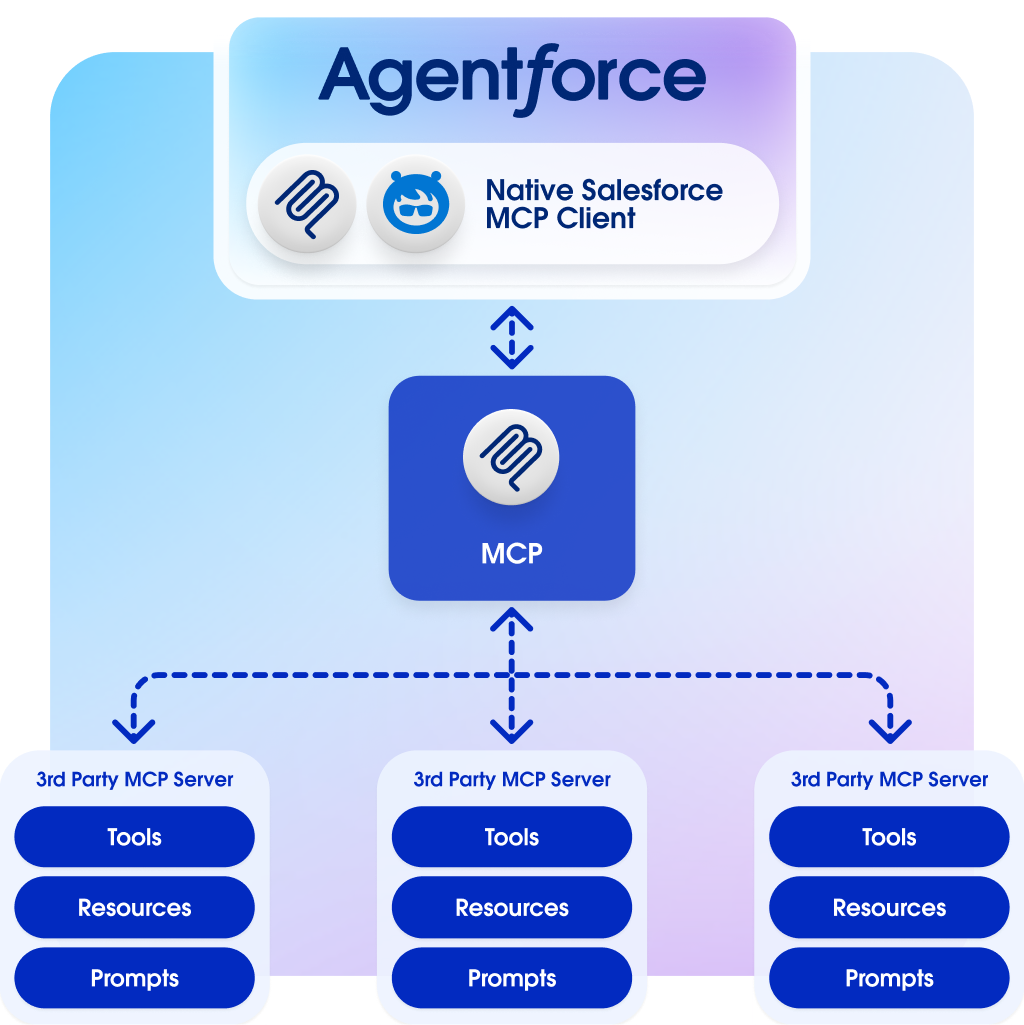
Three Core Components
- Native MCP Client: Built into the Agentforce runtime, connecting to any MCP-compliant Server without code. Deeply integrated with Agent Builder—select Servers, configure authentication, and enable Tools through the visual interface
- MCP Server Registry: An enterprise-grade registration hub. Admins can approve or reject specific MCP Servers and Tools, set rate limits, and define access policies. All unregistered Servers are denied by default—a zero-trust model
- AgentExchange: A Salesforce-vetted MCP Server catalog. PayPal, Teradata, and other partners are already listed, and developers can one-click deploy third-party MCP services into their Agentforce environment
Configuration Flow in Agent Builder
Adding an external MCP Server in Agent Builder: select the target MCP Server (from Registry or AgentExchange) → configure OAuth credentials → select which Tools to enable from the Server's exposed list → set invocation policies (rate limits, human approval requirements) → deploy. The entire flow is comparable in complexity to setting up a Connected App, with zero code involved.
Hosted vs. Self-Hosted vs. MuleSoft: How to Choose
| Dimension | Salesforce Hosted | Self-Hosted (Heroku / Own Infra) | MuleSoft Conversion |
|---|---|---|---|
| Setup Cost | Lowest—create External Client App | Build and maintain your own server | Near-zero with existing MuleSoft APIs |
| Customization | Predefined Tool sets only (Flows and Invocable Actions coming later) | Fully customizable—expose custom Apex, external APIs, any logic | Any API or Mule application on MuleSoft |
| Data Scope | Salesforce standard/custom objects + B2C Commerce | Any data source, depends on implementation | All systems covered by MuleSoft connectors |
| Security | Fully Salesforce-managed—OAuth, FLS, audit built in | Self-managed authentication, authorization, auditing | API Manager provides rate limiting and OAuth policies |
| Operational Burden | Zero—Salesforce-hosted | Self-managed monitoring, scaling, patching | Anypoint Platform-hosted |
| Best For | External AI accessing standard CRM data | Custom logic or non-Salesforce data sources | Enterprises with existing MuleSoft API assets |
In practice, these three approaches are often combined: Hosted MCP Server opens CRM data, MuleSoft bridges ERP and HR systems, and Heroku runs Servers requiring custom logic.
Security Governance: From Zero Trust to Full Auditability
MCP's openness makes native security governance essential. Salesforce's solution, built by the MuleSoft engineering team, centers on a two-layer architecture: Agentforce Gateway + MCP Server Registry.
Agentforce Gateway
The Gateway is the centralized entry point for all MCP traffic, handling: identity verification (all requests must carry valid OAuth Tokens), policy enforcement (rate limiting, IP allowlisting, time-window restrictions), and traffic monitoring (real-time dashboards and alerting). It's analogous to an API Gateway in microservices architecture, but purpose-built for Agent-to-Server interaction patterns.
MCP Server Registry
The Registry is the admin control plane, providing five layers of governance:
- Centralized Registration: All MCP Servers must be registered before Agentforce Agents can call them; unregistered Servers are denied by default
- Tool-Granular Control: Not all-or-nothing—admins can approve a Server but disable specific high-risk Tools (e.g., allow
create_casebut blockdeleteRecord) - Rate Limiting: Default 50 requests/minute/Agent, adjustable per Org, Agent, or Server
- Audit Trail: Event Monitoring Logs capture complete request/response data for every MCP interaction
- Human Approval: High-risk operations (refunds, bulk data modifications, deletions) can be configured to require human approval before execution
Hands-On: Connecting Claude Desktop to Salesforce Data
Using the Hosted MCP Server as an example, connecting Claude Desktop to Salesforce data takes just two configuration steps.
Step one: Create an External Client App in Salesforce and note the Client ID and Client Secret. Ensure the OAuth scopes include at minimum api, sfap_api, and refresh_token.
Step two: Add the following to Claude Desktop's claude_desktop_config.json:
{
  "mcpServers": {
    "salesforce": {
      "command": "npx",
      "args": [
        "mcp-remote",
        "https://YOUR_INSTANCE.my.salesforce.com/mcp/sse"
      ]
    }
  }
}
After launching Claude Desktop, it will automatically open the OAuth authorization page. Once authorized, Claude can directly query Accounts, Contacts, and Opportunities, create Cases, and search Commerce products. Add the --debug flag to enable detailed logging (written to the ~/.mcp-auth/ directory) for troubleshooting token refresh or network issues.
The same configuration approach works with Cursor, Windsurf, and other MCP-compatible IDEs—only the config file path differs.
Where Developers Should Start
| Role | Recommended Starting Path | Estimated Time |
|---|---|---|
| Salesforce Admin | Create an External Client App in a Sandbox, connect with Claude Desktop + mcp-remote to the Hosted MCP Server, test Account/Contact queries | 30 minutes |
| Salesforce Developer | Install the DX MCP Server (npx @salesforce/mcp), use natural language in VS Code + Claude to deploy code and run tests | 15 minutes |
| MuleSoft Developer | Expose an existing API as an MCP Server in Anypoint Platform, test calling it with Claude Desktop | 1 hour |
| AI App Developer | Connect to Salesforce data via the Hosted MCP Server's SSE endpoint, build cross-system Agent workflows | Half day |
| Technical Architect | Evaluate the MCP Server Registry and Gateway governance model, define an enterprise MCP connectivity strategy and approval process | 1-2 weeks |
Salesforce's MCP stack now covers the full chain from data exposure to security governance. Hosted Servers open CRM data with zero code, DX Server accelerates developer workflows, MuleSoft bridges enterprise API assets, Slack Server unlocks conversational data, Heroku provides elastic hosting, and Gateway + Registry ensure everything is controlled and auditable. GA pricing and detailed enterprise SLAs haven't been announced, but the technical foundation is ready—pick the entry point closest to your needs and start experimenting.